


- Messages
- 3,980
- Name
- Tomas
- Edit My Images
- No
Thomas
OK a bit of an update
Loaded 125 1Dslll files into Lightroom. These are about 30Mb each. My aging Dell will kick the fan in whilst doing this anyway. Checked temp ran upto about 78 degrees. fan speed set to default, ran at 2000 rpm. OK gave it nice job to do, convert that lot to DNG's. Temp got upto a max of 86 Degrees, but only for a second or two. rpm rose to a staggering 2006, temp dropped to 74. Temp seemed to fluctuate at about 76-80 during this process with the occasional foray into 84 -86 , but again only for a couple of seconds. No problems with display or any other component that I could find.
Increased fan speed to about 3000 rpm with a small drop in temp, but needed to increase to 3500-4000 to see the temp drop to below 70 degrees.
Running the MBP on mains power during these tests
MPB is only a month old. OS 10.5.6
John C
Cheers for that John, I really appreciate it, the results are very similar to the results that I have when performing tasks such as the ones you have just tried.
I found that the default fan speed can sometimes be a little biased toward the slower RPM's, whenever I measure a temp of 70°C or above a allow a short period of 4000 to 5000 rpm to cool it down.
I have my presets as follows:
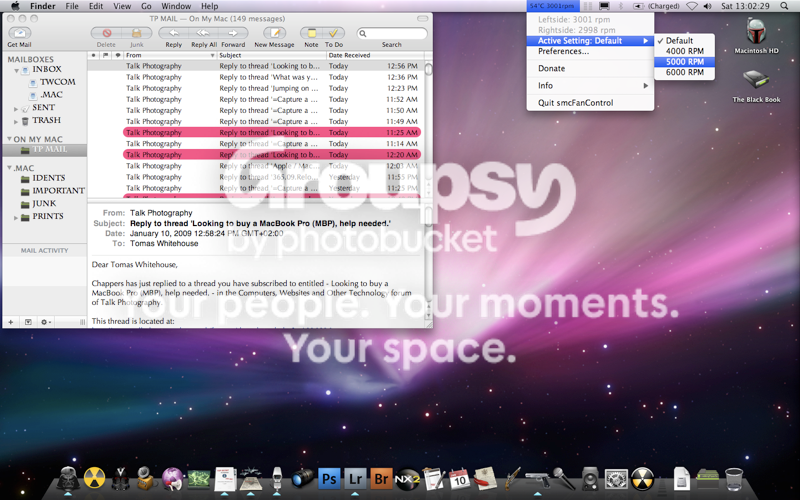
I only ever use the full RPM when temps go over 80°C, which is pretty darn hot to the touch. (top left corner of unit by the magsafe port)
In the pic, Lightroom has only just been booted, now I'm reading a temp of 61° with all the apps open in the pic.
It appears that these temps despite the slower fan speed defaults are not uncommon.
I have also noticed that the temp has no effect of the display detection too.
Using the 9600 GPU does produce much higher temp readings in shorter times.
