
LrC "Focus-Points" plugin straightens images by applying camera roll angle compensation

Messages
9
Name
Karsten
Edit My Images
No
Version 3.3 of the Focus-Points plugin introduces a new feature that straightens images by compensating for the roll angle if the camera was tilted when the photo was taken. This method can be applied to individual images or selections.

The plugin generally produces better and more reliable results when correcting levels than Lightroom's Auto Transform feature. This is because it responds directly to horizontal camera imbalance, rather than looking for and using reference information, which is often absent or unreliable in wildlife, sports and action shots.

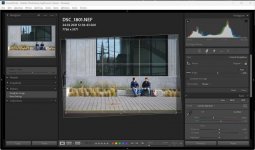
Example: The photo has a roll angle of 2.5°. Applying a crop angle of -2.5° compensates for the tilt. Using the ‘Straighten Images’ tool produces the same result as entering the roll angle compensation manually in Lightroom’s ‘Crop & Straighten’ tool. You can then modify or even revert the compensation as desired:
Straighten 1.jpg
 
@capricorn Normally I would chastise you for advertising without first asking permission, which I still think you should have done; but as your plugin appears to be free to download and use, I'm not going to offer you paid advertising. However, if all you are a member of TP for is to promote your plugin, which appears to be the case from your posting history, then I'm very disappointed and may reconsider the matter.
 
I'm sorry for this, Lindsay.

I'm neither a member nor a user of this forum. I was drawn to this site because I noticed my plugin was referenced in a forum thread, so I joined that discussion.

I thought the new version might be helpful for some users, so I posted the news without realizing that I might need permission to do so.

Yes, the tool is absolutely free to use. If you think my post is inappropriate and not useful for your community, feel free to remove it.

- Karsten
 
Thanks for the quick reply @capricorn Karsten. We will let the post remain. It would be nice if you had any other contribution to discussion, or image sharing, to offer on the site, but I understand now.
 
It is very easy and quick to just increase or decrease the angle value in transformation section, particularly with such strong lines in the centre. Auto anything gives totally disastrous results btw
 
@LongLensPhotography

The automated straightening function is useful for shooting bursts of birds in flight, racing cars and sports scenes. This was the motivation behind developing this feature. I have been using the underlying method for a long time to straighten images that look crooked but lack clear reference lines, using Lightroom's tools.
 
Last edited:
@LongLensPhotography

The automated straightening function is useful for shooting bursts of birds in flight, racing cars and sports scenes. This was the motivation behind developing this feature. I have been using the underlying method for a long time to straighten images that look crooked but lack clear reference lines, using Lightroom's tools.
Inbuilt function is useless for architecture and even most landscape.

I wonder if you are getting anywhere with full geometry fix? I can do this by hand in 30-60s per image (minor, intentional and predictable tweaks). Auto fails every single time
 
@LongLensPhotography

The automated straightening function is useful for shooting bursts of birds in flight, racing cars and sports scenes. This was the motivation behind developing this feature. I have been using the underlying method for a long time to straighten images that look crooked but lack clear reference lines, using Lightroom's tools.
Thank you again for the Focus Point plugin have found very useful to see images where the focus has been missed by a larger margin than is acceptable to me, Russ.
 
From the website it looks as though Canon support for the tilt correction feature is fairly limited in terms of models supported.

Is there any reason why the R3 and 1Dx models have been missed out?

Edit: it looks really good though hence wanting it to be available for my cameras!
 
It is very easy and quick to just increase or decrease the angle value in transformation section, particularly with such strong lines in the centre. Auto anything gives totally disastrous results btw


Now try editing a batch of 200+ images where a natural or unnatural (Dutch) tilt has been used.

I'll take the camera angle as the nearest approximation and adjust from there any day.

Just because you lack the knowledge or experience in a different photographic field, does not make something useless.
 
Is there any reason why the R3 and 1Dx models have been missed out?

Yes, the reason is that the 'Straighten Images' function requires information about the camera's roll angle. While camera manufacturers such as Nikon, Olympus/OM, Panasonic and Pentax have been recording this information in photo metadata (in unofficial MakerNotes sections) for years, Canon has only recently started to do so.

According to my information the 'LevelInfo' tag that contains 'RollAngle' information is currently only available for these Canon models:

- R5 (FW 1.5), R5m2
- R6m2 (FW 1.4), R6m3
- R7 (FW 1.3), R8 (FW 1.2), R10??

Even in the latest firmware versions, neither the R1 nor the R3 records 'LevelInfo'. A plugin user recently sent me some sample images from the R3, which allowed me to verify that the 'LevelInfo' tag, which has been added to the end of the MakerNotes directory for the R5, does not exist for the R3.

This is unfortunate given that these cameras are designed for sports and action photography, where large volumes of images are usually captured in a short space of time. In this case, unless the photographer has no time at all for post-processing, batch straightening could be very useful.

So, the only thing you can do is wait and hope that another FW update for the R3 will include 'LevelInfo'.
 
Now try editing a batch of 200+ images where a natural or unnatural (Dutch) tilt has been used.

I'll take the camera angle as the nearest approximation and adjust from there any day.

Just because you lack the knowledge or experience in a different photographic field, does not make something useless.
Smart editors would first select their picks, then edit only those
 
Smart editors would first select their picks, then edit only those
Just as a note from a non professional photographer doing a lot of sports and always manages to keep his camera at an angle rather than horizontal... ;-) , after a match I have many photos after the cull with often poor references to precisely straighten the photo. I edit a lot of them, to show action sequences and to provide photos to 'all' players so I am not shooting to get one cover photo. I'm for sure not the only one working like that and batches of over 200 photos per match is quite common. So in cases like mine, such a function speeds up the cropping of the photo (practically every of the photos I share is cropped, due to the limitations in positioning).

If there ain't that many shots to edit and there are clear lines to straighten the photos, the time saving is limited and the function adds limited value. So it varies per use case/ user .
 
This is a feature I’d wished was built into Lightroom by default

In video I use a plug in that reads the gyro data and stabilises off that and corrects the horizon, so I was always looking for a photography tool that did the same thing, so thank you, this seems perfect
 
This is a feature I’d wished was built into Lightroom by default

Considering the general use case, one might wonder why it isn't. The point is that level information, i.e. roll angle and pitch angle, is not commonly agreed upon like focal length, aperture and shutter time, which are stored according to the EXIF specification. Roll angle is part of so-called MakerNotes, an area which every camera manufacturer use like they require, with no specification publically available.

Adobe does not deal with MakerNotes data. This data is discarded when you import photos and is not stored.

I have often seen similar comments on the Focus Point function of my plugin. AF information - same exact topic.

Considering the enormous effort to decode and maintain manufacturer specific metadata it's no surprise that Adobe does not want to deal with that.
 
Adobe does not deal with MakerNotes data. This data is discarded when you import photos and is not stored.
The maker notes are used by LR in order to apply the jpeg settings to the raw file during import if "camera settings" is selected in the preferences. They are not discarded.
 
Last edited:
@sk66 Interesting, I didn't know this. That’s the second exception I’m aware of, apart from the FocusDistance, which is displayed for Canon (DSLR and mirrorless) and Nikon (DSLR, but not mirrorless), but not for any other camera manufacturer.
 
Back
Top