Making a 3x3 image grid

Messages
2,064
Edit My Images
Yes
I'd like to attempt this but would appreciate any tips on how to best select images to use. My usual photographic style is to crop visually rather than use a fixed size ratio. For a 3x3 grid I'm aiming to crop images to a 1x1 ratio.

What I'm initially finding difficult is selecting suitable images from my catalogue to use that will work together so any hints, tips etc appreciated

I'm not looking for guidance on the technicalities of creating the grid in Photoshop as there are plenty of tutorials rather some assistance on the artistic side of things

TIA
 
If your source images are rectangular, your first issue is finding which out of all your images will translate to a satisfactory square crop. That's not something that can be forced at random.

As for image selection beyond that to produce a group of nine, I couldn't give remote verbal guidance. It's the sort of task that has to be done by feel and experiment, so trust your eye & heart! Words & seeing aren't easy or productive bedfellows.
 
I'd like to attempt this but would appreciate any tips on how to best select images to use. My usual photographic style is to crop visually rather than use a fixed size ratio. For a 3x3 grid I'm aiming to crop images to a 1x1 ratio.

What I'm initially finding difficult is selecting suitable images from my catalogue to use that will work together so any hints, tips etc appreciated

I'm not looking for guidance on the technicalities of creating the grid in Photoshop as there are plenty of tutorials rather some assistance on the artistic side of things

TIA

I can't give you any guidance on which images to use, but I would suggest that when you create the grid you use "clipping masks" as this will allow you to adjust, move and resize the images without having to crop them first.
 
If your source images are rectangular, your first issue is finding which out of all your images will translate to a satisfactory square crop. That's not something that can be forced at random.

As for image selection beyond that to produce a group of nine, I couldn't give remote verbal guidance. It's the sort of task that has to be done by feel and experiment, so trust your eye & heart! Words & seeing aren't easy or productive bedfellows.
Thanks for that I guessed it probably would be difficult to provide artistic guidance remotely
 
I'd like to attempt this but would appreciate any tips on how to best select images to use. My usual photographic style is to crop visually rather than use a fixed size ratio. For a 3x3 grid I'm aiming to crop images to a 1x1 ratio.

What I'm initially finding difficult is selecting suitable images from my catalogue to use that will work together so any hints, tips etc appreciated

I'm not looking for guidance on the technicalities of creating the grid in Photoshop as there are plenty of tutorials rather some assistance on the artistic side of things

TIA

It might help to ask yourself *why* you're putting images in a 3x3 grid. Do they work together? What 'story' do they tell?

Story is overselling it a bit - but there should be some idea unifying the pictures and ideally more than one idea. e.g. flowers at different times of day; transport through the ages at sunset; monochrome fashion in an urban environment.

That'll help the initial selection process.

Then: do the colours work together? What about the contrast levels in the different images?

When it comes to putting them together, the 3x3 arrangement as a whole needs to work as a single image - so the usual composition ideas will apply. How does the set read? What path does the eye take through the arrangement? Does it feel balanced?

tbh I'd probably choose something less static than a 3x3 square grid but when I select images for a set I'm usually think in terms of magazine pages.
 
It might help to ask yourself *why* you're putting images in a 3x3 grid. Do they work together? What 'story' do they tell?

Story is overselling it a bit - but there should be some idea unifying the pictures and ideally more than one idea. e.g. flowers at different times of day; transport through the ages at sunset; monochrome fashion in an urban environment.

That'll help the initial selection process.

Then: do the colours work together? What about the contrast levels in the different images?

When it comes to putting them together, the 3x3 arrangement as a whole needs to work as a single image - so the usual composition ideas will apply. How does the set read? What path does the eye take through the arrangement? Does it feel balanced?

tbh I'd probably choose something less static than a 3x3 square grid but when I select images for a set I'm usually think in terms of magazine pages.
Thank you it's very useful to help me consolidate my thoughts
 
One of the best grids I have seen, was a set of twelve 6x6 images, arranged as contact prints, in the Ilford brochure "FP3 Film of Many Faces",

This set, which was published in the mid 1960s, showed a man repairing a chair seat in the street and every image would have been interesting on its own. The implication was that the twelve pictures, from a Rolleiflex, had been shot in sequence but I doubt I'll ever know for sure!
 
What I'm initially finding difficult is selecting suitable images from my catalogue to use that will work together so any hints, tips etc appreciated
What @juggler says is sound advice.

Trying to find suitable shots to combine from a random archive is the hardest way to do this. You need some linking element between the pictures, either aesthetic or conceptual. IMO.

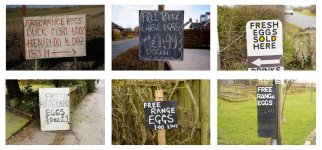
Grids are easier to compile if you start with an idea and shoot with it in mind. As I tend to think in 'sets' of pictures a lot I often make them into grids. As below:

signs.jpg

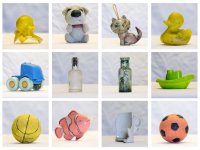
Another one I made after collecting objects from a local beach - with no plan in mind. I thought they were worth photographing when I'd got quite a few. I set up a table top 'studio' to give the objects a uniform look. The bottom row lets it down, and I could make a better 3x3 grid from what is there, but I wanted to put all the objects in one grid..

objectsf.jpg
 
What @juggler says is sound advice.

Trying to find suitable shots to combine from a random archive is the hardest way to do this. You need some linking element between the pictures, either aesthetic or conceptual. IMO.

Grids are easier to compile if you start with an idea and shoot with it in mind. As I tend to think in 'sets' of pictures a lot I often make them into grids. As below:

View attachment 489594

Another one I made after collecting objects from a local beach - with no plan in mind. I thought they were worth photographing when I'd got quite a few. I set up a table top 'studio' to give the objects a uniform look. The bottom row lets it down, and I could make a better 3x3 grid from what is there, but I wanted to put all the objects in one grid..

View attachment 489595
I think you make a valid point in shooting with a grid in mind rather than trying to force one using existing images
 
Back
Top