Metering

Messages
204
Edit My Images
No
Hi guys,
I'm new and learning. Can someone please help me with understanding some aspects of metering?
Am i right in understanding that If I point camera at object x the camera meters light levels for that object and that object should be perfectly exposed if I set my camera meter in middle. If meter is set to + will overexpose and on - will underexpose.
For HDR I've read you need to meter for dark areas of picture and light areas. Does this mean overexposing and under exposing while metering of same object x in middle or would I point at bright area-meter, recompose and shoot and then point at dark area-meter, recompose and shoot?
Thanks
 
Hi guys,
I'm new and learning. Can someone please help me with understanding some aspects of metering?
Am i right in understanding that If I point camera at object x the camera meters light levels for that object and that object should be perfectly exposed if I set my camera meter in middle. If meter is set to + will overexpose and on - will underexpose.
Only if the item is mid-grey or its tonal equivilent. You need to be aware of the metering problems associated with white cats and black dogs.
For HDR I've read you need to meter for dark areas of picture and light areas. Does this mean overexposing and under exposing while metering of same object x in middle or would I point at bright area-meter, recompose and shoot and then point at dark area-meter, recompose and shoot?
Wherever you like, what's important is that you increase and decrease the exposures incrementally until you have captured the entire dynamic range. The longest exposure of the sequence will be almost completely blown to white with the odd shade of grey but absolutely no blocked blacks, the shortest exposure will be almost pure black with no absolutely blown highlights. You may need to cover 8-14 stops of exposure at either 1- or 2-stop increments to do this. It depends on the scene. The starting point doesn't really matter as long as it's somewhere in the middle - from the starting point you adjust the exposure manually and do not move and recompose - keep the camera locked down on the tripod unless you want to make more work for yourself.

If you're going to use AEB to bracket, meter the scene as you would for any other shot. And hope that the full dynamic range of the scene can be captured with your chosen bracket.
 
Do you have the manual Der your camera? It will explain the different ways of metering that it has. That should also help you work out the second part of your question. It's not that I don't want to help, just that without knowing your camera it's hard to answer accurately.
 
Hi guys,
I'm new and learning. Can someone please help me with understanding some aspects of metering?
Am i right in understanding that If I point camera at object x the camera meters light levels for that object and that object should be perfectly exposed if I set my camera meter in middle. If meter is set to + will overexpose and on - will underexpose.
For HDR I've read you need to meter for dark areas of picture and light areas. Does this mean overexposing and under exposing while metering of same object x in middle or would I point at bright area-meter, recompose and shoot and then point at dark area-meter, recompose and shoot?
Thanks

Alastair has attempted an answer where I wouldn't have.

Your light meter is simple (even if the adverts claim it's a photographic genius) and has no idea what it is you're pointing it at. And even if it did know what you were pointing it at (as the adverts claim) - it'd have to read your mind to know what you want to achieve:thinking:.

So metering looks complicated but is simple - accept that it thinks what you're pointing it at is an average scene. So it'll overexpose a dark scene and underexpose a bright one - that's why you are in control.

HDR is a complex technique - get the basics nailed first.:)
 
Your light meter is simple (even if the adverts claim it's a photographic genius) and has no idea what it is you're pointing it at.

When in Evaluative mode my camera does know what I'm pointing at. It decides that whatever is under the active focus point is my subject. It then looks at all the other focus points to see if what's under them is at the same distance. That allows it to figure out which points cover the subject.


So it'll overexpose a dark scene and underexpose a bright one - that's why you are in control.

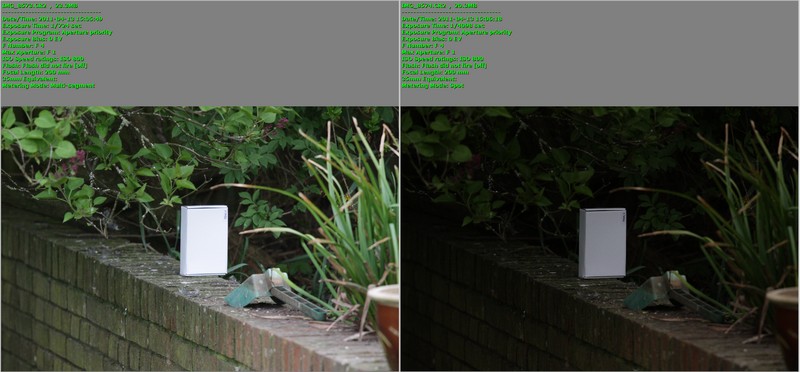
Once it knows what the subject is then it looks at the light levels over the whole scene and compares them to a database of standard images. In this example Evaluative metering (on the left) decided that the white box was my subject. It looked through its database and didn't find anything for 'grey box with a black background' (which is what spot metering gave, on the left) but it obviously did have something for 'White box on a grey background' and exposed perfectly.

Eval%20vs%20Spot.jpg
 
When in Evaluative mode my camera does know what I'm pointing at. It decides that whatever is under the active focus point is my subject. It then looks at all the other focus points to see if what's under them is at the same distance. That allows it to figure out which points cover the subject.


Once it knows what the subject is then it looks at the light levels over the whole scene and compares them to a database of standard images. In this example Evaluative metering (on the left) decided that the white box was my subject. It looked through its database and didn't find anything for 'grey box with a black background' (which is what spot metering gave, on the left) but it obviously did have something for 'White box on a grey background' and exposed perfectly.

Eval%20vs%20Spot.jpg
That example isnt anywhere near as smart as your captions suggest. That scene looks fairly average to me, and anyone smart enough to use spot metering ought to know to put the spot on a midtone:thinking:, if you're spot metering a white box you should be compensating;). I know that evaluative metering can get it right, but it doesn't always get it right and we all know it doesn't.

The point is when teaching photography, that people understand the meter can be wrong, and often is, and it doesn't know what it is we want to achieve. I can shoot people against a sky and have the sky blown for a backlighting effect, or expose for a dramatic sky. Evaluative metering might get me a shot, but will it give me the shot that I want:shrug:.

Don't get me wrong, I use evaluative metering most of the time, but I know how to get it to do what I want.

The forum is littered with threads from newcomers who don't understand why the camera isn't doing what they expect. I'm trying to get them to understand the camera doesn't read their mind or know what it's looking at often.
 
I'm using Nikon d90 and mainly use matrix metering. I understand meter won't know what I'm trying to achieve but my question was regarding a relatively well balanced scene with object x in middle as your focus point.
And I was asking about HDR as if that scene did have bright and dark parts how would I meter differently if at all? From my understanding and from manual I should be using bracketing to capture different exposure levels which would give me a bigger dynamic range.
Alastair said:
You may need to cover 8-14 stops of exposure at either 1- or 2-stop increments to do this. .
Can you please explain how I would be changing stops for this? I'm sure I shouldn't be changing apertures or shutter speeds or should I to achieve this?
 
Last edited:
Can you please explain how I would be changing stops for this? I'm sure I shouldn't be changing apertures or shutter speeds or should I to achieve this?

Yes, you should be changing shutter-speed - that's what AEB would be doing if you went the automatic bracket route. If I'm doing this I meter once to give me an exposure somewhere in the middle, but it doesn't need to be precise. I then lock the camera on the tripod, take the first exposure and then work my way down the shutter speeds in one stop increments until the review of the image on the rear screen is almost pure black and the histogram shows no burnt highlights. I then go back to the starting exposure and start lengthening the shutter speeds until reviewing the image on the rear screen shows it as almost pure white with no blocked shadows.

From memory, a typically dark indoor church/cathedral with stained glass windows has a starting exposure of about f/11 and 1/10. I'll run exposures for HDR down to 1/200-250 and check the review, and typically run them the other way to 2-4 minutes.
 
Yes, you should be changing shutter-speed - that's what AEB would be doing if you went the automatic bracket route. If I'm doing this I meter once to give me an exposure somewhere in the middle, but it doesn't need to be precise. I then lock the camera on the tripod, take the first exposure and then work my way down the shutter speeds in one stop increments until the review of the image on the rear screen is almost pure black and the histogram shows no burnt highlights. I then go back to the starting exposure and start lengthening the shutter speeds until reviewing the image on the rear screen shows it as almost pure white with no blocked shadows.

From memory, a typically dark indoor church/cathedral with stained glass windows has a starting exposure of about f/11 and 1/10. I'll run exposures for HDR down to 1/200-250 and check the review, and typically run them the other way to 2-4 minutes.

ah perfect that explains how people talk about taking 5-10 increment exposures. I was wondering as AEB only takes upto 2EV up and down.
 
I was wondering as AEB only takes upto 2EV up and down.

AEB in the D90 isn't really meant to be an HDR tool just to give you the opportunity to get 3 exposures of the same image without having to manually change the settings. It just happens that this is also handy for HDR, although it doesn't really give you enough stops for most HDR situations.
 
Back
Top