

You are using an out of date browser. It may not display this or other websites correctly.
You should upgrade or use an alternative browser.
You should upgrade or use an alternative browser.
name on EXIF data
- Thread starter donald
- Start date



OP

- Messages
- 1,315
- Name
- let me think....Donald
- Edit My Images
- Yes
Thanks for the replies, yes it was secondhand.
ALways just put the card in a card reader before and never "installed" the camera onto the pc. I seem to have a problem now though. PC is running 64 bit Win7. If the "communications" is set to normal on the camera there is no driver available and the device is not installed. If I set comms to PTP the camera is recognised and installed but on the EOS utility all the options are greyed out - am I still missing something?
ALways just put the card in a card reader before and never "installed" the camera onto the pc. I seem to have a problem now though. PC is running 64 bit Win7. If the "communications" is set to normal on the camera there is no driver available and the device is not installed. If I set comms to PTP the camera is recognised and installed but on the EOS utility all the options are greyed out - am I still missing something?
Keep using the card reader... twelve years of using digital cameras and I still think it's the better way of transferring images.
Unless you're using the camera tethered to a laptop, there's no reason to ever stick a cable in the side of the camera...
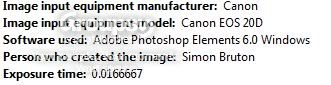
And yes - the metadata question is that the previous owner has it 'written' into the copyright section of your camera - just go through the menu til you find it, then change it to your name.
Unless you're using the camera tethered to a laptop, there's no reason to ever stick a cable in the side of the camera...
And yes - the metadata question is that the previous owner has it 'written' into the copyright section of your camera - just go through the menu til you find it, then change it to your name.

- Messages
- 649
- Name
- david
- Edit My Images
- Yes
Keep using the card reader... twelve years of using digital cameras and I still think it's the better way of transferring images.
Unless you're using the camera tethered to a laptop, there's no reason to ever stick a cable in the side of the camera...
I'm interested in this comment. I've done nothing else but stick a cable in the camera since the digital revolution. What are the issues please, thanks?

Canon Bob
Loves the Enemy
- Messages
- 9,754
- Name
- Bob
- Edit My Images
- Yes
....- just go through the menu til you find it, then change it to your name.
It's not in the menu on the older Canon bodies Rob, you have to use the EOS Utility and select the "Camera settings/Remote shooting" tab.
Bob
- Messages
- 729
- Name
- Graham Clarke
- Edit My Images
- Yes
Donald,
I do believe I had to download an additional driver for the 20d when setting the name on mine, I was using the latest version of the EOS utility, it worked fine with my 40d and the wifes 30d as loaded. The file I down loaded was Canon Camera USB WIA Driver for Windows Vista, it does not apear to be available for win7 .
I do believe I had to download an additional driver for the 20d when setting the name on mine, I was using the latest version of the EOS utility, it worked fine with my 40d and the wifes 30d as loaded. The file I down loaded was Canon Camera USB WIA Driver for Windows Vista, it does not apear to be available for win7
.I'm interested in this comment. I've done nothing else but stick a cable in the camera since the digital revolution. What are the issues please, thanks?
It's slower...that's it really...
When importing via USB direct from the camera it takes about 3/4 second longer per RAW image to transfer. Not much but when you're transferring 1500 images...well...
Logic dictates that it should be faster going direct from camera, but I've found that my Sandisk card-reader is much faster.
It's not in the menu on the older Canon bodies Rob, you have to use the EOS Utility and select the "Camera settings/Remote shooting" tab.
Bob
*sigh* just another reason 'why'...


 I'm on Win7 64bit on a dell xps laptop