

Natural Light Colour

  • Thread starter Thread starter Deleted member 11105
  • Start date Start date
D

Deleted member 11105

Guest
I went out and took a couple of photos attempting to capture the gloom of the landscape during the hour before nightfall yesterday. I set the White Balance on my Canon 1000D to AUTO and took a shot. Viewing the captured image on camera display I noticed that the colour looked desaturated. From experience I remembered that boosting the saturation previously did not produce satisfying results. Instead I questioned whether the problem lied with the white balance. The landscape as I was percieving it seemed to be enshrouded in a blue gloom. I entered the White Balance Adjustment Menu and increased the blue and green and shot a new image. I reviewed the new image, ajusted the White Balance again and shot again. The image on screen now seemed a more accurate representation of the scene I was percieving.


I am now questioning the acuracy of the auto white balace setting on my camera. Am I mad or are auto white balance functions often fooled?

Do you often find yourself having to adjust white balance and tint to correct auto white balance?

here is the image I took with straight camera auto WB:
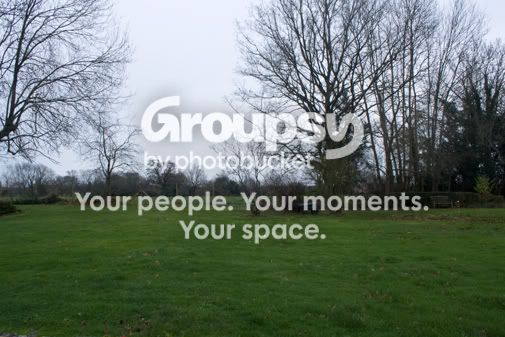
IMG_2648_CAMERA_AUTOWB.jpg


here is the version with WB adjusted:
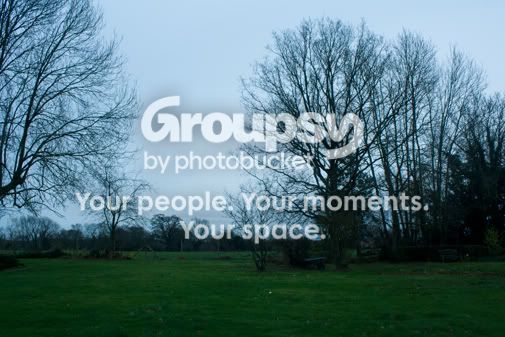
IMG_2652.jpg


and here is the WB adjusted version that has then been "corrected" (I'm sceptical)by camera raw auto WB:
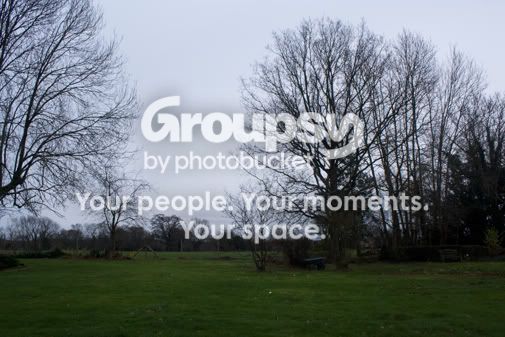
IMG_2652_AUTOWB.jpg


Duncan
 
Don't shoot Auto WB, set it for daylight shoot RAW and adjust if required in DPP. Also the contrast betweensky and land means you either need to use an ND filter or play around in Post Processing.
 
Your white balance isn't being fooled. It's actually doing exactly what it's supposed to- correcting the colour differences in different types of light to produce a natural looking colour balance. The only thing is this is one of the times wher you want to preserve the predominant hue. I tend to shoot in Raw. Raw files don't have the white balance settings applied until you process them so you can set it to whatever you like, then save it as a jpeg.
 
my simplistic understanding of auto white balance is that the camera looks for an area of something bright and nominally white and adjusts the white balance to that. Therefore if there is nothing significant that is truly white it will take whatever is brightest and whitish and make that white, like the sky in your shot.

I save as raw and adjust white balance in DPP.
 
I am now questioning the acuracy of the auto white balace setting on my camera. Am I mad or are auto white balance functions often fooled?

Yes. Not sure about the mad question :D

Do you often find yourself having to adjust white balance and tint to correct auto white balance?

Yes.

I always thought that the fixed white balances were not good because daylight actually varies a lot so there is always the chance that it will be way off. Have I been incorrect then?

Sure daylight varies, which is why you have sun, shade and cloudy white balance options.

Also I've never used DPP, will it give more control than camera raw? will it help me produce better images than camera raw or is it just an alternative?

DPP is just another Raw processing programme, and rather a good one, that does a few things specific to Canon which is handy. And it's free. But ACR will get just the same result in this situation.
 
You could try setting the colour temp on a white balance card. I find them very handy in when the lighting is a bit tricky.

http://www.rawworkflow.com/whibal/ <- these are good but a little expensive, there are cheaper what balance cards around.
 
For custom white balance, a white card or paper is actually recommended over grey, but either is usually fine. The important thing is that it's neutral.

At a party over the weekend, I used a white table cloth. Very handy and worked perfectly :thumbs:
 
The white balance just lines up the three channels on top of each other, so white paper is fine for correcting it.

However, the whole point of photographing the "blue moment" - or gloom - is to catch the way the light has changed from normal daytime light. This is complicated by the fact our brain runs a constant white balance adjustment for us, anyway, so it is not easy to reproduce what your brain tells you is an out-of-balance scene.

The best way is to shoot with the WB set on either daylight or shadow. The bluer light of the early evening will then still appear blue (though not so much if you choose shadow). By using RAW you can carry out further WB adjustments at the processing stage, to get the colour that you feel is closest to what you saw.

Darkening the sky with a graduated neutral density filter will also make the foreground more vibrant.
 
I think that's for exposure rather than white balance. It might not be a 'neutral' grey.

Canon recommends white, the logic being that plain white is easier to find 'on location' than a poperly neutral grey and when you shoot it using regular metering as a reference target it comes out mid-grey anyway. Also, in the low ambient artificial light situations where you often need custom balance, shooting a white target you are less likely to get into under-exposure and noise influencing the result.

That's the theory as I understand it, basically white being easier and perhaps more reliable but I don't think it makes much odds in practise.

However, for setting colour balance in post processing then white is potentially risky if it's gone into clipping. Much better to have a nice 18% grey card in shot as a reference to stick the dropper on.

And 18% grey for exposure too - just meter off it and make the settings directly. You can do the same off a white card but you need to know exactly what the percentage reflectance is and make the appropriate adjustment. This is the idea behind taking an incident light reading off the palm of your hand - increase the exposure by 1.3 stops and for the average caucasian you'll be spot on.
 
the manual for my 400D for setting custom white balance talks about using a white object, but then in a footnote says: "instead of a white object, an 18% gray card(commercially available) can produce a more accurate white balance." (page 87)

to be honest I rarely bother with the grey card as I save as raw & just tweak the WB in DPP until I'm happy
 
I don't think my 1000D has a temperature slider...

it has in DPP if you save as raw ;)


This makes me question, 'how often is daylight neutral?' Is it often off balance and therefore the white balance need tweeking to accommodate and produce a litteral representation of what is seen. It seems in the photos I took the camera's white balance system did capture some of the blue in the sky but the grass looked obviously grey as if it's complimentary colour had been added in correction.

Some of you seem to say that you find it best to adjust the image later in post production. But I can't help thinking that unless you have developed a really sensitive eye for light and remember the scene you shot exacly, it would be easier to get the balance right at the time when you can compare it dircetly with your perception of the scene.

so shoot a variety of scenes in raw then go load them into DPP and try the different white balances

its surprising how much difference there is between the sunny / shade / cloudy presets on some shots

I really suspect that the presets are compromise settings and even regionally compromised. The light you'll get from a vertically overhead sunny on the equator will be different from a more horizontally inclined sunny in Scotland, and loads of other variants including type of cloud and percentage of cloud cover, and the different colourations of different trees under which you are taking "shade" shots.
Therefore with complex mixes of whitebalance within a shot the presets may get you close, temperature slider may get you closer, fiddling with curves can get closer still but ultimately a complex scene may require different adjustment for different areas to achieve perfection :shrug:

But I reckon it all comes down to doing what YOU think is right for the shot. :D
 
If you shoot on daylight white balance what you will get is a picture showing the actual difference between the normal daylight temperature of say 5,500K and the actual temperature of say 7,500K. Your picture will look like what you would see if you went directly from midday sunlight to twilight without your brain adjusting.

Now, since your brain will have done some adjusting, it will have pushed your mental slider somewhere up towards towards the true WB of 7,500K. Not the whole way, by any means, but some of the way. So all you have to do is, starting from 5,500, slowly push the slider up towards the 7,500 mark until the image corresponds with what you saw.

You CAN'T do it all "in camera" because you don't know what your mental white balance was at the time.

Make sense?

I don't know if it helps, but shooting on Daylight WB is just like shooting with a daylight colour film. Ten years ago most of us didn't think twice about white balance, we just put the film in, shot and pretty much got what we expected back.

Automatic white balance is just adding an extra complication (WB used to get sorted with warming and cooling filters if you were really professional with film).
 
I don't know if it helps, but shooting on Daylight WB is just like shooting with a daylight colour film. Ten years ago most of us didn't think twice about white balance, we just put the film in, shot and pretty much got what we expected back.

I was under the impression that when you gave your film to boots or max spielman or whoever on the high street (or the big mail order places) to develop & print they automatically applied some sort of WB/colour correction during the printing process :shrug:, . . . which was why when getting reprints they never seemed to be the same colours :thinking:
can anybody confirm or correct me on that?
 
They do some colour adjustment in printing but that doesn't mean your film doesn't have a fixed WB.

You sometimes see the alterations that have been made on the back of the photo as "c0 y0 m+2 k-1" or something similar.
 
...But I reckon it all comes down to doing what YOU think is right for the shot. :D

Yes.

You CAN'T do it all "in camera" because you don't know what your mental white balance was at the time.

True.

I was under the impression that when you gave your film to boots or max spielman or whoever on the high street (or the big mail order places) to develop & print they automatically applied some sort of WB/colour correction during the printing process :shrug:, . . . which was why when getting reprints they never seemed to be the same colours :thinking:
can anybody confirm or correct me on that?

That's quite correct, and usually prints looked okay even when they were not quite right. You only noticed it when an item of clothing or something distinctive/memorable was off. Or when you got some mismatched reprints back as Wookie says.

Now then, is this where the confusion lies?

What is the colour is an object? It is the colour of the light reflected from it, which is the net result of the colour of the light falling on it, minus the light absorbed by it.

So in that sense, the camera is always abolutely spot on with colour every time. It cannot be wrong.

However, it often doesn't look that way and our brain is constantly trying to 'correct' the colour for what it thinks is right. Which is obviously wrong, and I guess we all do this slightly differently and strange things happen.

I was playing with some flash correction gels the other day, for use with fill-in flash to balance the blueish flash light with the orangey tungsten room light and when I got it technically correct according to 5200K daylight, it looked too blue. It looked better, more natural to my eye, with a bit too much orange left in. Because pictures taken in indoor artifical light situations like that need a bit of warmth, at least to my eye.
 
Back
Top