

Need a little help to judge if my monitor is okay..

Messages
358
Name
Rebecca
Edit My Images
Yes
Alright, as I cannot afford to spend £100 on a monitor calibration tool, I'm going to see if this will work..

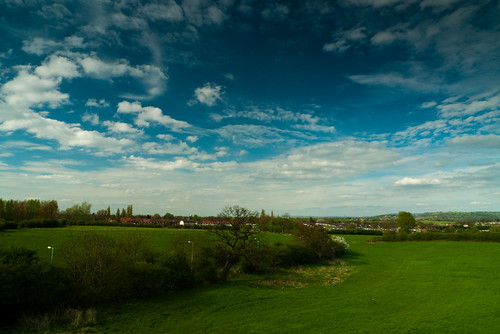
Basically, this is a shot that I ordered at 12x8 on DSCL, however it's far too dark, as are most of my other photos - but I never thought my monitor was too bad. Photos have always seemed fine when processed straight from the camera and to the printer, but when editing them on my laptop the prints have been too dark.

It was taken on my LX3 with a CPL & ND filter so the sky is supposed to look a little over saturated. At least, I think that shot was with the ND filter, looking at the original, it appears it may not have been. Either way.. !

This is the one which I sent off to get printed, which I thought looked perfect on my laptop at the time.
4578852949_6552033c57.jpg


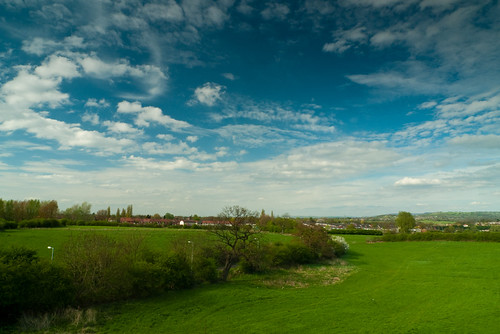
This is the image after I re-calibrated my monitor and edited it, this now looks way too bright on my PC monitor. I don't use that one for image editing, but it's amazing to see what the difference is. Hopefully this one should look about right when printed.
4579477260_f9f9c1a1c2.jpg


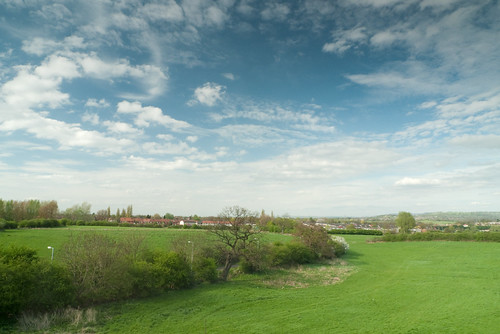
And just for the sake of it, here is the original unedited photo, which looks very bland and dreary on both of my monitors, which leads me to believe I actually did take that particular shot without an ND filter. Doh!
4579473776_649d1edaa4.jpg


The high res photos should be available on my flickr somewhere, I don't know how to link them as I rarely use flickr.

Thanks for any help, it will be much appreciated.

Also, I apologise if this is in the wrong forum! I wasn't too sure where to put it..
 
Thinking about it, this would probably be better off in the Image & Post Processing forum.

Would someone be able to move it please?

Thank you. :)
 
To me, 1 looks way too dark. 2 is about right, ish. Not that my monitor is properly calintated...
 
If you monitor isn't calibrated then keep a close eye on the histogram, the first image is dark, around a stop and a half under exposed. The last is better but lacks contrast and punch as you say, but that can easily be fixed in PP. I would trust the prints you got back from DSCL, adjust your monitor to match how the prints look the best you can. Adjust the image exposure and then re-order from the same supplier. I would still advise getting a screen calibrator when you can though, you'll be surprised just how far out your monitor is!
 
If you monitor isn't calibrated then keep a close eye on the histogram.....

Agreed. Your unedited original looks to be nicely exposed, with the white point where it is supposed to be. It may need the black level darkening just a tad, or contrast increased a little, but you weren't far off in the first place. The first version you posted is looking decidely iffy, and the second version is, let's say "artistic" rather than natural looking. I don't think your monitor is doing you any favours as it is.

Here is the histogram for the original...

20100505_104030_.JPG


Here is a version with nothing altered other than to pull down the shadow region a little, by increasing blacks from 0 to 9 in Lightroom. Unfortunately, I don't think the dark patch in the middle of the sky is working well. CPLs need to be used with care when shooting with wide angle lenses as you can easily end up with uneven darkening across the sky. Sometimes that can work for you, sometimes not.

20100505_103817_4_LR.jpg
 
Hey,

Thanks for the tips - I was begining to think that I might have to resort to histograms to try and figure out if my pictures are too dark and with too much contrast, so off to read about them for a while to see if I can figure out how they work.

I'll have a run through the stages on DryCreekPhoto to see if that will aid me a little better too.

Cheers
 
This might help - http://www.cambridgeincolour.com/tutorials/histograms1.htm

Also, take a look at the graphic below and see how clearly you can distinguish individual tones, especially at the black end and the white end. If tones are merging together and indistinguishable then you have a problem with your monitor.

grayscale.gif


On my laptop screen all the individual tones are very clearly distinct, although the differences between X and Y and Y and Z are more subtle.
 
Alright, I've had a bit of tweaking with my monitor, judging it against some of those calibrators listed and also comparing it as best that I can with the prints that I received.

The stuff about histograms is really quite fantastic, I had no idea they were so useful before, and not only that - they are really not that frightening either!

Thanks for all the help, it's been very much appreciated. :)
 
Don't forget that you can (should) review your histogram when you take the photo in the first place, to make sure that you have made best use of the camera's dynamic range. Once back at the PC you can continue to use the histogram to help with the fine tuning of your image.

Different approaches should be considered depending whether you shoot to raw or JPEG in camera. When you shoot to raw the aim is to capture as much tonal detail as possible, exposing to the right in order to minimise noise too. The image may initially look too bright, but in your raw editor you will adjust the image to give the best look. Obviously that is tricky to do if your monitor is poorly set up, but the histogram may well help.

When you shoot straight to JPEG your aim (IMHO) should be to get a perfect exposure in the first place, with the correct levels of sharpening, contrasts, saturation, white balance and anything else set before you release the shutter. The goal should be to require no further edits once you have taken the shot.

The important thing to watch for, whether shooting to raw or JPEG, is that you do not accidentally clip your shadows or highlights and thus lose useful image data. Sometimes the dynamic range of the scene is so great that the camera cannot fully capture the details in both the highlights and shadows at the same time. In such situations you need to decide which end of the tonal scale is of more importance to you, and make sure you record that end faithfully.

My personal approach is to always shoot raw, generally aim to expose to the right, and be guided by my histogram (and clipping warnings) both when shooting and editing my photos.

This is another good reference if you prefer to shoot raw and want to maximise the image detail you capture - http://www.luminous-landscape.com/tutorials/expose-right.shtml
 
Back
Top