


- Messages
- 422
- Name
- Craig
- Edit My Images
- Yes
I'm hoping someone will be able to help me with this cause it's been bugging me for days now. :bang: What it is, is I've created a paypal 'add to cart' button (with a drop down menu to select print sizes) to add to below a photo. The idea being to add one for each image.
The problem is when I put the standard generated code in the description box of the gallery plugin, the drop down menu doesn't align to the centre as it should. It aligns to the left (unlike the button itself). Here is the default code:
Looks like this:
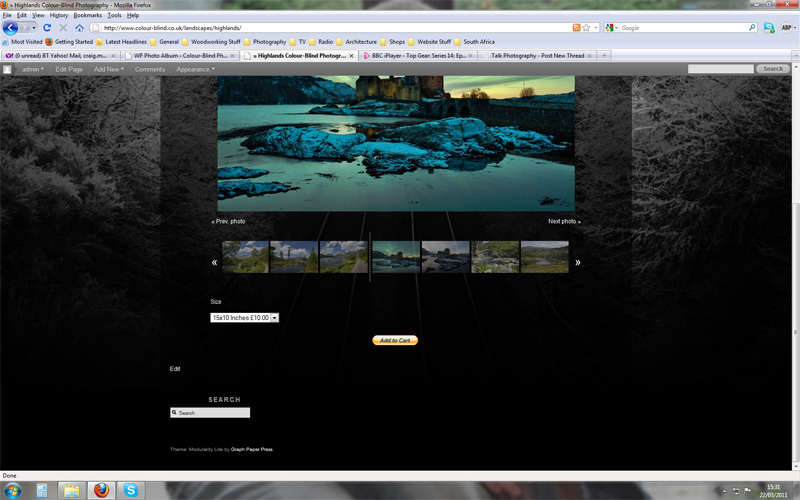
WebsitePic1 by Craig Watt, on Flickr
I tried modifying the code to this:
This doesn't change the appearance at all. However when I removed the quotation mark like so: <tr style="text-align: center;> it did centre it, however the drop down box no longer worked. It looked like this:
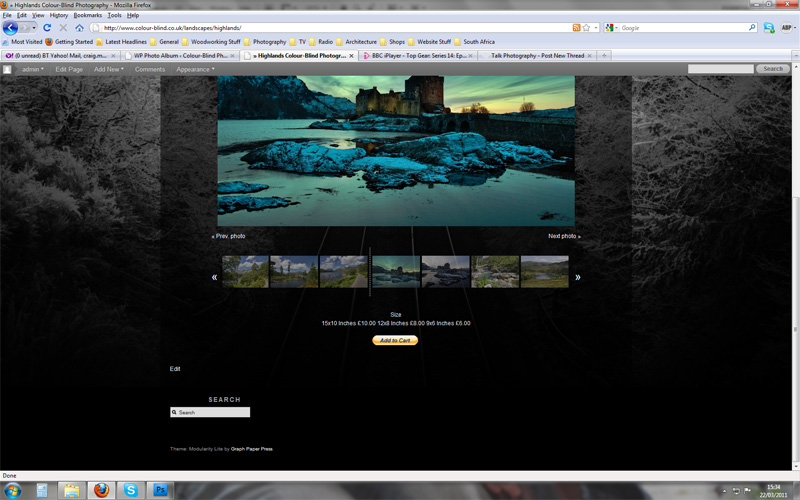
WebsitePic2 by Craig Watt, on Flickr
Any ideas what's going on or what I'm doing wrong? It's a wordpress site using a plugin called "WP Photo Album Plus" for the galleries if that helps.
Any help appreciated,
Craig.
The problem is when I put the standard generated code in the description box of the gallery plugin, the drop down menu doesn't align to the centre as it should. It aligns to the left (unlike the button itself). Here is the default code:
Code:
<form target="paypal" action="https://www.paypal.com/cgi-bin/webscr" method="post">
<input type="hidden" name="cmd" value="_s-xclick">
<input type="hidden" name="hosted_button_id" value="RXNH9E2U3FZ68">
<table>
<tr><td><input type="hidden" name="on0" value="Size">Size</td></tr>
<tr><td><select name="os0">
	<option value="15x10 Inches">15x10 Inches £10.00</option>
	<option value="12x8 Inches">12x8 Inches £8.00</option>
	<option value="9x6 Inches">9x6 Inches £6.00</option>
</select> </td></tr>
</table>
<input type="hidden" name="currency_code" value="GBP">
<input type="image" src="https://www.paypalobjects.com/WEBSCR-640-20110306-1/en_GB/i/btn/btn_cart_SM.gif" border="0" name="submit" alt="PayPal - The safer, easier way to pay online.">
<img alt="" border="0" src="https://www.paypalobjects.com/WEBSCR-640-20110306-1/en_GB/i/scr/pixel.gif" width="1" height="1">
</form>
Looks like this:
WebsitePic1 by Craig Watt, on Flickr
I tried modifying the code to this:
Code:
<form target="paypal" action="https://www.paypal.com/cgi-bin/webscr" method="post">
<input type="hidden" name="cmd" value="_s-xclick">
<input type="hidden" name="hosted_button_id" value="RXNH9E2U3FZ68">
<table>
[B]<tr style="text-align: center;">[/B]<td><input type="hidden" name="on0" value="Size">Size</td></tr>[B]<tr style="text-align: center;">[/B]<td><select name="os0">
	<option value="15x10 Inches">15x10 Inches £10.00</option>
	<option value="12x8 Inches">12x8 Inches £8.00</option>
	<option value="9x6 Inches">9x6 Inches £6.00</option>
</select> </td></tr>
</table>
<input type="hidden" name="currency_code" value="GBP">
<input type="image" src="https://www.paypalobjects.com/WEBSCR-640-20110306-1/en_GB/i/btn/btn_cart_SM.gif" border="0" name="submit" alt="PayPal - The safer, easier way to pay online.">
<img alt="" border="0" src="https://www.paypalobjects.com/WEBSCR-640-20110306-1/en_GB/i/scr/pixel.gif" width="1" height="1">
</form>
This doesn't change the appearance at all. However when I removed the quotation mark like so: <tr style="text-align: center;> it did centre it, however the drop down box no longer worked. It looked like this:
WebsitePic2 by Craig Watt, on Flickr
Any ideas what's going on or what I'm doing wrong? It's a wordpress site using a plugin called "WP Photo Album Plus" for the galleries if that helps.
Any help appreciated,
Craig.
Last edited:


