Newbie Question

Messages
214
Name
Kieron
Edit My Images
Yes
Hi all,

I'm after a bit of advise if you'd be so kind?

I'm still trying to learn the basic functions of my camera. Today i went out into the garden to play with the dogs and i thought i'd try to get some 'action' shots of them running around. Basically i was just messing around with the shutter speed/aperture/auto and manual focus.

Anyway when i got back inside and put the pics on the PC almost all of them we're blurred, except 1 or two. The problem is, i was playing with the settings so much i don't know what i did right on the shots that were in focus.:lol:

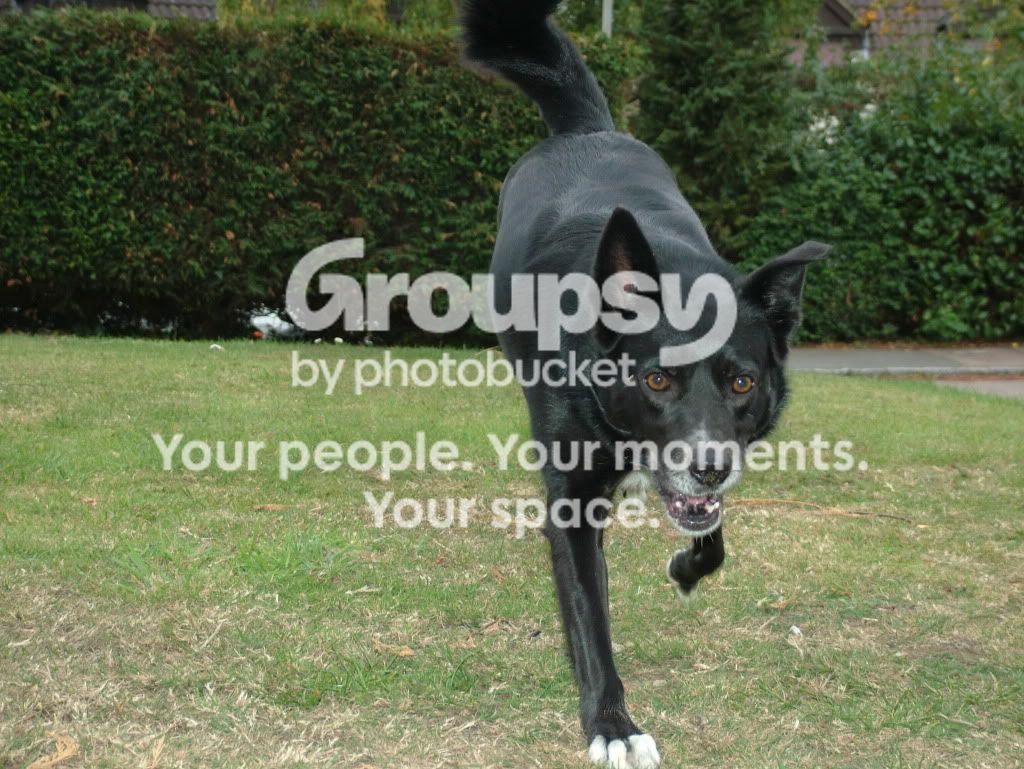
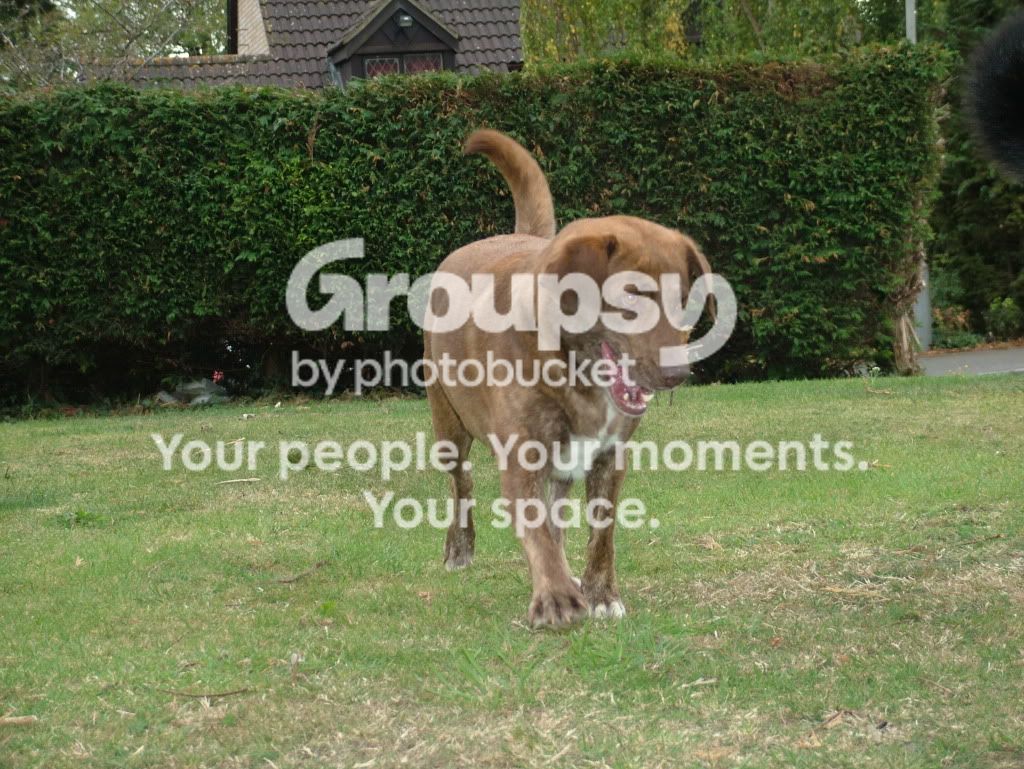
Anyway here's an example of a shot that wasn't right, and one that was, respectively.

DSCF5207.jpg


DSCF5203.jpg


So i guess my question is, how did i manage to get the shot in focus, and so crisp looking? lol

Thanks in advance.
 
your shutter was 400 which is about right as you where at 18mm we need to see a blurred one to tell you what you did wrong :)

why did you use flash?

oh and stay away from manual focus for shots like this or your relying mostly on luck..
 
Last edited:
your computer can tell you what setting you used on each shot (Exif Data). You'll need a fast shutter speed for something that is moving, to freeze the image, also focus can be an issue as the distance can vary quickly. A train on a track will be going fast, but you can predict where it is going to go and focus appropriately, a dog (like cats and children) will inevitably turn away from the camera, or run at you or whatever!
 
Given that both shots were shot at 1/400s and the flash fired, I think we can reasonably rule out either camera or subject movement as a cause of blurring, which would leave focussing.

Whether you were focussing manually or using AF, you missed it in the first shot. Moving subjects such as a dog will be notoriously difficult to keep in focus when focussing manually, especially with a relatively wide aperture. If you were using AF, it looks as if the camera has not locked on to the eyes as the focussing point. I don't know what AF options are available on your camera, but you might have more success if you can restrict it to a single AF point if you are not doing that already.
 
Thanks for all of your input :)

Firstly i never knew that you could tell what settings i used on the PC, that's gonna be a huge help!

I used the Flash because at 1/400s the shots looked under exposed, as it was pretty cloudy. Is there anything else i can tweak when i raise the shutter speed, rather than using the flash?

Also could somebody explain to me in short, what the AE/AF lock button does and how to use it please?

Thankyou for your patience. :thumbs:
 
Thanks for all of your input :)

Firstly i never knew that you could tell what settings i used on the PC, that's gonna be a huge help!

I used the Flash because at 1/400s the shots looked under exposed, as it was pretty cloudy. Is there anything else i can tweak when i raise the shutter speed, rather than using the flash?

Also could somebody explain to me in short, what the AE/AF lock button does and how to use it please?

Thankyou for your patience. :thumbs:

AE/AF Lock button won't help in this case as it does exactly what it says on the tin - it locks the focus. This wuld mean as the dog moved the focus would be out.

I can't look at the Exif Data as I'm on a works computer but I would check your ISO. If its set to too low a level the shutter will stay open for longer to try to get more light to the sensor and if your on manual it will simply be too dark.

Alternativly try setting the white balance for cloudy instead of sunny?

Sorry I couldn't be more help but I can't look at Exif at work unless it's on Flickr which my computer allows me on to!! If you don't have an answer by then I'll have a look later when I get home.

Dean
 
I've had a look at the exif data in IrfanView and it seems that the f number (the aperture) is at F3.
This a rather low figure as the depth of field it gives is very small. In other words focus may have been selected on a relatively small part of the image which will be in focus but other areas, both in front of, behind or actually on the dog may not be in focus.
 
AE/AF Lock button won't help in this case as it does exactly what it says on the tin - it locks the focus. This wuld mean as the dog moved the focus would be out.

I can't look at the Exif Data as I'm on a works computer but I would check your ISO. If its set to too low a level the shutter will stay open for longer to try to get more light to the sensor and if your on manual it will simply be too dark.

Alternativly try setting the white balance for cloudy instead of sunny?

Sorry I couldn't be more help but I can't look at Exif at work unless it's on Flickr which my computer allows me on to!! If you don't have an answer by then I'll have a look later when I get home.

Dean

Thanks for the advice. My ISO is set to 200, and i haven't changed it since i've had the camera as i'm entirely sure why i would want to. lol
 
I've had a look at the exif data in IrfanView and it seems that the f number (the aperture) is at F3.
This a rather low figure as the depth of field it gives is very small. In other words focus may have been selected on a relatively small part of the image which will be in focus but other areas, both in front of, behind or actually on the dog may not be in focus.

Thankyou.

So i should have used a much higher f number?

Also if i raised the shutter speed even more, and the shots became to dark i could raise the ISO and/or white balance to counteract the darkness?
 
I've also taken the liberty of playing around with the shot of the black dog.
All I've done is apply some sharpening and a couple of other settings.
If folk think I've overcooked it then I hold my hands up.

I did this because I'm assuming these are images straight from your camera and the camera may not be applying sharpening etc enough.

your original image:

Goodwin1234 black dog no pp by mack100, on Flickr

after a bit of sharpening:

Goodwin1234 black dog with some pp by mack100, on Flickr
 
Thankyou.

So i should have used a much higher f number?

Also if i raised the shutter speed even more, and the shots became to dark i could raise the ISO and/or white balance to counteract the darkness?

It looks to me like your depth of field is wide enough, as the houses in the background are in focus. Therefore I think you can leave your F number where it is. White balance will not affect the exposure, I'd just leave that in auto for now as it seems to be working ok for you.

If you up the ISO the camera can capture the light faster and so you can use a faster shutter speed. If you double the ISO from 200 to 400 and leave the f number (aperture) the same, then you can half the shutter time. So 1/250 would become 1/500. Might help.

Incidentally, do you know if you were using continuous focus (AFC on Nikons)?
 
I've also taken the liberty of playing around with the shot of the black dog.
All I've done is apply some sharpening and a couple of other settings.
If folk think I've overcooked it then I hold my hands up.

I did this because I'm assuming these are images straight from your camera and the camera may not be applying sharpening etc enough.

your original image:

Goodwin1234 black dog no pp by mack100, on Flickr

after a bit of sharpening:

Goodwin1234 black dog with some pp by mack100, on Flickr

A definite improvement! Your right, the images are exactly as i shot them. I didn't bother editing them since they aren't particularly good shots anyway. lol

It looks to me like your depth of field is wide enough, as the houses in the background are in focus. Therefore I think you can leave your F number where it is. White balance will not affect the exposure, I'd just leave that in auto for now as it seems to be working ok for you.

If you up the ISO the camera can capture the light faster and so you can use a faster shutter speed. If you double the ISO from 200 to 400 and leave the f number (aperture) the same, then you can half the shutter time. So 1/250 would become 1/500. Might help.

Incidentally, do you know if you were using continuous focus (AFC on Nikons)?

Gotcha, thanks. Will give that a try.

I'm fairly sure they were shot in S-AF.:love:
 
Last edited:
Gotcha, thanks. Will give that a try.

I'm fair sure they were shot in S-AF.:love:

Is this a Nikon? AF-S maybe? That mode is used for static subjects. Basically, once the camera has focus, it keeps it locked until you press the shutter. It's useful for landscapes etc but for a moving subject you really need AF-C which will continuously try to focus until the shutter is pressed. There is also AF-A mode that automatically chooses AF-S or AF-C but I would rather select manually to be sure.
 
Is this a Nikon? AF-S maybe? That mode is used for static subjects. Basically, once the camera has focus, it keeps it locked until you press the shutter. It's useful for landscapes etc but for a moving subject you really need AF-C which will continuously try to focus until the shutter is pressed. There is also AF-A mode that automatically chooses AF-S or AF-C but I would rather select manually to be sure.

Ah i see, so that's where i was going wrong then.. It's a fujifilm S7000
 
Back
Top