

You are using an out of date browser. It may not display this or other websites correctly.
You should upgrade or use an alternative browser.
You should upgrade or use an alternative browser.
Night time and long exposure - Too Bright In Places
- Thread starter glennk
- Start date


- Messages
- 1,662
- Name
- Derek
- Edit My Images
- Yes
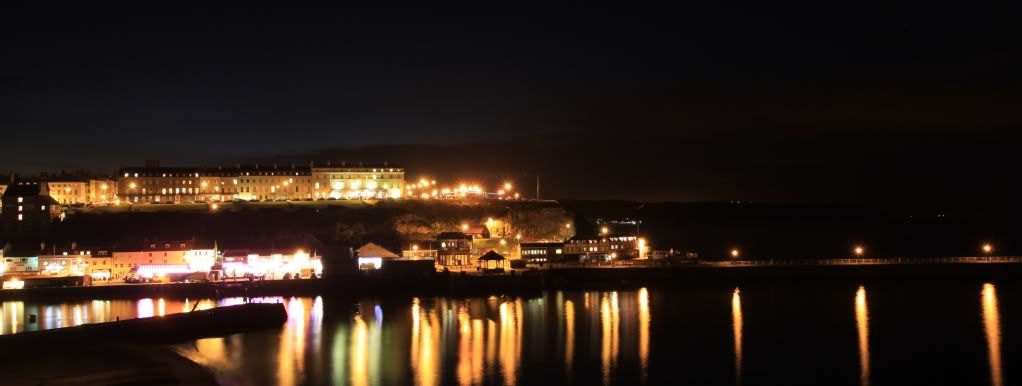
Given how bright some of the areas are in that scene, it's a simple matter of the dynamic range between light areas and dark areas is just too great for your camera to capture in a single shot.
If you are not familiar with the term dynamic range, I will try and explain in simpler terms. Let us assign a value to the amount of light in various parts of the scene, ranging from 1 for the blackest points to 10 for the brightest. Now, again just for the point of illustration, let us say that the range that your camera can capture only extends to 6 points. You now have a decision to make when faced with the situation you have. You can set the camera up to capture light values from 1 to 6, meaning that your shadows will have some detail, but all the bright areas will be overexposed, or you can capture the areas from 5 to 10, giving you properly exposed highlights, but leaving the shadow areas blacked out
To get round this, if you have a tripod, you can take several images, correctly exposing for the various parts of the scene, and then merge your images in post processing.
If you are not familiar with the term dynamic range, I will try and explain in simpler terms. Let us assign a value to the amount of light in various parts of the scene, ranging from 1 for the blackest points to 10 for the brightest. Now, again just for the point of illustration, let us say that the range that your camera can capture only extends to 6 points. You now have a decision to make when faced with the situation you have. You can set the camera up to capture light values from 1 to 6, meaning that your shadows will have some detail, but all the bright areas will be overexposed, or you can capture the areas from 5 to 10, giving you properly exposed highlights, but leaving the shadow areas blacked out
To get round this, if you have a tripod, you can take several images, correctly exposing for the various parts of the scene, and then merge your images in post processing.

- Messages
- 163
- Name
- Sam
- Edit My Images
- No
What camera do you have? most new DSLR's can take 3 pictures in a row. You can set it to change the aperture in between each shot automatically or adjust the shutter speed, either way you will have 3 shots with different dynamic range exposures that you can use Canon software/Photoshop or some other software as Derek said.

- Messages
- 9,818
- Edit My Images
- No
Try opening the aperture and reducing the shutter speed to compensate, that and better focussing on the light sources themselves should minimise the flare. Make sure that any filters are removed from your lens as these rarely help.
You can't prevent point light sources from burning out in night shots, but you can minimise the flare around them.
You can't prevent point light sources from burning out in night shots, but you can minimise the flare around them.

On the Canon 500d.
Menu - Second Tab (pic of camera with 2 dots).
Top option, Expo.comp./AEB
Press 'Set' to select and use the scroll wheel to chose the exposure differences.
'Set again' to set it.
On the tripod, set the self timer for a comple of seconds and the camera will auto take all three shots. Also, using the self timer will ensure the slight movement of the camera when pressing the button doesn't affect the images.
If trying it hand held, set the camera to continuous shooting mode. Hold the button and all 3 will be taken as fast as the camera can without having to press the button 3 times.
Menu - Second Tab (pic of camera with 2 dots).
Top option, Expo.comp./AEB
Press 'Set' to select and use the scroll wheel to chose the exposure differences.
'Set again' to set it.
On the tripod, set the self timer for a comple of seconds and the camera will auto take all three shots. Also, using the self timer will ensure the slight movement of the camera when pressing the button doesn't affect the images.
If trying it hand held, set the camera to continuous shooting mode. Hold the button and all 3 will be taken as fast as the camera can without having to press the button 3 times.
- Messages
- 9,818
- Edit My Images
- No
Good idea Andy, but you need to set the initial exposure below 30 seconds if you're doing AEB on the shutter speed as it caps out at 30 seconds (longer than that is bulb mode). So if your AEB bracket is +/-1 stop the initial exposure needs to be 15 seconds or less, if it's +/-2 stops it needs to be 7 seconds or less.
But, tbh you can chimp the exposure on the screen and just manually adjust. AEB will affect the overall exposure but won't give varying aperture and shutter speed for the same exposure value to optimise flare control.
But, tbh you can chimp the exposure on the screen and just manually adjust. AEB will affect the overall exposure but won't give varying aperture and shutter speed for the same exposure value to optimise flare control.


- Messages
- 2,529
- Edit My Images
- No
i think he need to use "Manual" mode rather then "Aperture" mode.
Pop it in "Manual" mode and set aperture to around f8/9 to start off with and adjust when needed.
Set shutter speed around 3-10 sec to start off with.
Set iso to 100-200 depend on what camera, i use nikon and i like to use iso 200 at the minimum.
use a tripod, no flash and use a remote or shutter release.
Use manual focus and then take a shot.
If is too bright then adjust shutter speed.
One last thing that experience tells me, if you use some kind of UV filter it MAY attract glare to your photo, so if any green glare appears then take the filter off and take the photo.
Pop it in "Manual" mode and set aperture to around f8/9 to start off with and adjust when needed.
Set shutter speed around 3-10 sec to start off with.
Set iso to 100-200 depend on what camera, i use nikon and i like to use iso 200 at the minimum.
use a tripod, no flash and use a remote or shutter release.
Use manual focus and then take a shot.
If is too bright then adjust shutter speed.
One last thing that experience tells me, if you use some kind of UV filter it MAY attract glare to your photo, so if any green glare appears then take the filter off and take the photo.
Last edited:
As said the dynamic range is too great between the light parts and dark parts. You'd need to use something like HDR as stated above, where you take multiple exposures with the same framing and combine them to produce a single image with a much greater dynamic range.

- Messages
- 987
- Name
- Alex
- Edit My Images
- Yes
Feel free to check out my flickr in my signature and look up the long exposure work I've done. I have the exact same camera as you and HDR is VERY well received with it.
One of the things I may recommend to you is over exposing it and then stopping it down in lightroom or photoshop. If you weren't prepared to do that, try putting the camera on Av mode and setting it to about F10 and the ISO at 200 or 400.
Just a suggestion.
One of the things I may recommend to you is over exposing it and then stopping it down in lightroom or photoshop. If you weren't prepared to do that, try putting the camera on Av mode and setting it to about F10 and the ISO at 200 or 400.
Just a suggestion.
The best way to shoot 'night' shots is to shoot at dusk before all the light has gone from the sky. This will reduce the dynamic range necessary and minimise burned out highlights.
Alternatively, get closer so you're recording the incidental light as well as that from the sources. Wet surfaces look great at night too.
Alternatively, get closer so you're recording the incidental light as well as that from the sources. Wet surfaces look great at night too.