Portable Back Up?

Messages
2,509
Name
Paul
Edit My Images
No
What's the latest way to back up photos when travelling? I don't think I'm going to have any sort of useful internet access and I'm petrified of losing cards. I don't have a laptop either. Any suggestions?

 
I use a netbook and an external USB hard drive - but only because the netbook has a small internal drive. It's not the cheapest option but not too bad a cost spread over the years I've had it.
 
I use a Dell netbook and a Western Digital My Passport USB external hard drive. I upload to the hard drive of the netbook and back up to the My Passport. With wi-fi available in so many places it also gives me web browsing and email.
 
Netbook again, with 250GB internal drive and a 500GB external one too when needed. Can pick them up fairly cheap plus you also have a very portable PC for general use whilst away.
 
I like the hard disc with a screen thingies.

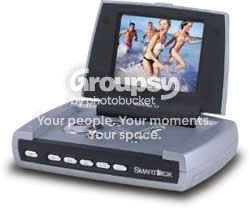
I have a Flashtrax which I think is out of production now but I'm sure Epson make a couple of these, as do Canon. They'll probably cost more than a net book but they're much smaller and will fit in a jacket pocket.

This is what mine looks like...

smartdisk_flashtrax_xt1.jpg


You just plug your memory card into the slot and press a button and it copies everything across. It'll display my 20D's RAW images too.
 
Last edited:
Net book all the way.
I bought one it had elements 7 installed already so a little software for editing already to use, it has 250GB memory and it was only £187 from pc world. They are small easy to carry light for luggage and will be a great back up.

Think of it another way, tot up the total of buying 250GB of memory cards??

spike
 
A netbook just isn't powerful enough for proper processing, so I never bother (besides, who is sad enough to want to spend hours processing their shots while they're supposed to be on holiday?

I'd buy a Hyperdrive iPad (£149 without a HDD) then stick a 500GB hard drive inside for £41. That gives you 500GB of super-fast backup in a very light package with very long battery life - for less than £200.

Indeed, I so like the Hyperdrive iPad that I'm seriously thinking of selling my Hyperdrive UDMA.
 
Last edited:
That sounds really good. Will it display images? My flashtrax displays JPEG's and the embedded JPEG's in RAW's.
 
That sounds really good. Will it display images? My flashtrax displays JPEG's and the embedded JPEG's in RAW's.

Don't know, the previous version (UDMA) that I own does, so I would think this will also. I've never used it that function though.
 
I use a netbook with a 250gb HDD and also take an external drive if I think I may need it.
 
besides, who is sad enough to want to spend hours processing their shots while they're supposed to be on holiday?
I am :lol: :lol: :lol:

In fact I am sat in a pub right now and have just edited my 365 image for the day on my netbook, uploaded it to flickr and made my daily post to the TP thread for my 365, now I am replying to you :naughty: :razz: :naughty:

All of this possible with my netbook, last summer when I was seriously ill in hospital for the final 5 weeks I was in I used my netbook every date to edit some photos that had been sat on my HDD for months waiting to be edited, all possible because I used a netbook, but no I don't use it for in depth edits...

I believe there are also a fair number of the respected sports guys on here that utilise a netbook pitch side though I may be wrong...about the respected part :naughty:

Matt :exit:
 
As long as you respect the limitations of cheaper netbooks, then you soon realise you have a system for storing photos, taking a look at ones you may be worried about and might need to retake PLUS you can use wireless to do normal geeky stuff. The newer dual core ones could open up even more possibilities...
 
I bought one it had elements 7 installed already so a little software for editing already to use

I installed Lightroom on my 10" netbook. There's just about enough screen space to do the kind of editing and processing that I usually do. I've also got Gimp and Bibble 5 on there. And now you've just reminded me, Lo-Fi is going on there as well.

A netbook just isn't powerful enough for proper processing, so I never bother (besides, who is sad enough to want to spend hours processing their shots while they're supposed to be on holiday?

On holiday, no. Not unless I went out of my way to get a particular shot that I want to upload somewhere, and don't want to wait until I get back. And the advantage of having Lightroom, Gimp, Bibble, etc is that I don't have to put up with a photo that's underexposed, with lack of contrast and saturation, with a skewed horizon line, etc, etc. I can do basic fixes to get it as good as I can.
 
Back
Top