


- Messages
- 1,730
- Name
- Jenny
- Edit My Images
- Yes
I know there have been various threads about print problems but none seem to be the same as the problem I am experiencing.
I don't get many prints and I don't really know anything about printing, so I am really a bit of a beginner. I have been getting prints from Photobox and have read about the problems some people have been having with them. Yes, they are always rather dark so I usually lighten my images before uploading to Photobox. Mostly they don't come out too badly.
But, the problem I have had recently is with green/yellow photos coming out very muddy and not at all like they are on my screen. Other colours work fine.
I got a calibration print from Photobox, but it is difficult to compare light shining through an LCD screen with a printed copy. I think my monitor was a bit bright so I darkened it a bit.
Next I thought I would try the same photos from Snapfish as an experiement. They all came out fine except the green/yellow ones which again were very muddy. This leads me to believe I am doing something wrong with these images or I have a problem with my screen set up.
Here is an example....
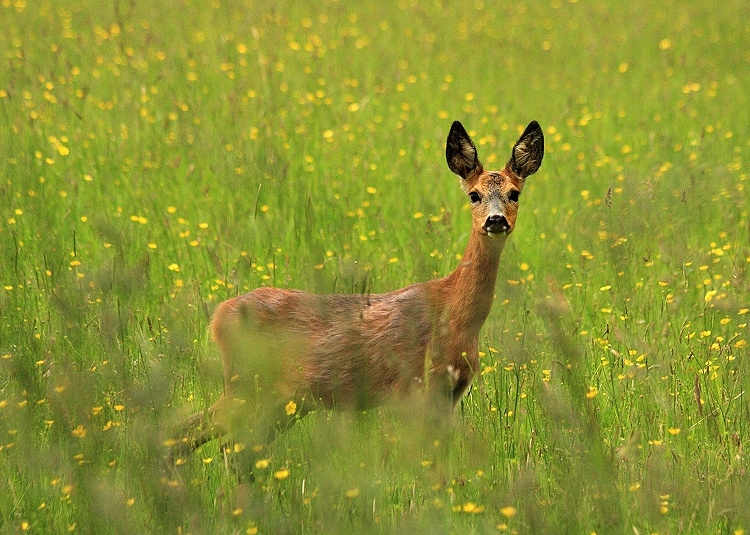
On my screen, this is a really vibrant bright green with lovely yellow buttercups. I wonder what everyone else sees? Both prints from Photobox and Snapfish have come out a very dull green and the buttercups are orange.
What am I doing wrong?
Jenny
I don't get many prints and I don't really know anything about printing, so I am really a bit of a beginner. I have been getting prints from Photobox and have read about the problems some people have been having with them. Yes, they are always rather dark so I usually lighten my images before uploading to Photobox. Mostly they don't come out too badly.
But, the problem I have had recently is with green/yellow photos coming out very muddy and not at all like they are on my screen. Other colours work fine.
I got a calibration print from Photobox, but it is difficult to compare light shining through an LCD screen with a printed copy. I think my monitor was a bit bright so I darkened it a bit.
Next I thought I would try the same photos from Snapfish as an experiement. They all came out fine except the green/yellow ones which again were very muddy. This leads me to believe I am doing something wrong with these images or I have a problem with my screen set up.
Here is an example....
On my screen, this is a really vibrant bright green with lovely yellow buttercups. I wonder what everyone else sees? Both prints from Photobox and Snapfish have come out a very dull green and the buttercups are orange.
What am I doing wrong?
Jenny


