

You are using an out of date browser. It may not display this or other websites correctly.
You should upgrade or use an alternative browser.
You should upgrade or use an alternative browser.
Printing
- Thread starter Barney
- Start date

- Messages
- 991
- Name
- Keith
- Edit My Images
- Yes
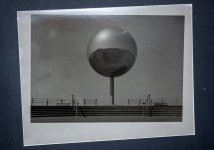
Are you not doing test strips? ie. 2, 2 , 4, 8 sec. which would equate to 2, 4, 8, 16 sec total exposure to get you in a stop of the desired exposure then additional tests at the grade you want to use and smaller exposure changes 4, 2, 2, 2. which would give 4, 6, 8, 10 seconds total .Second Print
First one was very dark and low contrast and suspect duff jessops paper
Second attempt is this one with multigrade
Only took six seconds and looks like I used a red filter, maybe 4 1/2 or 5. Is there anything obviously wrong?
View attachment 488389
With that print I would be stopping down further to give you more comfortable exposure times, lighten it up a bit overall , go up a grade, make sure you have 100% black and near to 100% paper reflectance, and perhaps burn in the steps and some of the orb. That is how I would print it but as ever make it look how you want not how people on the internet think it should look.
As you can guess from the above I am not a fan of detail in every zone.
OP

- Messages
- 4,315
- Name
- Wayne
- Edit My Images
- No
Are you not doing test strips? ie. 2, 2 , 4, 8 sec. which would equate to 2, 4, 8, 16 sec total exposure to get you in a stop of the desired exposure then additional tests at the grade you want to use and smaller exposure changes 4, 2, 2, 2. which would give 4, 6, 8, 10 seconds total .
With that print I would be stopping down further to give you more comfortable exposure times, lighten it up a bit overall , go up a grade, make sure you have 100% black and near to 100% paper reflectance, and perhaps burn in the steps and some of the orb. That is how I would print it but as ever make it look how you want not how people on the internet think it should look.
As you can guess from the above I am not a fan of detail in every zone.
Thanks for the advice Keith,
I think I left the knob thing on the lens wide open, so have not hit F11 at all, Still learning to drive the enlarger.
I will do more test strips later,
I cannot believe the gradation in the highlights from FP 4 film, miles better than a scan.
My test strips were 3 seconds to give 3, 6, 9, 12, 15, I didn't test for the paper grade.
I had been wondering how the flipping heck you could dodge and burn at those minimal exposure times.
Last edited:
- Messages
- 991
- Name
- Keith
- Edit My Images
- Yes
Which is one reason why you stop down the enlarging lens.had been wondering how the flipping heck you could dodge and burn at those minimal exposure times.
My test strips were 3 seconds to give 3, 6, 9, 12, 15, I didn't test for the paper grade.
Make the exposure for the whole strip X seconds, cover up the first inch or so expose for X seconds (the added exposure will be Xx2 ) cover up more paper and expose for Xx2 ( the added exposure will be X+X+(Xx2) = 4X ) .
With experience you will know for a given enlargement factor and approximate negative density where to start with your test strips, you will also get a feel for how the prints 'dry down' , it will become easier. I had my home darkroom for about ten years and learned these things, I have not had a darkroom for twelve years and counting so what once came almost without thinking would take a bit of practice to get in the flow again.
I am sure you will get there sooner than most given how you have taken to new formats and making up your own developers etc.
OP
- Messages
- 4,315
- Name
- Wayne
- Edit My Images
- No
Thanks for trying to help Keith, its appreciated.Which is one reason why you stop down the enlarging lens.
Make the exposure for the whole strip X seconds, cover up the first inch or so expose for X seconds (the added exposure will be Xx2 ) cover up more paper and expose for Xx2 ( the added exposure will be X+X+(Xx2) = 4X ) .
With experience you will know for a given enlargement factor and approximate negative density where to start with your test strips, you will also get a feel for how the prints 'dry down' , it will become easier. I had my home darkroom for about ten years and learned these things, I have not had a darkroom for twelve years and counting so what once came almost without thinking would take a bit of practice to get in the flow again.
I am sure you will get there sooner than most given how you have taken to new formats and making up your own developers etc.
So Hypothetically, I exposed at F2.8 for four seconds, inadvertently rather than F11, is there a simple equation to get me from f 2.8 to f 11 ? in seconds based on the four seconds initial exposure
- Messages
- 12,496
- Edit My Images
- No
A stop change doubles or halves the exposure.Thanks for trying to help Keith, its appreciated.
So Hypothetically, I exposed at F2.8 for four seconds, inadvertently rather than F11, is there a simple equation to get me from f 2.8 to f 11 ? in seconds based on the four seconds initial exposure
f2.8 to f11 is four stops: f4; f5.6; f8, f11 - so four seconds becomes 8; 16; 32; 64 seconds.
OP
- Messages
- 4,315
- Name
- Wayne
- Edit My Images
- No
Thanks for confirming that Andrew, that was my calculation but was not sure if the inverse square law may have had an effect somehowA stop change doubles or halves the exposure.
f2.8 to f11 is four stops: f4; f5.6; f8, f11 - so four seconds becomes 8; 16; 32; 64 seconds.
OP
- Messages
- 4,315
- Name
- Wayne
- Edit My Images
- No
So only when changing paper size?Inverse square applies when you move the head up and down the column. You get the same amount of light, but spread out more, so dimmer. Like a touch beam is brighter one inch from a wall than it is at 50 feet.

StephenM
I know a Blithering Idiot
- Messages
- 5,753
- Name
- Stephen
- Edit My Images
- Yes
Yes, if that's the only reason you project a larger or smaller image.
If, like many people, you want to fill the same size sheet with only part of the image, then that requires changing the degree of enlargement - which is what happens when you move the head
If, like many people, you want to fill the same size sheet with only part of the image, then that requires changing the degree of enlargement - which is what happens when you move the head
OP
- Messages
- 4,315
- Name
- Wayne
- Edit My Images
- No
Yes, if that's the only reason you project a larger or smaller image.
If, like many people, you want to fill the same size sheet with only part of the image, then that requires changing the degree of enlargement - which is what happens when you move the head
There is a scale on the column which should make calculations easier, what is the calculation for raising/lowering by 100mm for a known correct exposure?
StephenM
I know a Blithering Idiot
- Messages
- 5,753
- Name
- Stephen
- Edit My Images
- Yes
An enlarger is the same as a camera: it's just in reverse. You have a subject (the negative), a lens and a film plane (the printing paper). The calculations are the same as exposure corrections for close ups in principle. That means the lens focal length matters. And 100mm in a 1000mm basic distance is less significant than 100mm in a 50mm basic distance.
Play around with simple trigonometry and geometry to see how it hangs together- you'll learn more that way than if I give a simple answer.
See one of the appendices in my book.
Play around with simple trigonometry and geometry to see how it hangs together- you'll learn more that way than if I give a simple answer.
See one of the appendices in my book.