


- Messages
- 2,167
- Name
- Lynda
- Edit My Images
- Yes
Hi, sorry to be a pain, but I'm having a real problem setting up twin monitors. 
My graphics card is a 1 GB ATI Radeon HD 5450
There is one port for a monitor at the back of the computer (I am trying to use an adaptor to convert this to two) BTW the computer was bought in November from Dell and I specifically told them what I needed with regards to the graphics card, so if they have given me the wrong thing please tell me.
I have two monitors with different max screen resolution:-
1 - Samsung TV/monitor 1680 x 1050
2 - Hannspree 1280 x 1024 (i think)
The idea was that I would use the lower res screen for all the tools etc, and the samsung for editing and viewing images.
I also have a Sony on standby but it's not a big screen.
I'm being a bit vague with the screen resolutions of the hannspree and the Sony because at the moment I can only get a duplicate on each screen. I can't split them so they can be used independantly, therefore when I check the screen properties, I'm not sure which one is giving me the reading.
I have tried changing the settings between 'duplicate displays', 'extend displays' and the 'show desktop on 1/2' but none seem to give the the required setting.
In fact when I used the show desktop on 1, I've lost everything on the second monitor bar the mouse pointer.
When I use the extend display setting
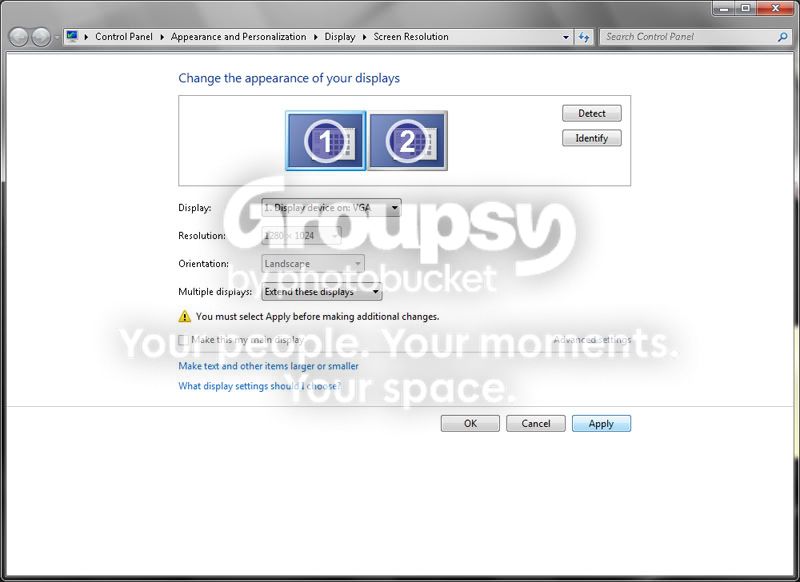
and try to identify screens it doesn't seem to recognise that there are two separate displays - just one big one.
I realise that I'm starting to talk nonsense now, so I'm going to walk away for 10 minutes and come back when my head is spinning less.
Any help would be appreciated.
Thank you
L
My graphics card is a 1 GB ATI Radeon HD 5450
There is one port for a monitor at the back of the computer (I am trying to use an adaptor to convert this to two) BTW the computer was bought in November from Dell and I specifically told them what I needed with regards to the graphics card, so if they have given me the wrong thing please tell me.
I have two monitors with different max screen resolution:-
1 - Samsung TV/monitor 1680 x 1050
2 - Hannspree 1280 x 1024 (i think)
The idea was that I would use the lower res screen for all the tools etc, and the samsung for editing and viewing images.
I also have a Sony on standby but it's not a big screen.
I'm being a bit vague with the screen resolutions of the hannspree and the Sony because at the moment I can only get a duplicate on each screen. I can't split them so they can be used independantly, therefore when I check the screen properties, I'm not sure which one is giving me the reading.
I have tried changing the settings between 'duplicate displays', 'extend displays' and the 'show desktop on 1/2' but none seem to give the the required setting.
In fact when I used the show desktop on 1, I've lost everything on the second monitor bar the mouse pointer.
When I use the extend display setting
and try to identify screens it doesn't seem to recognise that there are two separate displays - just one big one.
I realise that I'm starting to talk nonsense now, so I'm going to walk away for 10 minutes and come back when my head is spinning less.
Any help would be appreciated.
Thank you
L


