

RAW to jpg converter

With a Canon - DPP that came with your camera allows you to batch process.
 
naveen.nag said:
Does anybody anybody of a tool which converts raw files to jpg in bulk? If i want to convert large no of files to jpg before processing in case i choose not to process all of them.

I think that you need to review your workflow before doing anything else first.

Why are you converting RAW fIles just to see if they need processing?
 
DemiLion said:
I think that you need to review your workflow before doing anything else first.

Why are you converting RAW fIles just to see if they need processing?

Agree.
If not, why not just shoot in jpeg?
 
andy_fozzy said:
Agree.
If not, why not just shoot in jpeg?

Valid question :)

When i am back from a vacaton or outing with friends, they ask me for a copy of pics. So i may not have processed it yet. And they prefer then jpg without all the processings. And i prefer to process it in my spare time.

Btw, what raw + jpg format, does anybody use that? What exactly is this?
 
RAW + JPG means you camera gives you both files - more card space taken up obviously is the main issue. The JPGs are whatever settings you camera applies automatically to each image. Most people this will be default settings but I believe you can edit the settings.
 
littlemonster said:
RAW + JPG means you camera gives you both files - more card space taken up obviously is the main issue. The JPGs are whatever settings you camera applies automatically to each image. Most people this will be default settings but I believe you can edit the settings.

So does that mean for every pic that i take, the camera creates 2 files? One raw and other jpg ?

Haven't tried this yet.
 
As already mentioned, you basically have 3 ways.
1) Process from RAW using DPP. It can be slow to convert lots of files.
2) RAW files contains JPEG preview. Depending on your camera, it can be a smaller and highly compressed pic. However, it is very fast to copy it out using IJFR. You can also use dcraw if you prefer to create batch file using command line.
3) Shoot RAW+JPEG. It will take up space, and slow down your continuous shooting.

I like to convert to JPEG during my trip so that I can look at photos in picasa. My netbook is slow, so (1) is out. I used to do (3), but I found it slows me down, so I am using option (2). The quality of the preview isn't bad, and they are of smaller size. I like IJFR for its ease of use, but I have been meaning to write a script to automate my conversion to reduce the steps I need to take during trips.
By the way, one downside I found with IJFR is that it sets JPG file time to the conversion time. I found another tool to set time to exif time. I can't remember the name of the top of my head.

I have been wondering if someone is doing something similar to me. Now if picasa has an option not to try to process RAW, that would help me a lot.
 
so I am using option (2). The quality of the preview isn't bad, and they are of smaller size. I like IJFR for its ease of use, but I have been meaning to write a script to automate my conversion to reduce the steps I need to take during trips.


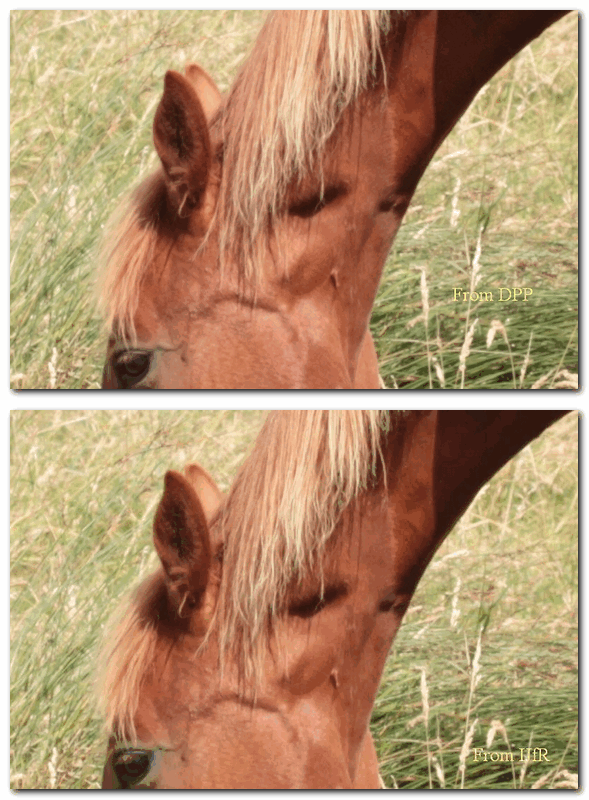
Er, the embedded jpegs from the 7D are identical in size and quality to the jpegs the camera would have produced if asked to do so. Here's are crops taken from an embedded jpeg and a proper jpeg produced using DPP's default settings. As you can see in the animation, there's virtually no difference..

DPP%20vs%20IJFR.gif
 
Last edited:
Er, the embedded jpegs from the 7D are identical in size and quality to the jpegs the camera would have produced if asked to do so. Here's are crops taken from an embedded jpeg and a proper jpeg produced using DPP's default settings. As you can see in the animation, there's virtually no difference..

DPP%20vs%20IJFR.gif

Looks as though the IJfR uses more compression, as you can see in the dark areas - they call it macroblocking I believe.
 
For 7D and 550D, the preview is the same resolution as RAW, but certainly not the best quality. I think it is the same as when you shoot Large size, and medium or low quality JPEG (can't remember exactly), which is decent enough for many purpose. Sorry that I was not clear. When I said 'smaller size' earlier, I meant file size. It also depends on camera. My epl2 has smaller resolution preview compared to RAW. And funnily, there is no choice to save JPEG at that resolution.
 
I seem to have misplaced the cd that came along with my camera. Could you pls let me know if i could download the DPP software from web? If so , where?
Canon website provides updates to existing s/w only - You are not supposed to lose the CD.

There are workarounds, but I'm not sure of the legality of these and I don't want to break any forum rules.
 
Back
Top