Recomend me a decent Graphics Card

Messages
298
Edit My Images
No
Im starting doing some paid work at the moment and whilst I try and figure out why im not getting the best contrast out of my monitor i am looking at replacing my graphics card. (Dell 2209WA is on its way !!!!)

I currently have an ATI Radeon X1950GT which im sure is OK, but when i got it it said it wasnt Vista compatible and even though i have found drivers for it, it isnt doing the job. There are areas i cant see on my screen and the colours look shot even with some ATI control panel tweaking.

Can anyone recomend a decent graphics card (try and get it under £100 please) that i can use.
i wont be doing much gaming, just something that will do me a job when editing large 5D2 RAW files in LR (i have 4GB of RAM already).

Ta
:D
 
Before you dig into your pocket the shell out for e new video card, can you borrow a monitor from a friend to see if your monitor is causing the problems??

A monitor is a lot cheaper than a video card

Tim
 
I was thinking of getting the dell 2209 WA, i hope a card isnt that more expensive.
I did just sell my other monitor and have realised that the issue i got must have been on that one aswel as it was fluke i saw the contrast problem somewhere other than my 2 monitors.
 
nVidia Geforce 9800GT with 1024mb memory from Aria.co.uk, delivered for just under £100 Quickcode: #33282

Should be able to cope with anything photoshop can throw at it standing on its head. :)
 
I'd have though the X1950GT should be easily man enough for the job of Photoshop. I only have an X800 in my PC and that's fine
 
aye that should handle most 2d without problems

i'd make sure you've got a monitor calibrator before getting a new card imho
 
aye that should handle most 2d without problems

i'd make sure you've got a monitor calibrator before getting a new card imho

Yeah, thought that earlier.
So, just bought a Spyder 2 Suite from Kerso. Going to try that. If no luck then its a new card, then its a new monitor.
Cheapest first, then getting more expensive.

Having said that, im convinced that the Graphics Card is to blame, whether it is users fault or the card is faulty but i can seem to get a decent difference between black and white.
 
I use oldish 3870 with out any problems .now you can get it under 100 or 50 even :)
re GPU in photos editing....it takes more RAM and CPU then GPU if any I would say ... unless you are in to 3d as well
 
I cant really see a new graphics card having any effect,

As far as i am aware for photo-editing , if a card can display 32bit colour, which any card can these days it should be fine if you spend £30 or £200.

Colour inacuracies will be user-error or a bad/uncalibrated screen.
 
Forget the new graphics card. Your current card is perfectly adequate for photoshop. I use a X1900 in a Mac pro and have no problems at all. What is the spec of the rest of the computer? Spend your money on other things.
 
Colour inacuracies will be user-error or a bad/uncalibrated screen.

I cant believe it to be the first one :lol: but it must be either the card, monitor or calibration.
Will let you know results when i calibrate it later in the week.

For anyone who has done it, what does it calibrate ?
The controls i have for the card are color, contrast, brightness and Gamma. Is that all the Spyder adjusts ??
 
All was going swimmingly until i read this :

make sure you've got a decent pcu, not like a standard Dell one

Ta for the link but for a noob in PC upgrades i need to back off from touching my PC with anything more than my index finger .... to turn it on (or stick a PCI-E card in) !!!
 
nVidia Geforce 9800GT from overclockers.. tis nooooiiiice
T'is bloody pointless.

Unless the OP is simply looking for a reason to justify purchasing a new graphics card there's only one upgrade I can see that would be worthwhile. And that's spending the £100 on something that might actually be of some use like a Pantone Huey Pro.
 
both I guess, I was doing a search for fetchmemytools, remembered play.com, saw this and wondered if it might suit him, I actually only have an onboard graphics card and thought for £50 I might have one as well.........but don't really know enough about them - do you Glitch?
 
FetchMeMyTools already has a perfectly adequate graphics card for his/her needs. The only upgrade necessary would be a hardware calibration device to take advantage of the current GPU and the new Dell monitor.

As for you, well that's a whole different question. Is your 'problem' one of inaccurate colours or just general poor graphics performance in Windows and/or whilst gaming?
 
Hi Glitch

No gaming, just photoshop. System works ok to be honest. It stumbles when I try to open 30 odd images. Also when I am working with mutiple layers I sometimes have to wait 10 seconds or so for heavy mathematical based photoshop filters to run their course.

Can live with it but for £50 it might be worth it

stew
 
Oh and also will that card allow me to conect two monitors?

stew
 
T'is bloody pointless.

Unless the OP is simply looking for a reason to justify purchasing a new graphics card there's only one upgrade I can see that would be worthwhile. And that's spending the £100 on something that might actually be of some use like a Pantone Huey Pro.

oooo get youuuuuu :suspect:
 
In 10 seconds really that long? no its not Trev, I can certainly live with it, but for £50 and I do sometimes edit 200 + images per day.
 
In 10 seconds really that long? no its not Trev, I can certainly live with it, but for £50 and I do sometimes edit 200 + images per day.


and those 10 secs are only on heavy scripts...

Try going through 1500 mx shots and getting them online in one night haha...

Spend the money.. I would :thumbs::nuts:
 
No gaming, just photoshop. System works ok to be honest. It stumbles when I try to open 30 odd images. Also when I am working with mutiple layers I sometimes have to wait 10 seconds or so for heavy mathematical based photoshop filters to run their course.
All you'd get from a new GPU would be a placebo effect. You'd think things were running faster but given that none of those processes have anything to do with the GPU you'd be better of spending your money elsewhere.

In order of actual use you've got an upgrade to your CPU, an upgrade to your RAM and then an upgrade to your hard-drive. But you might find a CPU upgrade slightly tricky so I'd definitely look into a faster hard-drive and then look into a RAM upgrade, providing it's within your budget.

Spend the money.. I would :thumbs::nuts:
But why?

What possible benefit, apart from being able to connect multiple monitors, would an upgrade to artona's GPU offer?
 
Hi Glitch

Hope we are ok taking over this thread, hopefully the info will help all

systemsetup.jpg


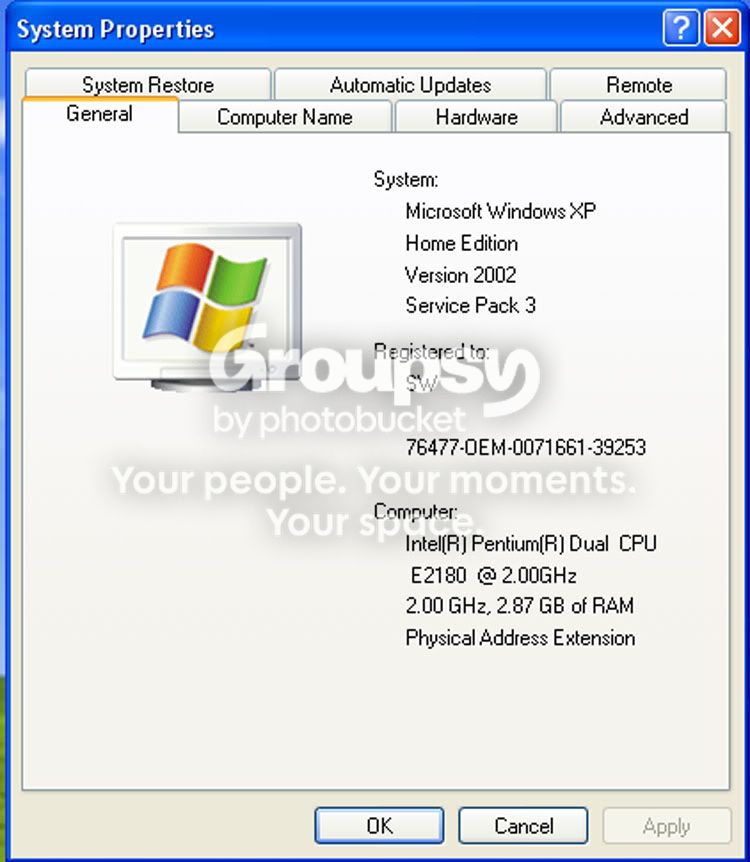
this is my system info at the moment. The PC came with vista which I replaced with XP home. I had a home serial number on a broken laptop. Its actually got 4 gigs of ram but only sees 3gigs, would xp pro see all 4?

I could manage a cpu upgrade no problem if you think its worth it

stew
 
Okay, you're running an E2180 which is an Intel s775 chip. You might be able to upgrade that to something a little more powerful, depending on your motherboard. The thing is, it's not exactly what you'd call a bad CPU. It's a bit weedy but hardly a total slowcoach. Any idea what motherboard you are running?

With regards to the RAM, both XP Home and XP Pro are 32-bit operating systems and as such can only address (i.e. use) about 4GB of RAM. But a lot of that will be reserved for system processes so you'll very rarely see anything above 3GB in a 32-bit system - hence the 2.87GB you see above.

The only way to take full advantage of your 4GB of RAM would be to change to a 64-bit OS like Vista, but you'd be well advised to wait until Windows 7 rears its head and go for that instead.

I would suggest your first priority would be to invest in a faster hard-drive as that's the easiest way to give your system a little extra power where it's needed. There's also a few free tweaks you can do to help things run a little more efficiently.

What you definitely don't need is a new graphics card, unless you have to run dual-screens.
 
Hi

Many thanks for that

Its an XFX motherboard but not sure what series

The hard drive is a Maxtor Diamondmax 22 500gigs

stew

stew
 
If you can find me the exact make/model of the motherboard I'll see if there's any possibility of getting some more juice out of your current CPU without breaking the bank.

Your hard-drive isn't by any means bad but they do have a tendency to slow up a little when dealing with multiple smaller files at the same time. Might be worth an upgrade but mileage may vary.
 
Hi Glitch

Hope we are ok taking over this thread, hopefully the info will help all

Doesnt bother me and i started it.
To my discussion to bed, im going to calibrate my monitor with a Spyder 2 Suite which will most likely sort my issue out,
then im going to get a new card (just becasue i can) as the one i got ive read up on and its not meant to be the best.
Then finally i might look into getting some different RAM. I got 4gB, but think its a bit low budget. Might go for some fast stuff.

OK, im off to read more of teh posts in this thread :clap:
 
then im going to get a new card (just becasue i can) as the one i got ive read up on and its not meant to be the best.
It honestly sounds like you're just looking for an excuse to upgrade your graphics card rather than looking to solve a problem you have. And that's fine; after all it's your money. But you don't need it and it won't make a blind bit of difference.

I've spent time on high-end professional workstations with the same GPU you're running and they're coping just fine.

Then finally i might look into getting some different RAM. I got 4gB, but think its a bit low budget. Might go for some fast stuff.
Different how?

What's your CPU, what motherboard are you running, what's the make/model/spec of your RAM and what were you intending to upgrade to?
 
Back
Top