Recomposing - How Do You Do It?

Messages
2,451
Name
Paul
Edit My Images
Yes
I have read a few times that you - focus & then recompose.

I have used the search for a tutorial & have used Google but i still cannot
get my head around it.

How do i recompose without losing my focal point?

When taking a portrait picture for example, i have set my focus point (red dot)
on the subjects eye but they still seem out of focus.

Surely if i focused on the eye & then changed the composition, the eye
would most certainly be OOF :shrug:

:help:
 
as long as youre not in AI SERVO (or have the focus moved to the * button) then once you semi press the shutter button and hold it it will retain the focus point until you either shoot or release.
 
I have AF only when AF-ON button is pressed, rather than also on pressing shutter release. While it's become second nature to 'squeeze' the camera with thumb and shutter finger when shooting, it means I can release the af-on button to then recompose.

Most cameras without a dedicated af-one, you can map ae button to do it iirc.
 
as long as youre not in AI SERVO (or have the focus moved to the * button) then once you semi press the shutter button and hold it it will retain the focus point until you either shoot or release.

It's better to have focus set to * as you can then focus and recompose without locking the exposure aswell
 
as long as youre not in AI SERVO (or have the focus moved to the * button) then once you semi press the shutter button and hold it it will retain the focus point until you either shoot or release.

:bonk: I have set my * button to focus & have been shooting in AI Servo.

So i guess for stationary stuff & portraits i should use One Shot AF & just
use the shutter button?

Is there a quick way to turn off the custom functions or is it a case of
scrolling through the menu?

Camera is a Canon 450d.
 
:bonk: I have set my * button to focus & have been shooting in AI Servo.

So i guess for stationary stuff & portraits i should use One Shot AF & just
use the shutter button?

Is there a quick way to turn off the custom functions or is it a case of
scrolling through the menu?

Camera is a Canon 450d.


Doubt that AI Servo is in your custom functions - On a 400D the AF mode change is the right hand one of the selection buttons on the back, probably similar on yours?
 
even on AI servo just press * to focus and remove your thumb, move the camera and press the shutter to take the photo

Thanks - i will leave it as it is & have a play tomorrow.
Also, can you adjust the focal length or it it just up,down,left,right
movements?

Doubt that AI Servo is in your custom functions - On a 400D the AF mode change is the right hand one of the selection buttons on the back, probably similar on yours?

Sorry, i didnt mean adjusting the AI servo mode just the * button :thumbs:
 
Surely if i focused on the eye & then changed the composition, the eye
would most certainly be OOF :shrug:
:help:

It depends on your setup, but that can be highly likely, have a read of:

http://visual-vacations.com/Photography/focus-recompose_sucks.htm

I read that recently when a friend sent it to me and thought to myself 'well, how the heck are you supposed to focus then - especially quickly?'.

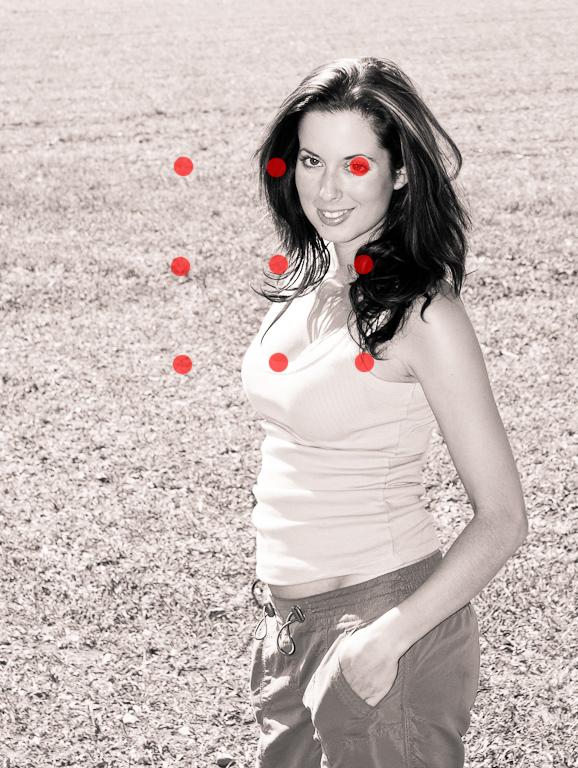
Now I knew some cameras had multiple AF points but didn't properly understand what that meant. I thought that was for auto focus in one mode and I also had 'spot focus' mode which used only the center point. I didn't even bother to look it up.

Then purely by accident I recently discovered that on my Sony A200 (and almost certainly on your Canon), I can very quickly and easily switch which to any of the 9 AF points my camera uses. I have had much better results since.

Here is a quick diagram showing what I mean. By setting 'local focus' (not sure what it is called on Canon' then using the rocker type button on the back of the camera I could quickly choose the top right focus point to focus on the models eyes and not needing to recompose before taking the photo (and thus avoiding the problems mentioned in the article). (Yes I know the points are quite central - this is a contrived example and the photo is cropped!).

af-diagram.jpg
 
You really only need to focus and recompose if the camera keep picking on points you don't want, or in another word, you want to control what you want to focus on. Or the other reason is the focusing points are not sensitive in the outer points, like Canon 30D which you focus using the center point.

The problem with focus and recompose can cause mis-focus if you are using a shallow DoF like F/1.4 the slight change of angle will change the distance enough to cause the shift of the DoF plane.
 
Thanks - i will leave it as it is & have a play tomorrow.
Also, can you adjust the focal length or it it just up,down,left,right
movements?

If you lens is parfocal (stays in focus when magnification/focal length is changed) you can change the focal length. Parfocal lenses are actually quite uncommon though.

The problem with focus and recompose can cause mis-focus if you are using a shallow DoF like F/1.4 the slight change of angle will change the distance enough to cause the shift of the DoF plane.

This is the probably reason your eyes you focus on are out of focus. Personally I prefer to use the appropriate AF point - it gets quite intuitive to switch them fast.
 
If you are going to be using an aperture between f/1.4 to about f/2.8 then ideally you do not want to be re-composing. If you want to use these apertures for portraiture then you will need a camera with lots of focal points (sadly my Nikon D40x only has 3 :() and your subject must remain perfectly still also.
 
Back
Top