

You are using an out of date browser. It may not display this or other websites correctly.
You should upgrade or use an alternative browser.
You should upgrade or use an alternative browser.
shooting towards a window.
- Thread starter bopins
- Start date

- Messages
- 6,473
- Name
- Ned
- Edit My Images
- Yes
Err, you can't really.
You either need to expose for the subject or expose for the window.
You could shoot multiple shots and do and HDR type thing, or you could use a -ve exposure brush on the window or you could try turning your camera's dynamic range thingy on to high. You could also try using flash.
You either need to expose for the subject or expose for the window.
You could shoot multiple shots and do and HDR type thing, or you could use a -ve exposure brush on the window or you could try turning your camera's dynamic range thingy on to high. You could also try using flash.
One technique worth trying is to set your camera to manual and expose for the window. Take a couple of test shots to get it right. Then use your flash to light the subject. You can do this with the on-board flash or, better still, with an external unit, if you've got one. You should be able to just use the flash in TTL mode to get the right fill. Doing this, though, you will either need to enable high-speed flash mode (on the external unit) or set up so that your shutter speed is below the camera's synch speed (probably around 1/200)


- Messages
- 6,481
- Name
- Tim
- Edit My Images
- No
Shoot at night.
I know that's a bit flippant, but time of day, weather conditions, the background through the window and position of sun will make a difference. Apart from that, flash or a reflector at least will help balance the light.
I suppose another question to ask is whether you do in fact want to shoot straight at the window, which ordinarily will leave you pretty much with a silhouette (or blown window), or to shoot sideways, across the window, taking advantage of the window light to illuminate your subject from one side, thus creating shape and depth. You can use a reflector inside the room for fill if you need to.
Bridal prep shots may give you some ideas. Try having a look through a few weddings by Aleksandras Babicius to see if you can find some examples. I'm sure there will be some - http://meninenuotrauka.lt/
More possible ideas - http://www.google.co.uk/images?um=1...=1&q=bride+window&aq=f&aqi=&aql=&oq=&gs_rfai= and here - http://www.google.co.uk/images?um=1...q=window+portrait&aq=f&aqi=&aql=&oq=&gs_rfai=
I know that's a bit flippant, but time of day, weather conditions, the background through the window and position of sun will make a difference. Apart from that, flash or a reflector at least will help balance the light.
I suppose another question to ask is whether you do in fact want to shoot straight at the window, which ordinarily will leave you pretty much with a silhouette (or blown window), or to shoot sideways, across the window, taking advantage of the window light to illuminate your subject from one side, thus creating shape and depth. You can use a reflector inside the room for fill if you need to.
Bridal prep shots may give you some ideas. Try having a look through a few weddings by Aleksandras Babicius to see if you can find some examples. I'm sure there will be some - http://meninenuotrauka.lt/
More possible ideas - http://www.google.co.uk/images?um=1...=1&q=bride+window&aq=f&aqi=&aql=&oq=&gs_rfai= and here - http://www.google.co.uk/images?um=1...q=window+portrait&aq=f&aqi=&aql=&oq=&gs_rfai=
A few different ways of doing it depending on what you want the outcome to be.
1) Meter for the subject and let the window blow. You can actually use this to good effect and end up with something that looks like it has been shot against a white background if you isolate your subject in the window frame.
2) Find a bit of middle ground.
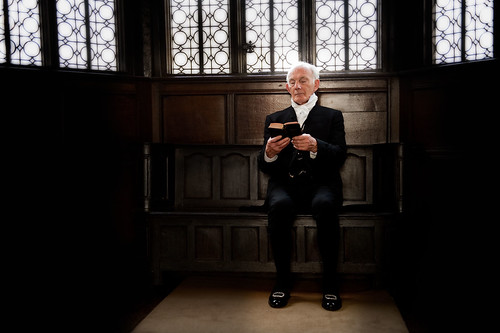
I wanted to keep the detail in the gent's dark suit here so I used a light meter and metered off the chest and fed that exposure into the camera on manual.
3) Make it a sillouette by exposing for the window and losing the subject.
4) Meter for the window and light your subject independantly using a flash as suggested.
Hope that helps.
1) Meter for the subject and let the window blow. You can actually use this to good effect and end up with something that looks like it has been shot against a white background if you isolate your subject in the window frame.
2) Find a bit of middle ground.
I wanted to keep the detail in the gent's dark suit here so I used a light meter and metered off the chest and fed that exposure into the camera on manual.
3) Make it a sillouette by exposing for the window and losing the subject.
4) Meter for the window and light your subject independantly using a flash as suggested.
Hope that helps.

- Messages
- 23,200
- Name
- Richard
- Edit My Images
- No
Shoot at night.
I know that's a bit flippant, but time of day, weather conditions, the background through the window and position of sun will make a difference. Apart from that, flash or a reflector at least will help balance the light.
I suppose another question to ask is whether you do in fact want to shoot straight at the window, which ordinarily will leave you pretty much with a silhouette (or blown window), or to shoot sideways, across the window, taking advantage of the window light to illuminate your subject from one side, thus creating shape and depth. You can use a reflector inside the room for fill if you need to.
Bridal prep shots may give you some ideas. Try having a look through a few weddings by Aleksandras Babicius to see if you can find some examples. I'm sure there will be some - http://meninenuotrauka.lt/
More possible ideas - http://www.google.co.uk/images?um=1...=1&q=bride+window&aq=f&aqi=&aql=&oq=&gs_rfai= and here - http://www.google.co.uk/images?um=1...q=window+portrait&aq=f&aqi=&aql=&oq=&gs_rfai=
Good reply

With flash, bounce-fill might be favourite I think, rather than direct. A simple bounce card would do that www.abetterbouncecard.com
But a silver reflector would be my first choice. Easy, nice light.

- Messages
- 23,200
- Name
- Richard
- Edit My Images
- No
thanks for replies so far.
could I use an nd filter to block some of the light?
Ben.
No, a neutral density filter is dark all over and is used to reduce the overall exposure. Basically, it wouldn't make any difference except make everything dark. What you need to do is reduce the brightness ratio so it comes within the dynamic range of the sensor. As Tim says jokingly, waiting till it's dark would do that, reducing the outside brightness so that it balances the interior light, but in the same way, using flash or a reflector would increase the brightess from inside, balancing the light outside.
As stated above, number one choice for me would be a reflector. Get one of those colapsable white/silver ones for under a tenner, or make one from a sheet of card 2x3ft or so, and stick kitchen foil on one side.
NB There's another type of filter sometimes referred to as ND, but it's really an ND Grad (graduated) fading from dark to clear. It's used for darking skies in landscape.
- Messages
- 175
- Name
- Andrew
- Edit My Images
- Yes
Having done a few outings with a wedding tog, his usual method is to blow the window. To you, it may look technically imperfect, but the white glow it produces can look quite pleasing to eye for those untainted by the technical knowledge. You could also bracket your shots with a quick burst of three and merge them later in photoshop.
- Messages
- 23,200
- Name
- Richard
- Edit My Images
- No
Having done a few outings with a wedding tog, his usual method is to blow the window. To you, it may look technically imperfect, but the white glow it produces can look quite pleasing to eye for those untainted by the technical knowledge. You could also bracket your shots with a quick burst of three and merge them later in photoshop.
Fair comment, it can look nice like that. However, you're at the mercy of the conditions - if it's overcast maybe, but and if the sun is belting straight in there it can be a pretty hopeless task.
With a reflector you can moderate the amount of fill-in by moving it back, or switching from silver to white.