

You are using an out of date browser. It may not display this or other websites correctly.
You should upgrade or use an alternative browser.
You should upgrade or use an alternative browser.
Shot in Raw by mistake.
- Thread starter kevinp
- Start date

- Messages
- 3,222
- Name
- Rhod
- Edit My Images
- Yes
You'll need some Raw converstion software to view and convert the images to jpeg. I'm pretty sure the camera can only do this when capturing the image. If you shoot with a Canon then the software should have come with your camera. Photoshop elements will do the job too.
Have a google for Raw convertors should be some free/trial options out there.
HTH
Have a google for Raw convertors should be some free/trial options out there.
HTH

Tringa
Numpty of the Day'
- Messages
- 6,218
- Name
- Dave
- Edit My Images
- Yes
Hello Kevin,
It is very likely that the software that came with your camera the will be able to handle the RAW files from your camera.
If not, Google for free RAW converters.
BTW shooting in RAW allows you to do more in PP than JPEG files.
Dave
It is very likely that the software that came with your camera the will be able to handle the RAW files from your camera.
If not, Google for free RAW converters.
BTW shooting in RAW allows you to do more in PP than JPEG files.
Dave


- Messages
- 3,959
- Name
- Adrian
- Edit My Images
- No
View NX2 is a good converter and free
http://nikonimglib.com/nvnx/index_en_eur.html#os-windows
http://nikonimglib.com/nvnx/index_en_eur.html#os-windows

- Messages
- 3,604
- Name
- John
- Edit My Images
- Yes
Let us know what camera you have and we can provide a definitive answer.
- Messages
- 3,604
- Name
- John
- Edit My Images
- Yes
You can view in Windows (assuming you're pc not mac) with the following -
http://www.microsoft.com/en-us/download/details.aspx?id=26829
Also, you should have the ViewNX software, with the cd that came with the camera. If not, go to the Nikon site and download.
Would also advise having a look at Lightroom 4, on Adobe's site. Free 30 day trial.
http://www.microsoft.com/en-us/download/details.aspx?id=26829
Also, you should have the ViewNX software, with the cd that came with the camera. If not, go to the Nikon site and download.
Would also advise having a look at Lightroom 4, on Adobe's site. Free 30 day trial.
You can view in Windows (assuming you're pc not mac) with the following -
http://www.microsoft.com/en-us/download/details.aspx?id=26829
Also, you should have the ViewNX software, with the cd that came with the camera. If not, go to the Nikon site and download.
Would also advise having a look at Lightroom 4, on Adobe's site. Free 30 day trial.
awesome, thanks for that, learned something new!
had been using just LR4 before

- Messages
- 3,295
- Name
- Andy
- Edit My Images
- No
If you've already got LR4, you've already got everything you need!
If you've already got LR4, you've already got everything you need!
its a little bit easier when you just want to quickly preview some pics, lol

Raymond Lin
I am Groot
- Messages
- 10,564
- Name
- Raymond
- Edit My Images
- No
No such thing as shooting in RAW by mistake, there is shooting in Jpeg by mistake though!
OP

- Messages
- 192
- Name
- kevin
- Edit My Images
- Yes
No such thing as shooting in RAW by mistake, there is shooting in Jpeg by mistake though!
Sorry what I meant was that I had set the camera in Raw when experementing with the buttons, without knowing what I had done
 , then when I came to veiw the photos on computer I realised what I had done.
Like I said before I am complete beginner to DLSRs and have a lot to learn but am learning slowly with the help from members on this forum.

Raymond Lin
I am Groot
- Messages
- 10,564
- Name
- Raymond
- Edit My Images
- No
Well, I am saying indirectly that you should always shoot in RAW.
Once you realise it's benefits, the extra step is so worth it.
Once you realise it's benefits, the extra step is so worth it.
OP
- Messages
- 192
- Name
- kevin
- Edit My Images
- Yes
Well, I am saying indirectly that you should always shoot in RAW.
Once you realise it's benefits, the extra step is so worth it.
Thanks Ive heard this before a lot of people advise shooting in raw.
Now that I have found out how to open them up will probably leave it in raw for now.
Thanks

- Messages
- 23,200
- Name
- Richard
- Edit My Images
- No
If you've already got LR4, you've already got everything you need!
^^^ This.
LR uses the standard Adobe Camera Raw (ACR) converter and should open raw files automatically.
- Messages
- 3,295
- Name
- Andy
- Edit My Images
- No
Well, I am saying indirectly that you should always shoot in RAW.
No, shoot in whatever suits you best. Raw isn't for everyone, in every situation. It has benefits for sure, but if you're happy with the images straight out of camera and have no interest in doing post processing, then stick to jpeg. By all means experiment, but don't feel compelled to just because all the magazines and people on here say you should!
^^^ This.
LR uses the standard Adobe Camera Raw (ACR) converter and should open raw files automatically.
Hmm, never tried that, will try that later today. Before I became an LR convert, I used office picture manager
 The codec pack helps open it in picture manager
You can view in Windows (assuming you're pc not mac) with the following -
http://www.microsoft.com/en-us/download/details.aspx?id=26829
And without trying to start a PC v Mac thread a mac just opens them without any additional software.
Not sure what you'd use with Linux mind

- Messages
- 2,839
- Name
- Chris
- Edit My Images
- Yes
And without trying to start a PC v Mac thread a mac just opens them without any additional software.
although that does rely on Apple having updated their OS to accept the particular raw format (safe with Nikon, Canon or Sony but not with other manufacturers)
When it does though it is great and makes working with raw files no slower than jpegs which is why to a Mac user there really is no point in using jpeg that I can see.

- Messages
- 1,224
- Name
- Adrian
- Edit My Images
- Yes
And without trying to start a PC v Mac thread a mac just opens them without any additional software.
Not sure what you'd use with Linux mind
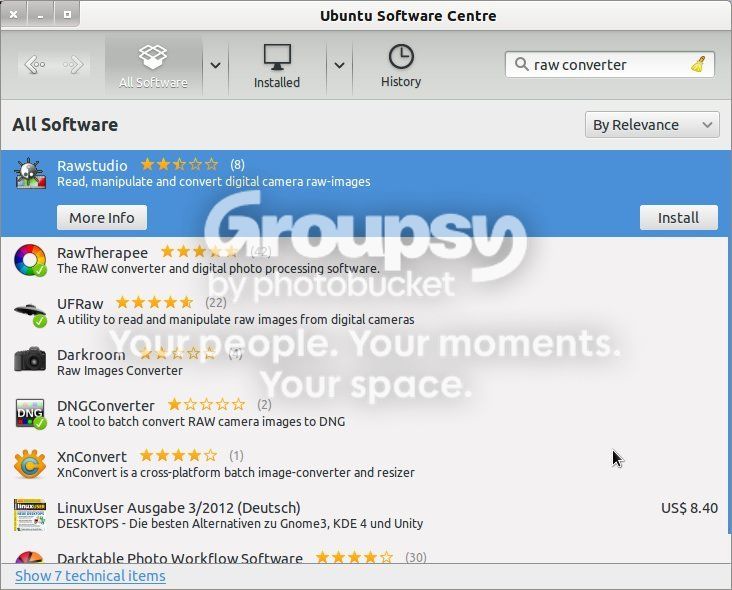
Well, in Ubuntu flavoured Linux, you open the Software Centre, browse by category (e.g. 'Graphics') or search (e.g. using 'raw converter' in the search box) for the software, then click on the product you want, click the install button and then wait a few seconds whilst it is installed


- Messages
- 202
- Name
- Russell
- Edit My Images
- Yes
ViewNX2 is great for Nikon users. LR4/ACR is obviously also a great bit of software. But when I want to really clean up and squeeze the detail out of a raw file (NEF in my case), I use Raw Photo Processor (free to download from this site). RPP is MAcOS only though.
Having said that, 90+% of my work is done in LR4 with some tweaking in PS CS5 if required. I use ViewNX2 if I quickly want to clean up, resize and convert a raw file to a TIFF or JPG but the file will still go into LR afterward. I use RPP on the infrequent occasions when I can't get the result I want from LR/PS.
Having said that, 90+% of my work is done in LR4 with some tweaking in PS CS5 if required. I use ViewNX2 if I quickly want to clean up, resize and convert a raw file to a TIFF or JPG but the file will still go into LR afterward. I use RPP on the infrequent occasions when I can't get the result I want from LR/PS.