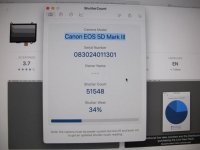
Thanks for trying , I don't have EOS utility on my iMac , Canon only go up to Mac OS13 , I have Mac OS Sequoia 15 .3 .2Found this…
“Turn on your camera and connect it to your computer using a USB cable.
Open the EOS Utility software on your computer.
Click on the “Camera Settings” tab.
In the “Camera Settings” window, click on the “Shutter Count” button.
The shutter count will be displayed in the “Shutter Count” window.”

Try here :-Thanks for trying , I don't have EOS utility on my iMac , Canon only go up to Mac OS13 , I have Mac OS Sequoia 15 .3 .2
Yay , That one worked but it is a payable service , ThanksTry here :-
Link