

You are using an out of date browser. It may not display this or other websites correctly.
You should upgrade or use an alternative browser.
You should upgrade or use an alternative browser.
Slow broadband
- Thread starter Ozei
- Start date

- Messages
- 7,842
- Name
- Mike
- Edit My Images
- No
Time for a phone-call and mind and get the dialect right


- Messages
- 9,438
- Name
- Andy
- Edit My Images
- Yes
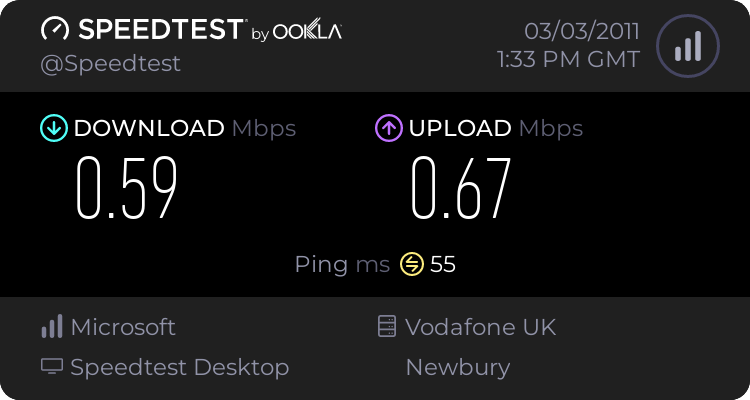
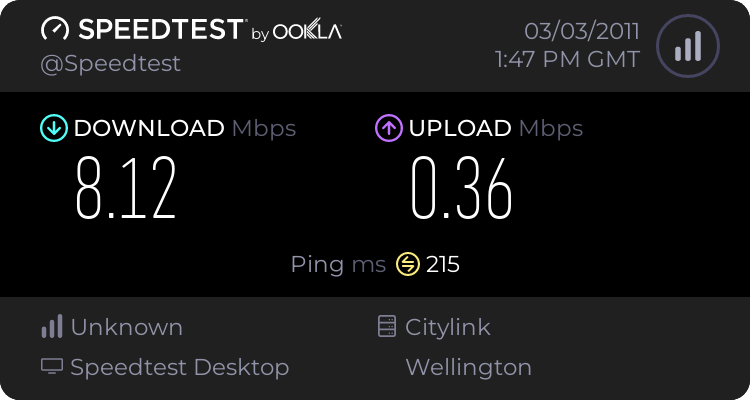
Typically, you want a server close to you as it is more likely to give you an accurate reading. Going to the Wellington server means your latencies will increase (so ping times will go up) but you'll probably get a reasonable indication of maximum speed.I've never understood what the difference is between whichever server you select for the test......
You might be surprised how many computers your packets go through to get to that server in Wellington. Any one could throttle bandwidth.
whats your distance from exchange (look up on samknows website), if you can log into your router whats your signal to noise ratio and attenuation like?
The exchange is less than a mile away Neil. Where are the s/n and attenuation figures on Netgear login?
The exchange is less than a mile away Neil. Where are the s/n and attenuation figures on Netgear login?
Line attenuation 38db down 10db up. Noise margin 12db down & up.

- Messages
- 30,364
- Name
- Neil
- Edit My Images
- No
Line attenuation 38db down 10db up. Noise margin 12db down & up.
attenuation seems okay, below 42 is a good start for 8mb.
noise is bang on recommended minimum from my cisco notes.
your router is plugged into the master BT socket and filters are plugged into all spare sockets?
Last edited:
Ouch. I'm on 56dB attenuation and I get 4Mbit. Are you sure Tiscali haven't throttled you?
I don't know what they (Tiscali/TalkTalk) might have done. I was getting 5.6Mb/s download speed a week or so ago (i.e. 10x what it is now).
- Messages
- 30,364
- Name
- Neil
- Edit My Images
- No
I don't know what they (Tiscali/TalkTalk) might have done. I was getting 5.6Mb/s download speed a week or so ago (i.e. 10x what it is now).
unless theres now a fault on your line then id say youve been throttled. do you have a "high" usage?
- Messages
- 1,975
- Edit My Images
- No
If nothings changed then its time to log a fault. If you can get to the master socket, use that to try and test the router only on the engineers test port inside it (remove the bottom half and there's a test socket there).
unless theres now a fault on your line then id say youve been throttled. do you have a "high" usage?
It can't be high usage - I don't download much and I only rarely use iPlayer or suchlike. How can I find out if they've throttled it?
- Messages
- 30,364
- Name
- Neil
- Edit My Images
- No
It can't be high usage - I don't download much and I only rarely use iPlayer or suchlike. How can I find out if they've throttled it?
it might be worth giving them a shout then, the noise ratio of 12dB is bang on the minimum recommended (higher being better, below 6dB you wont connect at all) so that may be related.
it might be worth giving them a shout then, the noise ratio of 12dB is bang on the minimum recommended (higher being better, below 6dB you wont connect at all) so that may be related.
 TalkTalk/Tiscali have the worst telephone support I've ever come across - and they have the nerve to charge for the calls!
I just checked usage on their website and it says 0% for March - but then it's only the 3rd of the month. I can't check the usage for February because they recently transferred accounts from Tiscali to TalkTalk and I can't access any earlier figures.
your router is plugged into the master BT socket and filters are plugged into all spare sockets?
Yes and yes.
- Messages
- 30,364
- Name
- Neil
- Edit My Images
- No
other things you could try before calling them..
stuff with motors and transformers (fans, fridges, microwaves etc) all interfer with ADSL. if your router is near anything like that try moving it away.
change out your microfilters if you have any spare
power off your router for 30 mins, i was once told by a telecoms engineer that this can help with connection issues as the exchange resets errors on down'd lines every 20 mins
stuff with motors and transformers (fans, fridges, microwaves etc) all interfer with ADSL. if your router is near anything like that try moving it away.
change out your microfilters if you have any spare
power off your router for 30 mins, i was once told by a telecoms engineer that this can help with connection issues as the exchange resets errors on down'd lines every 20 mins
other things you could try before calling them..
stuff with motors and transformers (fans, fridges, microwaves etc) all interfer with ADSL. if your router is near anything like that try moving it away.
change out your microfilters if you have any spare
power off your router for 30 mins, i was once told by a telecoms engineer that this can help with connection issues as the exchange resets errors on down'd lines every 20 mins
- Nothing with a motor is anywhere near the router.
- I have some spare filters so will try them.
- I'll try shutting down for half an hour.
Thanks everyone.

- Messages
- 572
- Name
- Jonathan
- Edit My Images
- Yes
other things you could try before calling them..
stuff with motors and transformers (fans, fridges, microwaves etc) all interfer with ADSL. if your router is near anything like that try moving it away.
change out your microfilters if you have any spare
power off your router for 30 mins, i was once told by a telecoms engineer that this can help with connection issues as the exchange resets errors on down'd lines every 20 mins
Just to expand on this a little more - additional connections i.e. for extra phones, sky boxes, fax machines can all affect your connection speed, try unplugging them (if present) and see if that helps.
Neil's advice is similar to what a telco engineer told me except he told me to unplug the phone cable from the BT socket (not turn of the router) for 30 mins to reset the connection back at the exchange. It may well be worth a try.
- Messages
- 30,364
- Name
- Neil
- Edit My Images
- No
Neil's advice is similar to what a telco engineer told me except he told me to unplug the phone cable from the BT socket (not turn of the router) for 30 mins to reset the connection back at the exchange. It may well be worth a try.
its good to know they werent blowing smoke up my ass

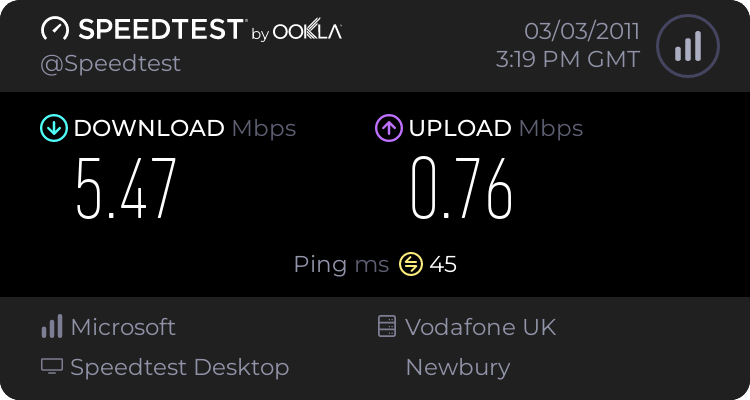
good old filters.. glad you got it sorted
Thanks Neil.
I wonder what's inside the duff one that could have gone wrong. Think I'll take it to bits - with a hammer.
- Messages
- 30,364
- Name
- Neil
- Edit My Images
- No
Thanks Neil.
I wonder what's inside the duff one that could have gone wrong. Think I'll take it to bits - with a hammer.
not much in there to be honest, sometimes they just break with no warning like anything running an electrical connection
