

You are using an out of date browser. It may not display this or other websites correctly.
You should upgrade or use an alternative browser.
You should upgrade or use an alternative browser.
Stuck on a problem, really need some help
- Thread starter ki_user
- Start date


- Messages
- 23,200
- Name
- Richard
- Edit My Images
- No
Sorry but I'm not after C&C I'm after technical help.
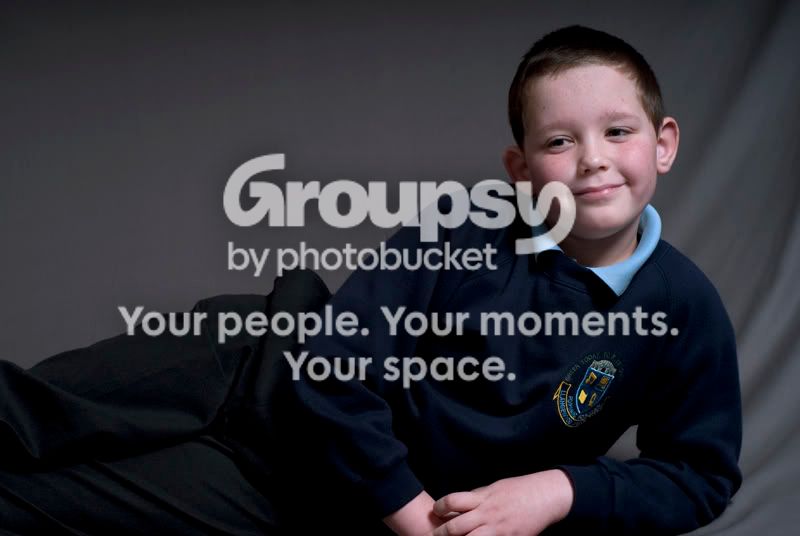
Move the light more to the front to stop the brightness fading so quickly, and increase exposure. But bearing in mind that black is black, lighter clothing will help enormously.

- Messages
- 3,614
- Name
- Luke
- Edit My Images
- Yes
strangely its happened to me a couple of times when doing some uniform shots but i found that if you boost the contrast/saturation up then the colours are really strong maybe thats whats happened. but i would also check your colour profiles in camera and in photoshop.


- Messages
- 4,581
- Name
- Mike
- Edit My Images
- No
Just looks under-exposed to me, the left side very under-exposed.
Sorry but I'm not after C&C I'm after technical help.
i think you,ll find that is technical help if you under expose your colours will look wrong :shrug:
OP

- Messages
- 2,675
- Name
- Lee
- Edit My Images
- Yes
i think you,ll find that is technical help if you under expose your colours will look wrong :shrug:
OK maybe I'm not explaining myself properly or maybe I just don't understand the answer.
The transition between different shades of the same colour seem a bit harsh.
I have used cut out to try and illustrate what I mean, where the face is made up of four colours rather than a smooth transition is what I am seeing on the clothes, but obviously not as bad.

- Messages
- 23,200
- Name
- Richard
- Edit My Images
- No
OK maybe I'm not explaining myself properly or maybe I just don't understand the answer.
The transition between different shades of the same colour seem a bit harsh.
I have used cut out to try and illustrate what I mean, where the face is made up of four colours rather than a smooth transition is what I am seeing on the clothes, but obviously not as bad.
<snip>
I think I'm understanding you. And it's still under-exposure

There is very little image data in the dark end of the tonal range, there is much, much more in the highlights. It doesn't run on a linear scale. The histogram is not linear.
This is the theory behind 'expose to the right' of the histogram which, mainly, drags the shadows out of the murky end and gives them some tonal separation. When you then darken them back down again in post processing, they still go dark obviously, but the tone separation is retained and you don't get the blocking effect you're seeing.
You obviously need some headroom on the highlight end to use the ETTR technique or you'll blow the brightest areas clean away, so that isn't always an ideal solution. The fundamental problem is to much dynamic range for the sensor to handle and the best way to moderate that is with lighting in a situation like yours - a simple reflector would make a huge difference. In situations where you can't moderate the light, HDR technqiue is a good solution but that invloves merging multiple exposures which makes moving subjects difficult.
OP
- Messages
- 2,675
- Name
- Lee
- Edit My Images
- Yes
That's fantastic, good explanation now I understand. Thank you very much for taking the time to reply so fully.
Just two more questions what is ETTR? and I have D-Range Optimizer, will this be making a difference to what I am experiencing? If so which setting should it be on, OFF, STANDARD or ADVANCED?
Just two more questions what is ETTR? and I have D-Range Optimizer, will this be making a difference to what I am experiencing? If so which setting should it be on, OFF, STANDARD or ADVANCED?
- Messages
- 23,200
- Name
- Richard
- Edit My Images
- No
That's fantastic, good explanation now I understand. Thank you very much for taking the time to reply so fully.
Just two more questions what is ETTR? and I have D-Range Optimizer, will this be making a difference to what I am experiencing? If so which setting should it be on, OFF, STANDARD or ADVANCED?
Expose To The Right
 Good tutorial here http://www.luminous-landscape.com/tutorials/expose-right.shtml
I'm not familar with Sony but I guess D-Range Optimiser might help a bit, if not much - it can be nothing more than a little bit of post processing done in camera, if that makes sense. However, the fundamental problem is that you don't have enough light on a dark subject. It is under-exposed, there is very little image data, and the way to adress that is by changing the image at point of capture, not trying to post process it and massage some life into an area of the image that is pretty much dead.
Have a read up on HDR technique (High Dynamic Range). It works a treat for static subjects (has to be static as it involves merging multiple exposures) and will help you get a handle on what's going on here.

- Messages
- 1,781
- Edit My Images
- No
Just two more questions what is ETTR?
Expose To The Right
OP
- Messages
- 2,675
- Name
- Lee
- Edit My Images
- Yes
Expose To The Right
I'm not familar with Sony but I guess D-Range Optimiser might help a bit, if not much - it can be nothing more than a little bit of post processing done in camera, if that makes sense. However, the fundamental problem is that you don't have enough light on a dark subject. It is under-exposed, there is very little image data, and the way to adress that is by changing the image at point of capture, not trying to post process it and massage some life into an area of the image that is pretty much dead.
Have a read up on HDR technique (High Dynamic Range). It works a treat for static subjects (has to be static as it involves merging multiple exposures) and will help you get a handle on what's going on here.
Spot on reply again, thanks very much.