The Amazing Sony A1/A7/A9/APS-C & Anything else welcome Mega Thread!

And the format, and the focal length and the distance to the subject etc. Yes, they all come into it but I didn't expect a carved in stone answer that stood for every instance I just wondered and apart from the number of shots taken there's the file size. Another factor is that I'm just a happy snapper and not taking panorama shots to meet a customers spec. I don't need a 2m print. The biggest prints I've had framed were A3 but when we redecorated I took them down and they never went back up and the biggest now fill an A4.

I do like zooming in looking around and seeing the detail but if I was doing a lot of panoramas I might not save them all as full sized files. At the moment I think the biggest panorama file I have is 70 odd mp. The few Brenzier shots I've done have been about the same as my panoramas, something between 6 or so and 20 or so with lenses in the 35 to 85mm range.

Usually landscape style panoramas are around 2-5 images. I think any brenzier style have been about 9/12 images. Night skies have been my biggest - I've been around 30 images for the big multi row 180 degree milky way arch shots.
 
I don’t worry about file size, my computer can handle stitching numerous large files, if you do ever get around to buying a new computer that should be one less thing for you to worry about ;)

Untill bloat catches up but hopefully I'll be ok for a while but these days getting 5 years out of anything seems too hopeful but we can dream :D It's not the money it's the hassle.

Usually landscape style panoramas are around 2-5 images. I think any brenzier style have been about 9/12 images. Night skies have been my biggest - I've been around 30 images for the big multi row 180 degree milky way arch shots.

The reason some of mine have been in the teens or over 20 is to avoid the long thin look. I was a bit surprised at the number of pictures I took the other day but it was just down to the number of panoramas.

When trying to stitch 20 odd dng's I got a message saying I'd exceeded the max size but I forget what it was. Switching to stitching jpeg got the size down and solved that. Googling tells me that doing larger panoramas is possible with psb but I've never even heard of that format. Anyway, there do seem to be some limits when using ps2026, Other pano software may have different limits. For me one limit is Mrs WW as there are limits to her patience but she is getting used to me saying I want to do a pano :D

As I'm thinking about sizes, what's the biggest print people have? As above, I used to have A3's but now just A4's and smaller.
 
Last edited:
Sure it wasn't PSD which is a Photoshop format.

Googling told me psb with a max of 4Exabytes. I've never heard of Exabytes before. Rephrasing and trying again got me the same plus psd at 2gb.

Googling psb got me this...

"A PSB file (Photoshop Big) is an Adobe Photoshop Large Document Format designed for massive images exceeding the 2GB or 30,000-pixel limit of standard PSD files. It supports files up to 4 exabytes and 300,000 pixels in width/height, making it ideal for high-resolution, multi-layered, large-scale prints."

I can't be sure but I think the message I got mentioned exceeding 300k x 300k limit. That was when trying to stitch dng's (because I was being lazy) and matches the psb limit as above. As above saving the dng's as jpeg's and stitching those went through fine, slow but fine. I don't know why that brought not just the file size but the dimensions down, the limit stated is dimensions but there must be a file size limit too? Who knows?

I've just checked and ps2026 does indeed include psb.
1773407415881.gif
 
Last edited:
My Sammy 45mm has arrived, I forgot how light it is. No issues with sharpness, looks every bit as good as I remember.

(Not sure how well these will look on direct upload)

Edit: slightly soft on here so you'll just have to take my word for it ;)

Screenshot 2026-03-13 at 14.28.50.jpgScreenshot 2026-03-13 at 14.28.58.jpgScreenshot 2026-03-13 at 14.29.07.jpgScreenshot 2026-03-13 at 14.30.10.jpgScreenshot 2026-03-13 at 14.30.31.jpg
Screenshot 2026-03-13 at 14.33.11.jpg
 
Looks nice. Looks to be about the same size as the Sony 28mm f2. Looks to be a nice alternative to a 50mm but as I have the Sony 40mm I think it's too close.
 
The version 4.00 firmware for the A1 has been out for 2 or 3 months now, has anyone heard of any major issues before I update?
 
I’ve just finally caved and picked up the 40G for my Cii… but something isn’t working as I’d hoped.

Is there a setting/mode where it can be auto aperture when the lens ring is on A and then set the aperture when I move the lens ring?

Not sure I’m explaining that well… I want the lens to handle like an X100 if I can?
 
I’ve just finally caved and picked up the 40G for my Cii… but something isn’t working as I’d hoped.

Is there a setting/mode where it can be auto aperture when the lens ring is on A and then set the aperture when I move the lens ring?

Not sure I’m explaining that well… I want the lens to handle like an X100 if I can?
I'm not sure I understand, on the lens aperture ring you have A, which is Auto meaning that you control aperture by the camera dial (or auto if set to Auto or P mode), and then as soon as you move the aperture ring on the lens away from A (so f2.8, f4 etc) you are controlling the aperture from the lens ring. AFAIK this is how all modern cameras/lenses work that have aperture rings on the lens.
 
I’ve just finally caved and picked up the 40G for my Cii… but something isn’t working as I’d hoped.

Is there a setting/mode where it can be auto aperture when the lens ring is on A and then set the aperture when I move the lens ring?

Not sure I’m explaining that well… I want the lens to handle like an X100 if I can?

Yep. Move the SPAM dial to S. Now the Aperture will be chosen by the camera. You set the shutter speed That’s how on Fuji X100 it works. But no SPAM dial
 
I'm not sure I understand, on the lens aperture ring you have A, which is Auto meaning that you control aperture by the camera dial (or auto if set to Auto or P mode), and then as soon as you move the aperture ring on the lens away from A (so f2.8, f4 etc) you are controlling the aperture from the lens ring

Yes, this is how I expected it to work. But e.g. if I have the camera in P or Auto and turn the aperture ring to f8 say …it ignores the aperture ring and shoots at whatever it wants. If I put the camera in A/M then the aperture ring will select aperture (as you’d expect).


Yep. Move the SPAM dial to S. Now the Aperture will be chosen by the camera. You set the shutter speed That’s how on Fuji X100 it works. But no SPAM dial

This is the problem - likewise if I select S, choose a shutter. The camera picks the aperture regardless of of the ring position.

The behaviour I want is when I set the aperture ring I get that aperture - is this possible?
 
Last edited:
Yes, this is how I expected it to work. But e.g. if I have the camera in P or Auto and turn the aperture ring to f8 say …it ignores the aperture ring and shoots at whatever it wants. If I put the camera in A/M then the aperture ring will select aperture (as you’d expect).


This is the problem - likewise if I select S, choose a shutter. The camera picks the aperture regardless of of the ring position.

The behaviour I want is when I set the aperture ring I get that aperture - is this possible?

Sorry. Misunderstood. Yep. You can only select the Aperture in Manual or Aperture Priority mode.
 
I’ve just finally caved and picked up the 40G for my Cii… but something isn’t working as I’d hoped.

Is there a setting/mode where it can be auto aperture when the lens ring is on A and then set the aperture when I move the lens ring?

Not sure I’m explaining that well… I want the lens to handle like an X100 if I can?

Once you get used to it I hope you enjoy the lens. It's a favourite of mine.
 
Sorry. Misunderstood. Yep. You can only select the Aperture in Manual or Aperture Priority mode.

Ah that’s a real shame, it’s one of the reasons I wanted the lens. Never occurred to me the camera would ignore the aperture ring and treat the f stops the same as A.

I mean is it not A for auto? When it’s anything but that.
 
Ah that’s a real shame, it’s one of the reasons I wanted the lens. Never occurred to me the camera would ignore the aperture ring and treat the f stops the same as A.

I mean is it not A for auto? When it’s anything but that.

I'm probably missing something here but the dial has "A" for Aperture Priority and "Auto" for... er... Auto :D They are definitely different modes. I use Aperture priority plus auto ISO until the light falls to the point that the shutter speed is too low and then I switch to manual and dial in the aperture and shutter settings I want again with auto ISO.

I never use Auto or P modes.
 
As Toby said above. If you select A on the lens you change aperture with the controls on the camera. Yes?

It's a while since I had an X100 but as I remember there's no aperture or shutter priority as such, you just set the reverent dial to "A" depending if you want aperture or shutter priority or set each dial, both aperture and shutter, for manual mode. That's not how the Sony's work. You select Aperture, Shutter, Manual or Auto on the mode dial and this causes dials to behave differently or not work. I hope/think you'll get used to it.
 
Last edited:
On an X100 A on the lens ring is auto aperture, or you set a stop.
Yes that’s the same on Sony, A on the lens ring stands for auto, BUT if you have the camera set to aperture priority or manual mode it overrides the Auto setting and you still have manual control of the aperture but instead of controlling it from the lens you control it from the camera dial.

I believe most cameras work this way, however Fuji may behave differently because most don’t have a mode button and so each of the three exposure parameters are either manually set or auto, they don’t for example have a manual mode or aperture priority mode which overrides the Auto setting of the aperture ring.

I hope this makes sense.
 
Last edited:
Yes it makes sense I guess the A setting IS doing what I want, I just wanted the stops to always set the f stop.

I’ll just have to turn the mode dial as well for that and get used to looking in two places to check the camera is actually set how I want.
 
Yes it makes sense I guess the A setting IS doing what I want, I just wanted the stops to always set the f stop.

I’ll just have to turn the mode dial as well for that and get used to looking in two places to check the camera is actually set how I want.
99.9% of the time I’m in aperture priority or manual mode and therefore the aperture ring on the lens controls the aperture f stop. 0.1% of the time I’ll use shutter priority in which case aperture is set automatically by the camera.

Auto mode and P mode should be avoided at all times ;)
 
Yes, I’m normally in A or S but sometimes I just quickly want auto to snap my son in action.

There is a very simple solution to getting a quick photo rather than using full auto.

Aperture Priority
Auto I.S.O
Auto W.B
Set minimum shutter speed to 1/250
Adjust aperture to suit either on the lens or set the lens to A and use the aperture wheel on the camera and use the exposure compensation dial.

Alternatively

Manual
Auto I.S.O
Auto W.B
Set minimum shutter speed to 1/250
Use the shutter speed and aperture wheels to adjust as needed.

Either will produce much better photographs than using full auto and is just as fast, in all honesty.
 
Last edited:
There is a very simple solution to getting a quick photo rather than using full auto.

Aperture Priority
Auto I.S.O
Auto W.B
Set minimum shutter speed to 1/250
Adjust aperture to suit either on the lens or set the lens to A and use the aperture wheel on the camera and use the exposure compensation dial.


I tend to do something like this, though actually generally toggle through auto-iso min SS between normal for, well, normal shooting and then “Faster” to catch my son.

Typing that out makes me think I wonder if I can get that toggle on a button (or if it has to cycle all values) I shall investigate (I do it via the Fn quick menu thing just now).

It is kinda surprising given all the customisation Sony offer i can’t have the aperture ring be an overide. Sadly I’m no longer in a past role I had where I was able to make firmware requests of Sony.
 
I tend to do something like this, though actually generally toggle through auto-iso min SS between normal for, well, normal shooting and then “Faster” to catch my son.

Typing that out makes me think I wonder if I can get that toggle on a button (or if it has to cycle all values) I shall investigate (I do it via the Fn quick menu thing just now).

It is kinda surprising given all the customisation Sony offer i can’t have the aperture ring be an overide. Sadly I’m no longer in a past role I had where I was able to make firmware requests of Sony.
It’s Fuji that’s the outlier here rather than Sony.

Full auto is full auto why would they allow to change the aperture?

Auto is a very poor option for photographing a fast moving kid as shutter speed can drop well below what is needed.
 
Last edited:
I tend to do something like this, though actually generally toggle through auto-iso min SS between normal for, well, normal shooting and then “Faster” to catch my son.

Typing that out makes me think I wonder if I can get that toggle on a button (or if it has to cycle all values) I shall investigate (I do it via the Fn quick menu thing just now).

It is kinda surprising given all the customisation Sony offer i can’t have the aperture ring be an overide. Sadly I’m no longer in a past role I had where I was able to make firmware requests of Sony.
TBH it's not really, if you want everything auto except the aperture this is exactly what aperture priority is (assming you have auto ISO set). Auto is full auto as the name suggests, you don't have control of anything.

Am I missing something here?
 
My Sammy 45mm has arrived, I forgot how light it is. No issues with sharpness, looks every bit as good as I remember.

(Not sure how well these will look on direct upload)

Edit: slightly soft on here so you'll just have to take my word for it ;)

View attachment 476832View attachment 476833View attachment 476834View attachment 476835View attachment 476836
View attachment 476838
I had a play with the Samy yesterday using the A7R5 and the lens is faulty it seems. In AFC the lens is continually struggling or not focussing at all, just hunting. Tried AFS and AFA and it would focus, but very slow and this was on a wide variety of subjects and contrasts. I cleaned the contacts on the lens with some IPA and left overnight.

Tried again this morning and the same as above so tried the lens on the A6700 and it was worse. So will need to contact Forddes and see what they say.

When the lens did focus the sharpness was excellent on the A7R5.
 
I had a play with the Samy yesterday using the A7R5 and the lens is faulty it seems. In AFC the lens is continually struggling or not focussing at all, just hunting. Tried AFS and AFA and it would focus, but very slow and this was on a wide variety of subjects and contrasts. I cleaned the contacts on the lens with some IPA and left overnight.

Tried again this morning and the same as above so tried the lens on the A6700 and it was worse. So will need to contact Forddes and see what they say.

When the lens did focus the sharpness was excellent on the A7R5.
That's a shame. One thing before you return it, I wonder if there's an update for the lens as the A7R5 is newer than my A1 and IIRC some lenses needed an update for the newer cameras. I believe the A6700 is relatively new too.
 
That's a shame. One thing before you return it, I wonder if there's an update for the lens as the A7R5 is newer than my A1 and IIRC some lenses needed an update for the newer cameras. I believe the A6700 is relatively new too.
Thanks for the reply. How would you update the lens firmware as there's no USB port on the lens?
 
Thanks for the reply. How would you update the lens firmware as there's no USB port on the lens?
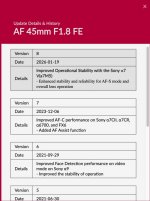
Further to my posts above, the 45mm did indeed have a firmware update for the A6700, but I can't see anything regarding the A7RV.

Screenshot 2026-03-15 at 14.14.51.jpg


I still have a samyang dock so I'll dig it out later/tomorrow and see what version my 45mm shipped with as I'd imagine it will be the same as yours. In the meantime Sony cameras do show you what version both the camera and lens is, however I don't know if that's just Sony lenses or whether it also shows third party lens firmware versions. Again, this is something I cna check later.

.
 
I had a play with the Samy yesterday using the A7R5 and the lens is faulty it seems. In AFC the lens is continually struggling or not focussing at all, just hunting. Tried AFS and AFA and it would focus, but very slow and this was on a wide variety of subjects and contrasts. I cleaned the contacts on the lens with some IPA and left overnight.

Tried again this morning and the same as above so tried the lens on the A6700 and it was worse. So will need to contact Forddes and see what they say.

When the lens did focus the sharpness was excellent on the A7R5.
Sounds like you need to update the firmware on the lens had the same problem with every Samyang lens.
 
@Swanseajack I've checked my Sammy 45mm and it still had version 2.0 on so I've updated it to version 8.0, the latest version. Maybe worth trying if you've got the Sammy dock?
 
The version 4.00 firmware for the A1 has been out for 2 or 3 months now, has anyone heard of any major issues before I update?
Well I've taken the plunge and so far not noticed any issues :banana:
 
Just in case anyone is interested. A review of the Sony mount Voigtlander 28mm f2 apo.


Vignetting seems to be the only real issue.
 
Is anyone using the 28-70 f/2?

About to pull the trigger on one here but have seen a few reviews mention issues with flare, has anyone got firsthand of experience of this?
 
You need the samyang dock :facepalm:

Sounds like you need to update the firmware on the lens had the same problem with every Samyang lens.

@Swanseajack I've checked my Sammy 45mm and it still had version 2.0 on so I've updated it to version 8.0, the latest version. Maybe worth trying if you've got the Sammy dock?

Apologies for the late replies but I have been unable to log onto this website since Sunday due to not receiving verification codes or they were coming too late and they were timing out. Reset my password so hopefully I will be okay now. I have also notified Admin.

I decided to return the Sammy for a refund and I have picked up the Zeiss 55mm lens instead. I have voucher codes from Sony after buying into the system and the 55mm lens lets me have £100 cash back, so the lens will only owe me £349, so it seemed a no brainer for me.

Initial play and the 55mm has very nice rendering and seem's super sharp.
 
Last edited:
Just in case anyone is interested. A review of the Sony mount Voigtlander 28mm f2 apo.


Vignetting seems to be the only real issue.

I bought one at the end of February out of the first stock to hit the shelves. I haven't been concerned by any Vignetting when running the files through LR. The design is different to the 15mm Voigtlander I currently own and the 35mm & 50mm I owned when I had my Nikon Z cameras.
 
Apologies for the late replies but I have been unable to log onto this website since Sunday due to not receiving verification codes or they were coming too late and they were timing out. Reset my password so hopefully I will be okay now. I have also notified Admin.

I decided to return the Sammy for a refund and I have picked up the Zeiss 55mm lens instead. I have voucher codes from Sony after buying into the system and the 55mm lens lets me have £100 cash back, so the lens will only owe me £349, so it seemed a no brainer for me.

Initial play and the 55mm has very nice rendering and seem's super sharp.

The 55 is a very sharp, neutral lens, quick and accurate focussing. Weaknesses are CA, 55mm focal length often being just a little bit longer than wanted and the rendering being a little busy at times. Enjoy.
 
Back
Top