The Amazing Sony A1/A7/A9/APS-C & Anything else welcome Mega Thread!

Oh also shoot some gradients, if you're in a larger gamut with same low bit depth (8bit in a jpeg most likely) banding is more likely (do some searching around AdobeRGB banding and see wha you find).


So to summarise, "is this what you'd expect?" - yes, shooting a scene with limited colour range, and/or viewing on the web/lower quality displays.

Note that for many people the best display they own, and most likely to view pictures, will be their iPhone. Since about 2016 (iPhones 7) they've covered the whole P3 colourspace. But most web content is sRGB (though if you export in P3 they'll show it, the difference is most obvious in reds and oranges).
 
Last edited:
Oh also shoot some gradients, if you're in a larger gamut with same low bit depth (8bit in a jpeg most likely) banding is more likely (do some searching around AdobeRGB banding and see wha you find).


So to summarise, "is this what you'd expect?" - yes, shooting a scene with limited colour range, and/or viewing on the web/lower quality displays.

Note that for many people the best display they own, and most likely to view pictures, will be their iPhone. Since about 2016 (iPhones 7) they've covered the whole P3 colourspace. But most web content is sRGB (though if you export in P3 they'll show it, the difference is most obvious in reds and oranges).
Thanks. I think it was more that Adobe profiles in LR look very different to Sony ones etc that I expected hues to be different, for example in the Adobe profiles reds are more ‘cherry red’ compared to Sony’s which are more of an orangey red.

And yes my screen is only P3 not full colour gamut, but as I said I was expected to see different hues as opposed to a larger colour range (y)
 
Depends how you're viewing it and what you're taking pictures of.

They're different gamuts, do you have a good enough monitor that you'd expect to be able to tell the difference (and do you know if it's well calibrated)?

Even on a good monitor, you're likely viewing DCI-P3 at best, this can cover sRGB but not all of Adobe RGB.
View attachment 440142

First pic of the difference I found to illustrate. From that you'll also note the difference should be most pronounced in the greens. Shoot a scene with lots of green variation in it and see how you get on?
Of course, the CIE 1931background colour on the graphic will be modified by the monitor you are viewing the graphic on - so even if you are viewing on a poor laptop screen with < 100% sRGB, you will still see something there, despite it being outside of the sRGB labelled area...
 
OK, I've given up on Sony JPEGs, I can't get them to look nice. This example demonstrates well what I dislike about Sony colours SOOC, here you can see my default raw preset on the left and the SOOC JPEG on the right, look how there's a sort of green hue across everything on the JPEG. It doesn't seem to matter which "Creative Look" I choose, whether it be standard, neutral etc or if I choose a picture profile instead it always seems to have it. The only exception is VV2 but that makes all the colours look hideous. If anyone ever figures out how to get rid of this green 'cast' please let me know.

What I've also discovered is that if you import the jpeg into LR and export it without making any changes the file looks different to the original jpeg :thinking:


Screenshot 2024-12-03 at 13.23.18 by Toby Gunnee, on Flickr
 
Last edited:
What I've also discovered is that if you import the jpeg into LR and export it without making any changes the file looks different to the original jpeg :thinking:

Thats understandable, there are a whole host of settings for JPEG crompression and we have no idea what teh Sony camera is using , but on importation into Lightroom there may well be some intepolation going on of the Sony JPG file, and then Lightroom exports its using its own settings - IMO perfectly normal

Edit and many of us could have told you that you were going to watse your time trying to get Sony JPGs to look like what you want, history tells us that the lab coat is just too picky.
 
Last edited:
Thats understandable, there are a whole host of settings for JPEG crompression and we have no idea what teh Sony camera is using , but on importation into Lightroom there may well be some intepolation going on of the Sony JPG file, and then Lightroom exports its using its own settings - IMO perfectly normal
Yeah makes sense, I just never thought about it before and assumed that LR imported as is if no settings were applied (y)

Edit and many of us could have told you that you were going to watse your time trying to get Sony JPGs to look like what you want, history tells us that the lab coat is just too picky.
I wouldn't say "too" picky, I just know what I like and what I don't like :p To be fair it has been the achilles heal of Sony over the years (y)
 
So I've been wanting this lens for about 3 years. I rented one 2 years ago and it was amazing, so after this I defo knew I wanted it :)
Today it arrived and this is some sample first outing images taken using it - it looks good !

I'll be using it to photograph my sons footy team matches, his karting and airshows.


Sony 200-600


54181453030_7522331354_b.jpg


54181453035_50876c8b6c_b.jpg


54181453020_babc39723e_b.jpg


54180129592_5a69c8c905_b.jpg


54181015676_977e6fbbfa_b.jpg


54181336344_df56e20878_b.jpg


54181287873_3b9bbe8854_b.jpg


54181015681_938bdcfe46_b.jpg
 
Last edited:
So I've been wanting this lens for about 3 years. I rented one 2 years ago and it was amazing, so after this I defo knew I wanted it :)
Today it arrived and this is some sample first outing images taken using it - it looks good !

I'll be using it to photograph my sons footy team matches, his karting and airshows.


Sony 200-600


54181453030_7522331354_b.jpg


54181453035_50876c8b6c_b.jpg


54181453020_babc39723e_b.jpg


54180129592_5a69c8c905_b.jpg


54181015676_977e6fbbfa_b.jpg


54181336344_df56e20878_b.jpg


54181287873_3b9bbe8854_b.jpg


54181015681_938bdcfe46_b.jpg
Nice, enjoy (y)
 
Yeah makes sense, I just never thought about it before and assumed that LR imported as is if no settings were applied (y)


I wouldn't say "too" picky, I just know what I like and what I don't like :p To be fair it has been the achilles heal of Sony over the years (y)

Even the Fuji stuff is slightly different SOOC vs exported Film Simulation jpeg from a RAW file.
 
Even the Fuji stuff is slightly different SOOC vs exported Film Simulation jpeg from a RAW file.
Thanks, when you say exported film simulation from raw is this from lightroom or processed raw in camera? If it's from lightroom I can understand this as it's just Adobe's interpretation of the film sim rather than the same processing performed in camera. What I didn't realise was that lightroom processes jpeg files even when no processing is applied by the user, I just assumed it would import jpegs as they were, so more of a viewer so to speak than an editor, until changes have been made of course.
 
Something else I've noticed with jpegs is that it doesn't appear to correct vignetting even though I have the lens corrections set to auto in camera (there is no "on", only "off" and "auto". Also the lens profile doesn't appear to be copied over into Lightroom, no lens profile is automatically selected and the only option to set it manually in LR is the Sony DT 18-200mm :thinking:
 
I’ve been looking into Sony colours and it appears that you can change hues etc using the picture profiles (different to the creative look where you can choose standard, monochrome etc). Picture profile is primarily for video but it says it can be used for stills too, has anyone tried this?

I like to see the different effects different lenses have, I suppose using these profiles could make lenses look more similar.
 
Not Sony...

I've been buying watches :D Got 3 on the way. At least watches have stopped me buying another car, for now.

PS.
I watched a couple of vids on building watches and I quite fancy it but I decided that my eyesight probably isn't up to it these days. Plus, buying the bits and building one is actually more expensive than buying a built watch with the exact same movement in it. You lose the enjoyment of DIY though. I might think about it some more :D
 
Last edited:
I like to see the different effects different lenses have, I suppose using these profiles could make lenses look more similar.
I think the lenses would still look different as you’re only changing colours not characteristics (y)
 
I think the lenses would still look different as you’re only changing colours not characteristics (y)

But lenses do affect colour so applying a profile affecting colour will potentially lessen the effect of the lens. For people going for a particular look to their colours I suppose this is a good thing but anyone wanting the effects a lens has on colour to be visible would want to avoid this.
 
I just assumed it would import jpegs as they were, so more of a viewer so to speak than an editor, until changes have been made of course.

If you make no changes and export original format for the format choice it’ll not touch the file.
 
But lenses do affect colour so applying a profile affecting colour will potentially lessen the effect of the lens. For people going for a particular look to their colours I suppose this is a good thing but anyone wanting the effects a lens has on colour to be visible would want to avoid this.
They do, but any shot you take has been processed so as long as you stick to the same processing, whether that be SOOC jpeg or your own preset, you can see the difference between each lens (y)
 
If you make no changes and export original format for the format choice it’ll not touch the file.
Well that's not what I'm seeing.

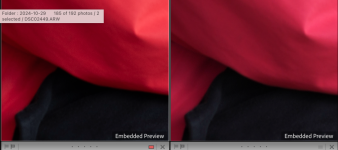
Here is the untouched jpeg passed through lightroom on the left, and the SOOC jpeg on the right. Greens and reds appear to be most affected, and there appears to be more difference if using the AdobeRGB rather than sRGB colour space in camera.


Screenshot 2024-12-03 at 20.01.01 by Toby Gunnee, on Flickr
 
I've had a play with colour profiles today, unfortunately you still can't change hues individually (there are hue changes but it affects all colours) and I can't get the SOOC jpegs to match my go to raw develop preset which I think gives true life like colours.

So far this is the best I've come up with, but I can't get rid of that kind of 'green hue' that's always plagued Sony's (IMO)
I've always used RAW, but have also always noticed a green hue/tint. I've set the import preset to -19 on the green hue which seems to remove much of it, but I was wondering whether there was any more permanent cure. I'm glad I'm not the only one who sees green!
 
I've always used RAW, but have also always noticed a green hue/tint. I've set the import preset to -19 on the green hue which seems to remove much of it, but I was wondering whether there was any more permanent cure. I'm glad I'm not the only one who sees green!
I have no green hue on my raws using the preset I’ve created. One of the easiest ways to get rid of it are using an adobe LR profile, however they can often be too magenta and also affects the reds in that they’re more ‘cherry’, however the Adobe profiles do give better clarity in the reds, the others make the reds lose shadow detail somehow.

I use color fidelity profiles which get rid of the green hue without making them overly magenta. The reds are more natural/true to life than adobe however still lose some of the clarity like the camera profiles.
 
Last edited:
Well that's not what I'm seeing.

Interesting, I've just done a test, import jpg SOOC, export as "original" and the file is indeed different, the md5sum hash is different, so I checked the exif and it's modified (which would explain that).

BUT that's literally the only change. If I take the input file and export and strip all the exif (exiftool -all= FILENAME) then the original and export ARE identical:

1733261891424.png

So I can say for certain, Lightroom isn't modifying the pixels.

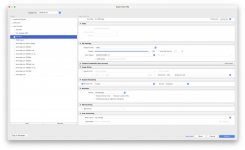
Can you share a screenshot of your export settings?

1733261965409.png
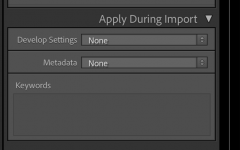
I guess also relevant would be if you're applying any processing on import?
1733262117144.png
 
Last edited:
This is unfortunate :oops: :$

 
Interesting, I've just done a test, import jpg SOOC, export as "original" and the file is indeed different, the md5sum hash is different, so I checked the exif and it's modified (which would explain that).

BUT that's literally the only change. If I take the input file and export and strip all the exif (exiftool -all= FILENAME) then the original and export ARE identical:

View attachment 440198

So I can say for certain, Lightroom isn't modifying the pixels.

Can you share a screenshot of your export settings?

View attachment 440199
I’m not sure what all that means but I can post my export settings tomorrow when I’m on the computer. However, what I’m seeing in the LR module is the same as the exported jpeg, i.e. different to the SOOC jpeg so I don’t think it’s the way its exporting.
 
So what I'm showing is if I compare the binary 1s and 0s of the SOOC jpeg and the same imported to LR then exported, they're exactly the same. Lightroom makes no changes to the image. I'm comparing the binary rather than looking at the image as then it's not at all subjective, it's objective fact it didn't change it.

Unless I'm misunderstanding what you're seeing - as I understand it you're taking a jpeg from the camera, comparing it to the same jpeg imported, exported and re-imported to Lightroom? (I do see the differences you describe in your image, I'm not doubting what you're seeing. It looks, to me, like SOOC jpg vs LR processed RAW of the same image when you shoot RAW+JPEG).
 
Last edited:
I have no green hue on my raws using the preset I’ve created. One of the easiest ways to get rid of it are using an adobe LR profile, however they can often be too magenta and also affects the reds in that they’re more ‘cherry’, however the Adobe profiles do give better clarity in the reds, the others make the reds lose shadow detail somehow.

I use color fidelity profiles which get rid of the green hue without making them overly magenta. The reds are more natural/true to life than adobe however still lose some of the clarity like the camera profiles.
Thanks - I'll try that. I've got it on Adobe Standard, so I'll have a flick around through the others and see if there's one that works better for my eye. I've not really explored with profiles before.
 
So what I'm showing is if I compare the binary 1s and 0s of the SOOC jpeg and the same imported to LR then exported, they're exactly the same. Lightroom makes no changes to the image. I'm comparing the binary rather than looking at the image as then it's not at all subjective, it's objective fact it didn't change it.

Unless I'm misunderstanding what you're seeing - as I understand it you're taking a jpeg from the camera, comparing it to the same jpeg imported, exported and re-imported to Lightroom? (I do see the differences you describe in your image, I'm not doubting what you're seeing. It looks, to me, like SOOC jpg vs LR processed RAW of the same image when you shoot RAW+JPEG).
Yeah I understand what you're saying, however even if the binary is showing no changes there clearly are changes if reds and greens appear different. I appreciate that you're saying t's subjective vs objective, however the differences are clear as day and as it's not just me that's seeing it then there are obviously changes occuring for whatever reason. It's clear in your example too, the reds on the left are more orangey compared to the ones on the right which are more cherry. It's very odd, even more so if you're saying the data remains unchanged :thinking:

I agree witih David though, LR must be applying some processing even if the user isn't applying any. I understand that different software have different demoisaicing algorithms, I just assumed that jpeg images wou;dnt require this.

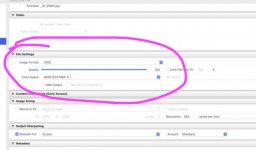
Here's my export settings as requested (y)

Screenshot 2024-12-04 at 08.00.46.jpg
 
It's clear in your example too, the reds on the left are more orangey compared to the ones on the right which are more cherry.

Yes, they’re different as that’s raw vs jpg. No reason to expect them to be the same.

Are your test files shot in raw+jpg? In which case you will be seeing the jpg on the re-import and the raw on the original unless you’re very careful to select JPEG as by default LR stacks them and shows you the raw.

Anyway it’s probably not that - you are processing in your export as you’re re-encoding the JPEG’s (and sharpening it etc). Decoding and encoding JPEG’s is a lossy process so there will always be changes. To colour and shape due to how JPEG’s stores and compresses both.
 
Yes, they’re different as that’s raw vs jpg. No reason to expect them to be the same.

Are your test files shot in raw+jpg? In which case you will be seeing the jpg on the re-import and the raw on the original unless you’re very careful to select JPEG as by default LR stacks them and shows you the raw.

Anyway it’s probably not that - you are processing in your export as you’re re-encoding the JPEG’s (and sharpening it etc). Decoding and encoding JPEG’s is a lossy process so there will always be changes. To colour and shape due to how JPEG’s stores and compresses both.
No I'm definitely seeing the jpeg in lightroom as I have LR set up so that it shows raw and jpeg files separately. How am I re-encoding the jpegs please? I don't think it's this though, as I said even before exporting the jpeg looks different in LR to the SOOC JPEG as you can see here. As I said previously, there seems to be more difference between the JPEG in LR and SOOC JPEG when the camera is set to AdobeRGB as oppposed to sRGB.


Screenshot 2024-12-04 at 09.31.09 by Toby Gunnee, on Flickr
 
Last edited:
Untitled.jpg

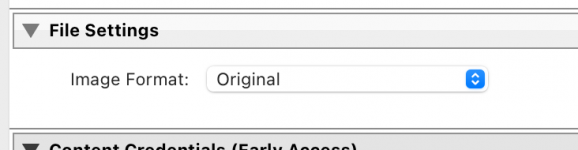
Here in the "file settings" choose "original image" and you'll get the jpg with no changes exported.

I thought your original screenshot showing the difference was a side-by-side in Lightroom, I see the difference in your screenshot there - is that the same SOOC jpg in Lightroom and preview now? I.e. no exporting has happened? (checking so I can test replicating it).
 
Ahah, I've taken a test AdobeRGB jpeg and I can now replicate what you're seeing - different colour in preview vs Lightroom. I'll make an sRGB test case too.

I'll bet it's to do with colourspace handling but I'll investigate. I don't see the issue on 422 Heif that I normally shoot (which is better colour, so makes sense, fewer compromises).
 
The plot thickens, I _think_ what I'm seeing is that Lightroom preview is always displaying in sRGB whereas preview is showing the wider gamut of the AdobeRGB.
  • If I make sRGB encoded jpeg they appear the same in Lightroom and preview.
  • sRGB jpeg and SOOC AdobeRGB jpeg appear identical in Lightroom.
  • sRGB jpeg and SOOC AdobeRGB jpeg appear different in Preview.
That seems odd to me, you'd think Lightroom would manage colour profiles correctly to show the extent of the monitor's capabilities (I have a nice screen with complete P3 coverage here, so it can do sRGB and I can put it in an sRGB profile if I want, but it won't do all of AdobeRGB).

Investigations down the rabbit hole continue...
 
I've found this statement in an Adobe forum which would make sense:

> By default, LrC uses a ProPhoto RGB (Malissa) color space while working in the Develop module and the Previews used by the Library module are Adobe RGB color space.

Except I _think_ I'd still expect AdobeRGB jpgs to appear the same in library and preview then, but they don't
 
Right, gonna stop investigating for now, but I note images from Lightroom embed the colour profile whereas it's not SOOC. So something screwy definitely going on with the profiles. I'd expect Preview to handle them correctly and I think LR is behaving differently.

Actually I'll try one more thing (embedding a colour profile myself if I can easily...
 
AHAH that's it. Mystery solved - they're using different colour profiles, you get Adobe profiles in LR (for whatever colour space) and system profiles in preview. The exception is if the file has an embedded profile, then that's used. Adobe exports always embed the profile, the sony SOOC jpegs do not.

If I take an ARGB jpeg from Lightroom and extract the colour profile, and embed it in the SOOC jpg without changing the jpg any other way then the Adobe RGB jpeg now appears the same in Lightroom and preview.

Does that make sense? Anyone need that explained more?
 
Oh no where have you sent me... so if you're shooting HEIF it defaults sRGB (you can't change it) unless you enable HLG still image then you get the (widest gamut yet) BT.2100 color space (BT.2020 gamut)

This also doesn't embed a profile and is even more of a difference than Adobe RGB (which kinda makes sense at this stage). I do get correct HDR display on a HDR screen in preview though, which is lovely :)

So what we REALLY want here is for Sony to embed colour profiles. And they can change the file extension to HEIC whilst they're at it too...
 
Last edited:
Ok let me try distill this into actionable advice for SOOC files from Sony cameras:
  • If you're shooting JPG, use sRGB for most similar images everywhere.
    • If you're being critical about colour, because you're tweaking the camera in some way to modify it, then to evaluate it you have to evaluate the images in the same way they'll be used.
    • So if they go into a Lightroom workflow, fine, evaluate them there.
    • If they go straight to web unedited, I suggest evaluate them there on test web browsers (different OS etc) as I've not done the tests there to see what they do absent an embedded profile. It will vary on OS I'd expect though, but then it'll vary as much or more by monitor, if they have night-shift or similar etc enabled. You're fighting a losing battle, sorry!.
  • If you're shooting HEIF:
    • Turn on HLG if you want HDR output viewable on apple devices.
    • rename the files to .heic when they come off the camera so Photos.app displays portrait photos correctly without rotate & crop.
If you care about precise colour:
  • You need to control the capture AND display.
  • So you need to embed a colour profile in your image.
    • SOOC? Nope.
  • This shouldn't be a burden, as if you care that much you're also controlling the display hardware or print.
  • if you're not - well most people won't see the subtle changes you care about, sorry.
    • But shoot sRGB and you'll at least minimise them.
 
Ok let me try distill this into actionable advice for SOOC files from Sony cameras:
  • If you're shooting JPG, use sRGB for most similar images everywhere.
    • If you're being critical about colour, because you're tweaking the camera in some way to modify it, then to evaluate it you have to evaluate the images in the same way they'll be used.
    • So if they go into a Lightroom workflow, fine, evaluate them there.
    • If they go straight to web unedited, I suggest evaluate them there on test web browsers (different OS etc) as I've not done the tests there to see what they do absent an embedded profile. It will vary on OS I'd expect though, but then it'll vary as much or more by monitor, if they have night-shift or similar etc enabled. You're fighting a losing battle, sorry!.
  • If you're shooting HEIF:
    • Turn on HLG if you want HDR output viewable on apple devices.
    • rename the files to .heic when they come off the camera so Photos.app displays portrait photos correctly without rotate & crop.
If you care about precise colour:
  • You need to control the capture AND display.
  • So you need to embed a colour profile in your image.
    • SOOC? Nope.
  • This shouldn't be a burden, as if you care that much you're also controlling the display hardware or print.
  • if you're not - well most people won't see the subtle changes you care about, sorry.
    • But shoot sRGB and you'll at least minimise them.
Haha, do you want to borrow my lab coat? :ROFLMAO:

I've done some testing, if I used AdobeRGB in camera the jpegs look different in LR and also when exported. If I shoot in sRGB in camera the jpegs look the same in LR and also when exported.
 
I've also been working on colour profiles and have developed something I'm reasonably happy with, still doesn't match my edited raws perfectly but the reds certainly look more realistic and I don't think there's quite as much as a green hue.

Here you can see the difference in reds, on the left is my in camera profile and on the right is camera std. The left looks more true to life (at least on my screen)


Screenshot 2024-12-04 at 12.32.49 by Toby Gunnee, on Flickr

Here it's not so obvious, but the bricks on the right (camera std) are a bit orangey and on the left it's more natural.

Screenshot 2024-12-04 at 12.33.54 by Toby Gunnee, on Flickr

My picture profile settings are:-

Black level -2
Gamma Still
Black Gamma Range Wide
Black Gamma Level -3
Knee (unchanged)
Color Mode Still
Saturation +4
Color Phase 0
Colour depth R +1, G +3, B -1, C +3, M -3, Y 0
Detail level +3


I just need to do the A7RV now :facepalm:
 
Last edited:
I've done some testing, if I used AdobeRGB in camera the jpegs look different in LR and also when exported. If I shoot in sRGB in camera the jpegs look the same in LR and also when exported.


Yup this is consistent with what I found above. If you used AdobeRGB and embedded a profile before doing anything with them (you can do this with exiftool) they’d look the same too. But that’s a faff.

FYI I also tested and if you set a “profile” in camera it doesn’t embed a colour profile either (I had a faint glimmer of hope…).


Haha, do you want to borrow my lab coat?

It’s ok, I’ve got my own ;-)
 
Last edited:
Back
Top