The Fabulous Fuji X owners thread

Surely you have to half press the shutter for it to calculate the exposure?
Makes sense, I don’t think sometimes :LOL: I guess if it was constantly calculating it would drain the battery.

I need to look how many cameras act now, maybe they’re the same :thinking::LOL:
 
And does the labcoat have an opinion?
It does ;)

The main reason for the test was to see if the X100VI could replace my RX1R II. I'm really impressed with the RX1R II image quality but it niggles me with certain things. I couldn't test the X100VI as I've already had it on test, unfortunately the weather let me down and I never got chance to use it so I thought I'd try the X-E5 as it's pretty close in handling and spec.

Overall I prefer the handling of the X-E5 over the RX1R, I like having a joystick, I like having a viewfinder there all the time, and I like having BBF. There's a couple of niggles, The screen is a bit awkward to pull out, I'm used to being able to 'grab it' from the bottom and flicking it out, and on the Fuji there's the little 'tab' I have to try and get my sausage fingers under. The delay when pressing play to review images is annoying, but from info above this sounds model specific. The other thing is that I found I kept changing the focus mode/area. As you'll all know if you move the focus point with the joystick it brings up all the focus points and allows you to change focus area (single point, wide etc) using the rear command dial. I'd move the focus point and then catch the command dial and change it to wide, or tracking. Can you change the behaviour of this so that moving the joystick just moves the focus point and does activate focus area changes?

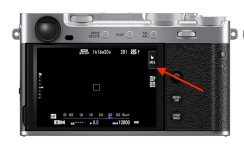
Despite turning the touchscreen off I did accidentally manage to turn it on and I ended up taking loads of shots without realising it. It turns out that even with touchscreen off there's an area you can press to activate it again, seems an odd one to me. Can you get rid of this so you don't accidentally activate the touchscreen?

Screenshot 2026-04-22 at 18.57.00.jpg


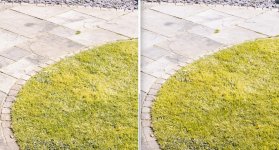
In terms of IQ I can't tell a great deal between the Fuji and my RX1R II, I think maybe there's a little more 3D on the Sony, but then I don't know if this is down to editing. Even with grass, where Fuji used to really let itself down, is hard to distinguish from the Sony as you can see by these 1:1 crops of my garden.

Screenshot 2026-04-22 at 18.37.15.jpg


The RX1R II does render OOF areas really nicely, and I doubt that the X100VI can match this, not just because there's a stop difference in DOF but I just think there's something special about the RX1R lens.
 
Last edited:
@snerkler in Button/Dial settings in the wrench menu you can turn the touchscreen off for good, I do this with all my Fuji’s

I would expect the Zeiss lens to render nicely but I’m pleased that you think the Fuji IQ has progressed since your X-T1 nightmare

I think you really do need to try a Q3 just so that you know what a compact is capable of, Leica Manchester do trials where you can borrow a camera for a day, obviously you’d have to come to Manchester. You’d need big pockets in both senses of the phrase though :ROFLMAO:

The X100VI is an awesome bit of kit though and is definitely greater than the sum of its parts, where although the RX1R series are excellent I’m not sure they have that ‘wow’
 
@snerkler in Button/Dial settings in the wrench menu you can turn the touchscreen off for good, I do this with all my Fuji’s

I would expect the Zeiss lens to render nicely but I’m pleased that you think the Fuji IQ has progressed since your X-T1 nightmare

I think you really do need to try a Q3 just so that you know what a compact is capable of, Leica Manchester do trials where you can borrow a camera for a day, obviously you’d have to come to Manchester. You’d need big pockets in both senses of the phrase though :ROFLMAO:

The X100VI is an awesome bit of kit though and is definitely greater than the sum of its parts, where although the RX1R series are excellent I’m not sure they have that ‘wow’
I'd love a Q3, but it's not an everyday carry camera for me, and I don't have a big enough bank account ;) Harrisons area. Leica dealership, I have had a play with the Q3 in store.

I had a play with the Nikon ZF today as I love the retro design, but it's a brick of a camera and not what I had in mind. It is cool that you can get an adpater to be able use Leica M lenses, and autofocus wtih them too :eek: Of course, leica lenses are out of my price bracket too :lol:
 
Oh, one more question about Fuji, when using the crop modes (digital tele converter I think they call it) it just puts a frame in the middle of the screen where it will crop too, very Leica-esque, can you not change it so that the screen just shows you the cropped view?
 
Oh, one more question about Fuji, when using the crop modes (digital tele converter I think they call it) it just puts a frame in the middle of the screen where it will crop too, very Leica-esque, can you not change it so that the screen just shows you the cropped view?
On my X100vi I use the lens control ring for digital crop. I get the full cropped image in viewfinder.
Also, unlike previous iterations the vi does not interpolate the file. It merely crops from the 40 meg sensor.
 
On my X100vi I use the lens control ring for digital crop. I get the full cropped image in viewfinder.
Also, unlike previous iterations the vi does not interpolate the file. It merely crops from the 40 meg sensor.
Thanks Trev. It seems the X100VI is suffering the same fate as the V, trying to find one is like trying to find rocking horse poop. I wonder why Panamoz and Cotswolds don't sell Fuji :thinking:
 
Thanks Trev. It seems the X100VI is suffering the same fate as the V, trying to find one is like trying to find rocking horse poop. I wonder why Panamoz and Cotswolds don't sell Fuji :thinking:

It might simply be down to margins, Fuji bodies/cameras are on a single fiugure % dealer margin. E-infinity do sell them, but the X100VI is only £100 less than a UK dealer (for a silver one)

Clifton Cameras are indicating that stock is due April, so I expect that a batch will arrive at all major retailers shortly
 
I forgot to mention, I had a play with the X-T5 in store as well yesterday, the grip seems a lot better than I remember the X-T1 being, was pretty nice to hold actually.
 
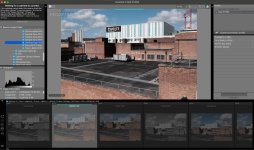
OK, so obviously a complete Fuji X Raw Studio novice, I'm trying to import/edit my photos from a folder stored on my computer, if I navigate to them they show at the bottom but are greyed out. In the top left corner it says trying to connect to camera, which obviously I don't want to do as the files are on my computer, the panel on the right has very limited edit options, and don't do anything if I click them anyway, and it's only showing the raws, it doesn't show jpegs.

So, the big question is what am I doing wrong, and how do I get it to stop trying to connect to a camera please? I normally use Lightroom, but I'm curious how close lightroom's Fuji sims are compared to the Fuji software.

Screenshot 2026-04-23 at 08.36.25.jpg
 
OK, so obviously a complete Fuji X Raw Studio novice, I'm trying to import/edit my photos from a folder stored on my computer, if I navigate to them they show at the bottom but are greyed out. In the top left corner it says trying to connect to camera, which obviously I don't want to do as the files are on my computer, the panel on the right has very limited edit options, and don't do anything if I click them anyway, and it's only showing the raws, it doesn't show jpegs.

So, the big question is what am I doing wrong, and how do I get it to stop trying to connect to a camera please? I normally use Lightroom, but I'm curious how close lightroom's Fuji sims are compared to the Fuji software.

View attachment 480028

X Raw Studio uses the camers engine to process. You must connect with a cable.
 
Thanks Trev. It seems the X100VI is suffering the same fate as the V, trying to find one is like trying to find rocking horse poop. I wonder why Panamoz and Cotswolds don't sell Fuji :thinking:
Hi, I’d emailed Panamoz last week as I’m considering a move from Sony to Fuji gfx and they could get the Fuji 100sii for £3100, so maybe worth asking.
 
OK, so obviously a complete Fuji X Raw Studio novice, I'm trying to import/edit my photos from a folder stored on my computer, if I navigate to them they show at the bottom but are greyed out. In the top left corner it says trying to connect to camera, which obviously I don't want to do as the files are on my computer, the panel on the right has very limited edit options, and don't do anything if I click them anyway, and it's only showing the raws, it doesn't show jpegs.

So, the big question is what am I doing wrong, and how do I get it to stop trying to connect to a camera please? I normally use Lightroom, but I'm curious how close lightroom's Fuji sims are compared to the Fuji software.

View attachment 480028

Just use lightroom it's fine.
 
Hi, I’d emailed Panamoz last week as I’m considering a move from Sony to Fuji gfx and they could get the Fuji 100sii for £3100, so maybe worth asking.
Panamoz are quoting more than UK prices unfortunately.
 
Decided to get the hood for my 55-200 from Aliexpress, a JJC for £7 instead of £15 for the Fuji. I know it's not a big difference but the quality is actually pretty nice! Fits perfectly. Same shade of black.
I've had a few JJC bits and they've always been pretty decent. They could be the Harley Benton of the camera world! :)
 
I’ve been trying out a new recipe that I saw in a Lisa Portinari video. I really like it, it’s quite film-looking I think. She recommends using with with a black mist filter. I have a 1/8 on my 16-80 and it doesn’t seem to make a huge amount of difference tbh… for my 35mm, I’ve got a 1/2 and it’s way too strong. Next time I go out I’m going to try the same recipe, but with no filters.

These are just a few random shots from the last couple of weeks, all with that recipe though:

DSCF1187.jpeg

DSCF1193.jpeg

DSCF1196.jpeg

DSCF1204.jpeg

DSCF1200.jpeg

DSCF1215.jpeg

DSCF1225.jpeg
 
I wanted to take a photo of my berry yoghurt bowl this morning at work, grabbed the XT1 and a 27/1.2...

Got to work but noticed the focusing distance was massive, thought nothing of it, not until later when I realised I actually put on the 75/1.2 instead!

5db61de3e28a.jpg
 
Last edited:
I’ve been trying out a new recipe that I saw in a Lisa Portinari video. I really like it, it’s quite film-looking I think. She recommends using with with a black mist filter. I have a 1/8 on my 16-80 and it doesn’t seem to make a huge amount of difference tbh… for my 35mm, I’ve got a 1/2 and it’s way too strong. Next time I go out I’m going to try the same recipe, but with no filters.

These are just a few random shots from the last couple of weeks, all with that recipe though:

View attachment 480051

View attachment 480052

View attachment 480053

View attachment 480054

View attachment 480055

View attachment 480056

View attachment 480057
I found that the Tiffen 1/4 worked well, but manufacturers don’t really have a standard so manufacturer A 1/4 May be different to manufacturer B

But the Tiffen 1/4 introduced noticeable excess distortion/softness on the 60MP Leica Q3 but it was fine on the X100F
 
Last edited:
I found that the Tiffen 1/4 worked well, but manufacturers don’t really have a standard so manufacturer A 1/4 May be different to manufacturer B

But the Tiffen 1/4 introduced noticeable excess distortion/softness on the 60MP Leica Q3 but it was fine on the X100F
I think I remember reading on here that the K&F filters tend to be on the strong side, and my 1/2 is a K&F. It's definitely too much, you can see it in this shot:

DSCF1273.jpeg
 
Last edited:
I wanted to take a photo of my berry yoghurt bowl this morning at work, grabbed the XT1 and a 27/1.2...

Got to work but noticed the focusing distance between massive, thought nothing of it, not until later when I realised I actually put on the 75/1.2 instead!

5db61de3e28a.jpg

That's a nice bowl.
 
Back
Top