Too much blurr in my shots.

Messages
8,400
Name
Andy
Edit My Images
No
Hi, hope you can help.

I have been away for a week and just uploaded and processed some of my images. I have noticed that most of my hand held images when zoomed in are blurred. The only images i used a tripod for are of sunsets so it's impossible to see how sharp they are. I did a test with the tripod and my images are sharper. I have IS turned on when i'm out and about but still get the blurrrrrrrrs! :D

What's the best way to stop this? I see many shots on here that are pin sharp. Do you guy's use tripods and monopods at every opportunity?

Cheers
 
Can you post a couple of shots with the problem - with EXIF data intact? That will make it easier to see the problem and comment.
 
I take it you know the 1/focal length rule of thumb?
With IS you should be able to go about 3 stops slower, unless the subject is moving.
 
You really need to show the pictures with EXIF in place or list the settings you used.. This then makes it real easy to see what went wrong :)

oops all posted dean on 23:00 :)
 
Could you post some examples? And 100% crops as well, depending on how the blur looks, someone with a keener eye than me will probably be able to tell you if it's motion blur, or a soft lens, haze etc. What focal lengths and shutter speeds are we talking about? Shooting raw or JPEG?

Chris

Edit: Argh, I'm the latecomer at 23:01, must type faster :D
 
Canon reccomend you turn IS off when using a tripod as the gyro's can cause blur when thev camera is stationary on a tripod.
 
this wouldnt have any bearing at all on blurred shots :)

Well my thinking was if the OP had been shooting raw for the first time, he may not have realised that additional processing would be needed to get the shots looking sharp, and may be mistaking softness for blur.

Unlikely I know, but the more information we have, the more likely it is that someone will be able to help out!

Chris
 
I'm shooting raw and i use Lightroom 2.3. I hold the camera with my hand cupped under the 28-135 IS USM Lens and my elbows in trying to support the camera with my body.

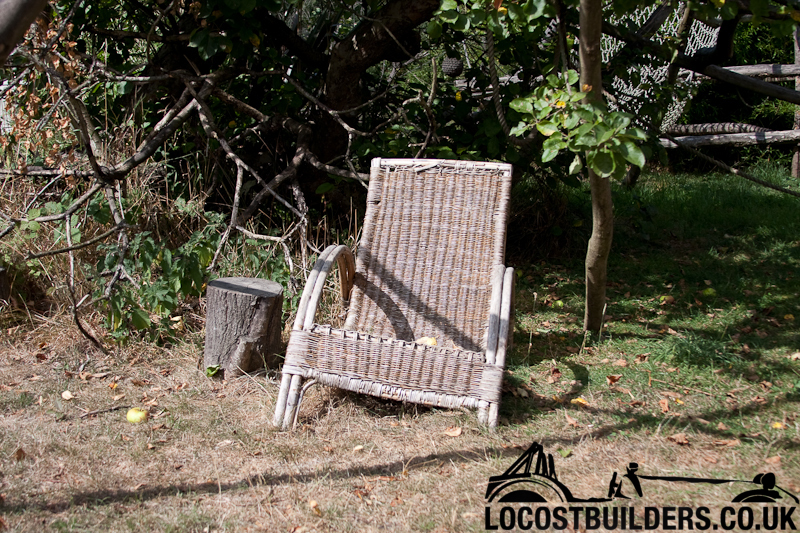
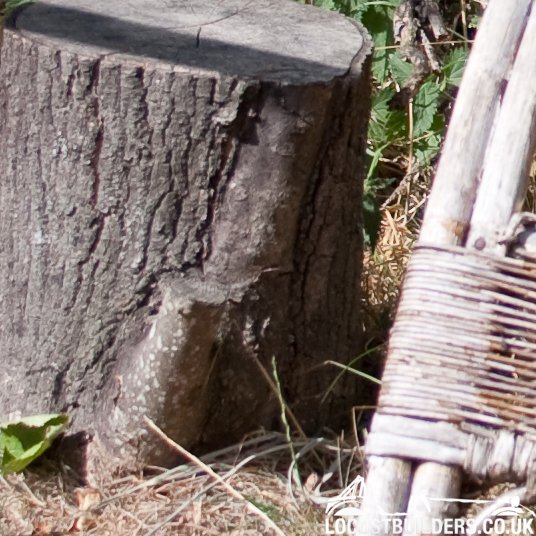
Here are 2 shots, one at 100% I remember standing really still for this one!

Shutter 1/1250 f4 ISO200 at 30mm
chairtest01_800pix_Colour.jpg


At 100%
chair_Pic_100_Percent.jpg


It may just be me being fussy?? I'll do some tests with the tripod and see if it makes much difference.

Cheers
 
Well it's not camera-shake, not at 1250th sec, anyway...
f/4 - is that the maximum aperture for that lens?

No need to go that fast really, not unless you're trying to freeze something moving very fast indeed...

At 200 ISO, that would be about the normal amount of softness from a RAW file from my old D2x, so if the cameras are similar in chip-performance, it's not something to worry unduly about...
You just need to add some sharpening in your PP workflow...
 
I don't see a problem really - shallow DoF caused by f/4 and I think the point of focus was the tree trunk not the chair. I don't know how good this lens is - especially wide open - that could be the reason it's not as sharp as you've see from others. Otherwise a little sharpening will help, but I think this is what you should expect. Maybe if you upgrade your camera & lens you'll see a difference but I don't know Canon stuff at all.

Was that the very first picture you took with that body? Image number is '0'
 
The leaves in the close-up look sharper than the tree trunk. I guess it's just a point of focus issue.

In the main shot, the grass in the bottom-right area does look excessively soft though. That would cause me some concern
 
Yeah i guess if i used ISO100 and say F8 i would still get a fast shutter and a more crisp sharp image. It was a very bright day hence the fast shutter speed.

I do make sure that the shutter speed is 'faster' than the focal length of the lens but this isn't always possible. In the above case it certainly is.

I have a few shots from a tripod and they are pretty pin sharp so i guess i'm just being a fussy b****r!! :D
 
stopping the lens down a bit will no doubt help as well.
 
Did you have the image stabilisation running when you took that shot?

Using IS/VR at high shutter speeds does cause image degradation and blurring like you describe. If you are shooting over about 1/250 with the 70-200 (or similar focal length lenses) turn the IS/VR off.

Closing the aperture will also sharpen things up a bit, as would increasing the contrast, you could underexpose that a bit more quite safely and then open the shadows up a bit in your lightroom suite. The higher contrat gives the appearance of "sharpness" - some image sharpening is done in exactly this way, simply by increasing the contrast around the edges of subjects.

Other shooting techniques that will always help, over and above your elbows tucked and hand hold:
breath in, compose, slowly exhale gently and then when you are ready to trip the shutter, hold your breath - but only on exhale, not inhaling. Just stop breathing out for a moment.

Don't stab the shutter, press it gently. Stabbing it can jar the camera - no, it DOES jar the camera.
 
Did you have the image stabilisation running when you took that shot?

Using IS/VR at high shutter speeds does cause image degradation and blurring like you describe. If you are shooting over about 1/250 with the 70-200 (or similar focal length lenses) turn the IS/VR off.

Closing the aperture will also sharpen things up a bit, as would increasing the contrast, you could underexpose that a bit more quite safely and then open the shadows up a bit in your lightroom suite. The higher contrat gives the appearance of "sharpness" - some image sharpening is done in exactly this way, simply by increasing the contrast around the edges of subjects.

Other shooting techniques that will always help, over and above your elbows tucked and hand hold:
breath in, compose, slowly exhale gently and then when you are ready to trip the shutter, hold your breath - but only on exhale, not inhaling. Just stop breathing out for a moment.

Don't stab the shutter, press it gently. Stabbing it can jar the camera - no, it DOES jar the camera.


IS was on. I'll try turning it off at high shutter speeds in the future. Some good info there thanks!

Trying to remember everything is difficult......for me! :D
 
Also. I find that the IS on the 28-135 quite slow to get to speed. You really need to hold the shutter for 0.5s before taking the shot. A real pain shooting moving items with AI focus/single shot focus. Again, try a slightly smaller aperture. 4 is at the limit dependant on focal length. I found a lot of my shots blurred too, but in the right hands the lens can be good
 
Back
Top