UGH!!! Lightroom and the internet?

Messages
2,835
Name
Richard
Edit My Images
Yes
Why oh why does something look completly different in lightroom compared to the internet.

This picture for example, the red looks like a bright red in Lightroom and then when I put it onto the internet the red looks brown, im looking at the same picture end everything. Am I missing something here?
I even saved the picture and imported it back into Lightroom and the bright red is back.

http://richardgrebby.co.uk/pictures/test.jpg
 
is it possible something to do with CMYK and RGB settings I dont know for sure if they are in lightroom but have a look just incase you got it set for print (CMYK)

Michael
 
It's all about the colour spaces used - in Lightroom they use the AdobeRGB system but when you save the jpegs you're using sRGB which is more widely compatible.

I get anoyed by this all the time. Also, saving to jpeg seems to bring out any gradual fades (like vignetting) and turn them much darker - the shots of my old Olympus cameras didn't have such an obvious dark fade at the bottom in Lightroom so I was a little disappointed when I saw them as jpegs.
No PP on these ones but I might re-export another set with some small tweaks.
 
Do you have your screen set to sRGB in LR and some other colour temperature in Windows (& hence your browser?)
 
possibly something to do with colour management differences between lightroom and browser. I was having similar probs between CS3 and Firefox, then installed FF colour management, set it to use same profile as CS3 and bingo, now they all look the same.
 
hmm, its all very good adding a plugin to my browser but its no good for other people.

What can I do to get them to display correctly on a standard web browser?
 
possibly something to do with colour management differences between lightroom and browser. I was having similar probs between CS3 and Firefox, then installed FF colour management, set it to use same profile as CS3 and bingo, now they all look the same.


+1. Although most users use IE which is not a color managed application.


Lr uses any colourspace you want to give it - aRGB, profoto, etc etc.

Look at your export settings in lightroom. the web uses the sRGB colour space which has a smaller gamut than most other spaces so iof you output as an aRGB space and post it on the web the colors will all **** slightly.

Make sure any images you are posting on the web are output to the sRGB color space. That should solve the problem. the next issue will be how your monitor is calibrated..... but that;s another story.
 
+1. Although most users use IE which is not a color managed application.


Lr uses any colourspace you want to give it - aRGB, profoto, etc etc.

Look at your export settings in lightroom. the web uses the sRGB colour space which has a smaller gamut than most other spaces so iof you output as an aRGB space and post it on the web the colors will all **** slightly.

Make sure any images you are posting on the web are output to the sRGB color space. That should solve the problem. the next issue will be how your monitor is calibrated..... but that;s another story.

surely the monitor shouldnt give me different results on the same image?

I cant see how to save out from photoshop and choose sRGB
 
It's all about the colour spaces used.

Correct

in Lightroom they use the AdobeRGB system but when you save the jpegs you're using sRGB which is more widely compatible.

Lr can output to any color space and will accept your image in the space it's profiled with. aRGB has a wider gamut than sRGB and if you post an aRGB or Profoto image on the web (which uses the sRGB space) the colours will shift.

I get anoyed by this all the time.
make sure when exporting from lr or Photoshop that you export the image as sRGB whjen you want to show images on the web.
 
ahha I did it through lightroom and it was automatically set to sRGB and this is what I get.

test3.jpg


Which is what it should look like. Now why cant I do this in PS?

Ahh, maybe if I use the save for web function in PS and choose jpg it will sort it out.

Thanks for the help guys, I think its just a never saved a pic for the web through photoshop, not for a long time anyway.

Now the next question, is the watermark too big and off putting?
 
surely the monitor shouldnt give me different results on the same image?

I cant see how to save out from photoshop and choose sRGB


in photoshop, use Save for web and you can select the sRGB color space there.

your monitor may indeed shift colours from your images. olour management is a complex beast.
 
ahha I did it through lightroom and it was automatically set to sRGB and this is what I get.

test3.jpg


Which is what it should look like. Now why cant I do this in PS?

When saving for the webi'd advise saving the image at a maximum 600 pixels on the longest edge. Might be an idea trying to edit the shadow behind the subjects. Nice iomage but that is very distracting. bouncing the flash would help.
 
Yep. All images uploaded onto the net need to be in sRGB colour space.

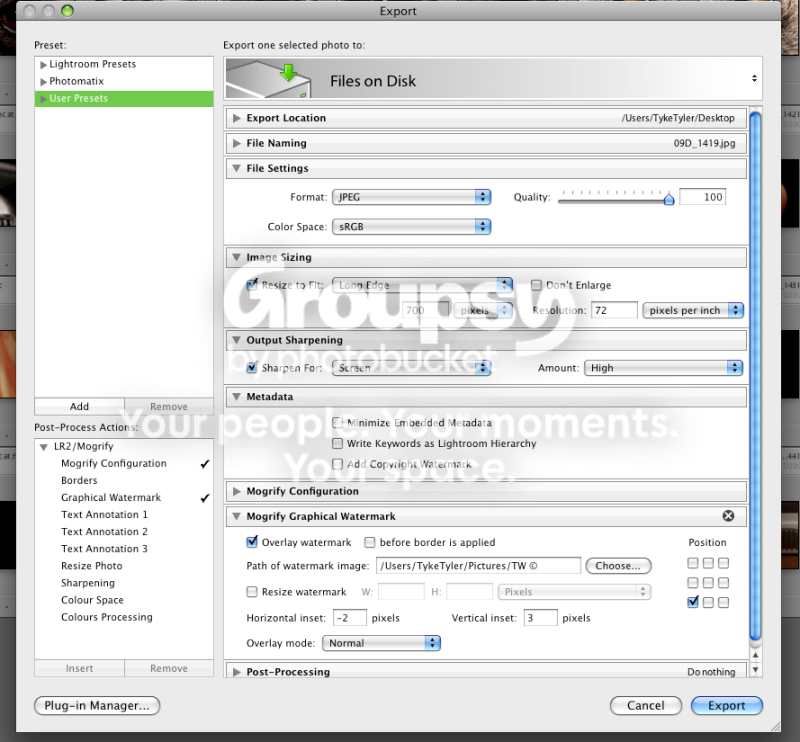
In the LR export menu:
Picture2-1.png


It helps if you browsers are configured for sRGB too, run a google search to configure your web browser.

All example images your posting are identical with my configuration (apart from the first one being Hu-ge! :lol:)
 
Thanks guys I got it now.

Im just trying to get the LR Mogrify thing to displace my watermark right as I did it in photoshop before.

all I get is this, I dont want it resized or anything. I tried adding the dimensions of the watermark but nothing happens.

wm1.jpg
 
you need to resize the watermark depending on the resolution of the image I guess
 
Back
Top