

Hi everyone,
Well, I told you in my opening thread it wouldn't be long before I came asking for help
I was driving past Stowe school today and had my camera in the car so I decided to take some photos. Now they're basically just point and shoots, but I'm just trying to get used to settings first before I even attempt anything remotely arty
My problem is, they all look very washed out. The colour of the car hasn't come out well, and neither has the sky/grass. I think it's because the sky was very bright, yet the car/ground was quite dark. It's just resulted in a very 'white and hazey' image.
So what I'm wondering is, what could I have done whilst taking the shots to get a better result?
Also, I shot them in RAW + JPEG luckily so I can have a proper play around with the settings. However, I don't know what settings to play around with Any suggestions?
Thanks very much everyone. Hopefully I'll look back at this post in a years time and laugh at my first attempts at photography!
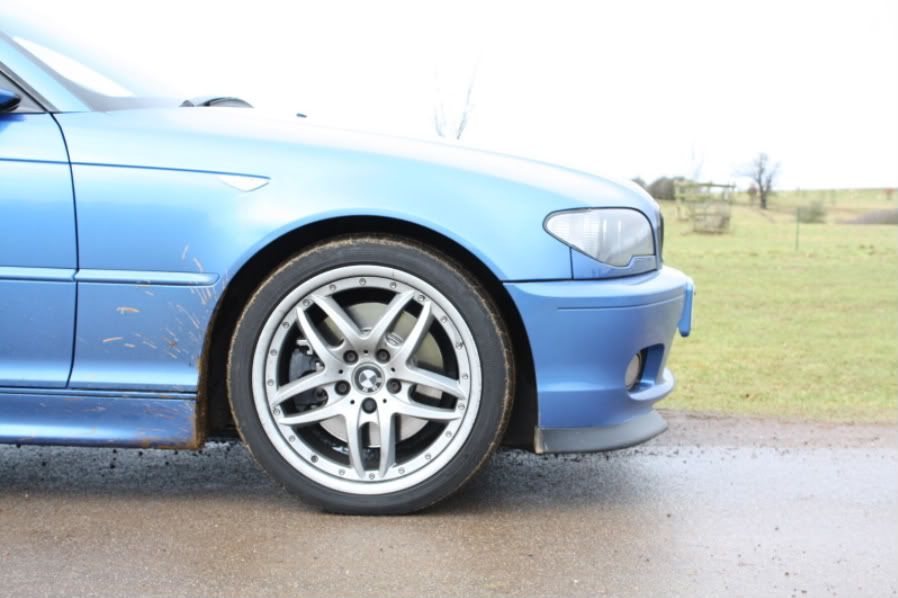
Edit: Like I said, not arty, and not a good shot, but I'm learning. The car's also pretty dirty
Well, I told you in my opening thread it wouldn't be long before I came asking for help
I was driving past Stowe school today and had my camera in the car so I decided to take some photos. Now they're basically just point and shoots, but I'm just trying to get used to settings first before I even attempt anything remotely arty
My problem is, they all look very washed out. The colour of the car hasn't come out well, and neither has the sky/grass. I think it's because the sky was very bright, yet the car/ground was quite dark. It's just resulted in a very 'white and hazey' image.
So what I'm wondering is, what could I have done whilst taking the shots to get a better result?
Also, I shot them in RAW + JPEG luckily so I can have a proper play around with the settings. However, I don't know what settings to play around with
Any suggestions?Thanks very much everyone. Hopefully I'll look back at this post in a years time and laugh at my first attempts at photography!
Edit: Like I said, not arty, and not a good shot, but I'm learning. The car's also pretty dirty


