- Messages
- 140
- Name
- Jason
- Edit My Images
- Yes
Hi All,
I have had a search around but cant seem to find anything about this.
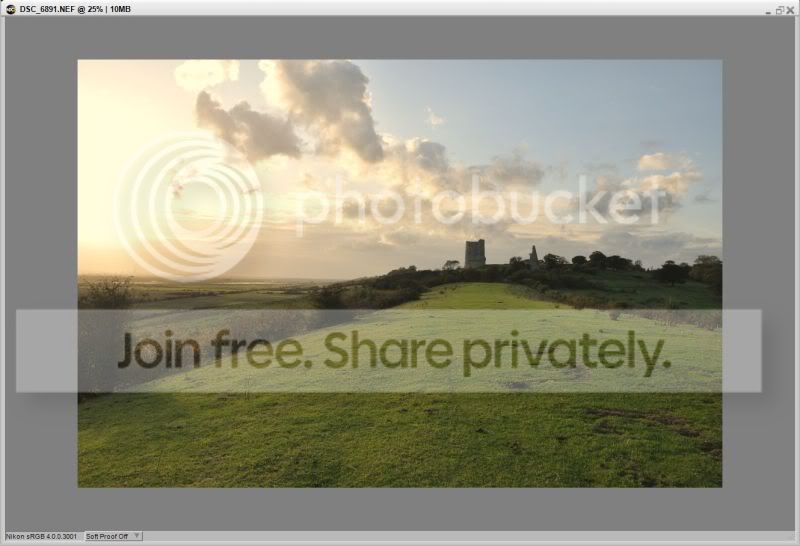
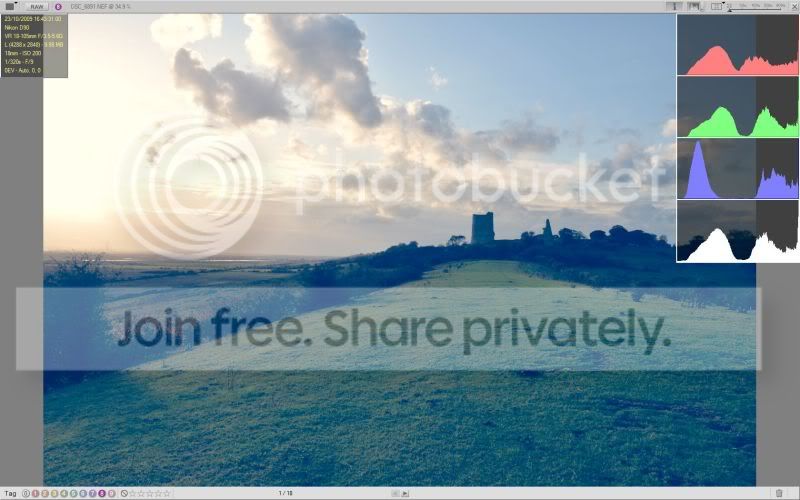
I updated my ViewNX to the latest version (1.5 I think) last weekend. And then proceeded to import a load of pictures of the weekends activities. I nearly canned them all as it looked like I had left the camera in Manual mode with too high an ISO setting and the totaly wrong shutter and appature resulting in a very over exposed image.
After fettling with the quick settings to see if I could make the images better - to no avail, I decided to take a look in CaptureNX2 as a last resort...
To my suprise the images were spot on and looked no where near as ruined as they were in ViewNX.
So at the moment, ViewNX is only useful for metadata, GPS and moving stuff to other folders, I am unable to actualy look through and QA the pics before any further processing, which is a bit fustrating as you can imagine.
Anyone else suffering the same issue? This is something which has started since installing the "upgrade"
OS is Vista 32B, camera is D90.
TIA

I have had a search around but cant seem to find anything about this.
I updated my ViewNX to the latest version (1.5 I think) last weekend. And then proceeded to import a load of pictures of the weekends activities. I nearly canned them all as it looked like I had left the camera in Manual mode with too high an ISO setting and the totaly wrong shutter and appature resulting in a very over exposed image.
After fettling with the quick settings to see if I could make the images better - to no avail, I decided to take a look in CaptureNX2 as a last resort...
To my suprise the images were spot on and looked no where near as ruined as they were in ViewNX.
So at the moment, ViewNX is only useful for metadata, GPS and moving stuff to other folders, I am unable to actualy look through and QA the pics before any further processing, which is a bit fustrating as you can imagine.
Anyone else suffering the same issue? This is something which has started since installing the "upgrade"
OS is Vista 32B, camera is D90.
TIA