Washed out looking picture problems

Messages
712
Name
Kevin
Edit My Images
No
HI all i am having a problem that just keeps popping up when im out and about.

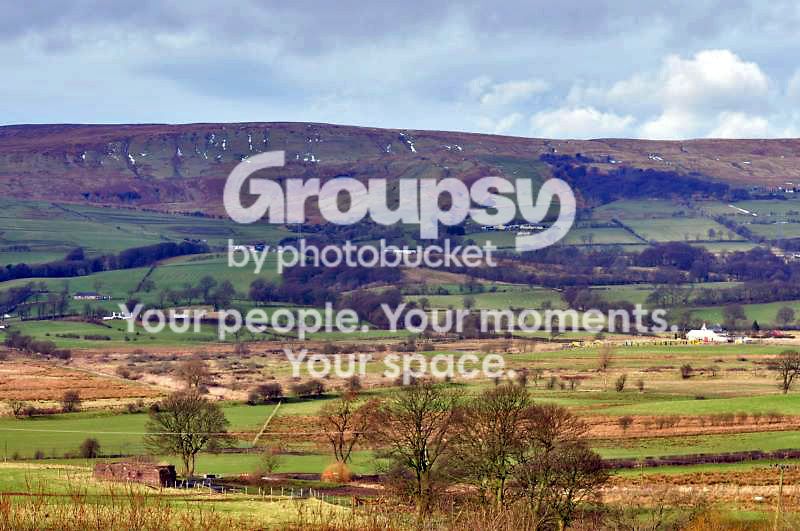
Some of my pictures just seem washed out/clouded over. I was wondering if there is something i might be doing wrong as it is getting to be a bad habbit now.

I tryed my camera in a few settings but just cant seem to cure it here is one i will use as an example.

Landscape3.jpg


Shooting info...... 70mm @ iso 200, 1/200s, F/8 and auto whitebalance.


Thanks.
 
I am no expert but i would bring the iso down & the shutter speed if its on a tripod.
 
Its overexposed, try pulling your black levels slider across to the right, could also be haze, lens misting/fungus/scratches
 
a lot of nikon users use AEB on -0.3 or -0.7 just to underexpose the shot a little
 
Yeah that looks better but should it not come straight from the camera like this.

And cheers Slipwave
 
No it should not be like that straight from the camera, what camera is it?
 
Un-sharp mask.

Was it a bit misty on the day? I had a similar problem when shooting around 9-10am. Also, shooting with that kind of focal length will also not be helping things.

It was clear bud could be the focal length though that was im trying to find out as i say it keeps popping up.
 
Well the early morning mist can sometimes still be hanging around and the further you are away from the subject the more mist will be inbetween lens and landscape. Do you have any more shots from the day?

landscape11.jpg


This was taken from the same point i just turned a bit.
 
Changing from 'spot' metering to average or evaluative (think Nikon call it 'matrix) would also help in this situation.
 
a polariser is for reflected sunlight isn't it?
 
like a nd filter, but that can be achieved by underexposing without the hassle of filters
 
like a nd filter, but that can be achieved by underexposing without the hassle of filters

A circular polairzer would make a massive difference to the sky in this shot and it's one of the few filters you can't simulate afterwards in pp.
 
it's one of the few filters you can't simulate afterwards in pp.

is it? i must admit i haven't tested it so cant say with any authority, but i find it surprising that it cant be simulated
 
It can be simulated but not to the same level of a polariser - why try and do it in PP though if you can get it right in camera

It amazes me people almost have a mantra about getting exposure right in camera rather than relying on PP, yet would rather use PP to combine two shots rather than use an ND grad, or mess around with colour temperature rather than using warm up or cool down filters.
 
i think we are deviating a bit here, grads weren't mentioned, we were talking about using a cpl against under exposing
 
PP vs filters? Seemed pertinant.

A CPL does help to reduce haze, a UV/haze filter would also help but a lot of people insist that with haze the only true solution is to shoot IR through a red filter, with PP being second best, and filters the least suitable option
 
Have I missed something - Was this shot taken with a filter ?
 
Back
Top