

You are using an out of date browser. It may not display this or other websites correctly.
You should upgrade or use an alternative browser.
You should upgrade or use an alternative browser.
Watermarks??? How do I create one for a Canon 550D
- Thread starter Martylaa
- Start date

- Messages
- 1,193
- Edit My Images
- Yes
have you tried using a framing script like i use below
you will need something along the lines of photoshop ie elements or cs5 etc

you will need something along the lines of photoshop ie elements or cs5 etc
Last edited:
Martylaa said:Ah ok, can I create one with Apertures???
Some cameras enable you to add copyright info etc to the file in camera, but that's not something you see on the image and can be stripped off with software.

- Messages
- 1,193
- Edit My Images
- Yes
The framing script I use reduces the image size, sharpens the image and adds your chosen logo and a nice border and also adds your name, email address and website into the exif data and when you upload to facebook or flickr it adds a title like
Picture by Louise Punchard
Please email Louise.punchard@gmail.com for any suspected copyright infringements.
Also allows you to put the picture title in the frame too like Say a picture of a cat called smokey It will show up on the left side saying smokey
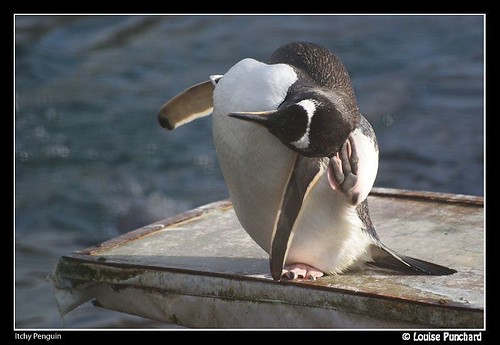
photo by looneytunez, on Flickr
plus it's simple to use for someone whose new to photoshop etc or someone with learning difficulties like me.
I don't see how different putting a logo at the bottom of the image would stop people taking the image and cropping it out at the end of the day no matter how much copywrite you put on it if someone wants the image they will take it either way.
I was merely only trying to help the op like you are I like the script as it adds a nice border to the image I don't really like the logo in the corner as I think it distracts the eye and spoils the image everyone to there own I guess
Picture by Louise Punchard
Please email Louise.punchard@gmail.com for any suspected copyright infringements.
Also allows you to put the picture title in the frame too like Say a picture of a cat called smokey It will show up on the left side saying smokey
photo by looneytunez, on Flickr
plus it's simple to use for someone whose new to photoshop etc or someone with learning difficulties like me.
I don't see how different putting a logo at the bottom of the image would stop people taking the image and cropping it out at the end of the day no matter how much copywrite you put on it if someone wants the image they will take it either way.
I was merely only trying to help the op like you are I like the script as it adds a nice border to the image I don't really like the logo in the corner as I think it distracts the eye and spoils the image everyone to there own I guess
Last edited:

TheBigYin
Moderator
- Messages
- 17,060
- Name
- Mark
- Edit My Images
- No
Personally, I tend to think that watermarks look hideous, and I only use them on shots that are going on Facebook.
If you're worried people will rip off your photo's - don't post them on the internet.
If you do post them on the 'net, make them small enough to be of little commercial use - 640px max length.
And if you're really serious about copyright protection, look into something like Digmarc.
If you're worried people will rip off your photo's - don't post them on the internet.
If you do post them on the 'net, make them small enough to be of little commercial use - 640px max length.
And if you're really serious about copyright protection, look into something like Digmarc.

- Messages
- 673
- Name
- Mariusz
- Edit My Images
- Yes
I asked my good friend who is an interior designer to design a logo (or few I could pick from) to use as my water mark, and she did a stunning job (it just shows how well she knows me  ). Now whatever picture's mood is, I can pick a matching logo (they are all very similar by design, but still each is unique), and it works pretty well I must say. By the way, I use LR3.
- Messages
- 240
- Edit My Images
- No
have you tried using a framing script like i use below
you will need something along the lines of photoshop ie elements or cs5 etc
Is this a script you created or a generic one that you populated with your information?
W
whiteflyer
Guest
Ah ok, can I create one with Apertures???
If you use the Aperture plug-in BorderFX you can set it to add any amount of Titles, Copyright & Metadata automatically on export. There is also an iPhoto version from the same source.
Normally I would just have my copyright and sometimes the watermark, but as an example of what it can add.
It will also add customizable frames to an image if required.

Last edited by a moderator:
Video Tutorial on how to create a watermark
http://www.photoshopmama.net/chores/mamas_quick_wc_part3/mamas_quick_wc_part3.html
Dave
http://www.photoshopmama.net/chores/mamas_quick_wc_part3/mamas_quick_wc_part3.html
Dave