

You are using an out of date browser. It may not display this or other websites correctly.
You should upgrade or use an alternative browser.
You should upgrade or use an alternative browser.
What causes this? UPDATED FINDINGS!
- Thread starter squizza
- Start date

- Messages
- 4,888
- Edit My Images
- No
What kind of filter?


- Messages
- 7,637
- Name
- Lewis
- Edit My Images
- Yes
Have you got a 100% crop too?
Is it like that when you zoom in on the camera display?
Is it like that when you zoom in on the camera display?
OP

squizza
Eeyore
- Messages
- 2,855
- Edit My Images
- Yes
Have you got a 100% crop too?
Is it like that when you zoom in on the camera display?
Yes
 I'll put a crop up. Give me 5

- Messages
- 4,888
- Edit My Images
- No
See anorakus' answer. I'd be willing to bet it's either the filter or the teleconverter. Place bets.


OP
squizza
Eeyore
- Messages
- 2,855
- Edit My Images
- Yes
Usual question - does it happen with different lenses/filters?
Try taking the teleconverter out, not using a filter.. change one thing at a time and see if it makes a difference.
A.
This is using 300mm +1.4x - shows no problems


- Messages
- 836
- Edit My Images
- Yes
It's the filter...the 300/4 is prone to getting the bokeh destroyed like this. There was a post a few months back by Philthejugler showing exactly the same pattern.
Bob
Weird.. is this a problem with the 300mm and Hoya filter combo?
I always use Hoya UV filters on my L's (although I only have a 70-200 at the high end) and I've never seen this.
A.

Canon Bob
Loves the Enemy
- Messages
- 9,754
- Name
- Bob
- Edit My Images
- Yes
Weird.. is this a problem with the 300mm and Hoya filter combo?
I always use Hoya UV filters on my L's (although I only have a 70-200 at the high end) and I've never seen this.
A.
I just looked for Phil's post....wrong forum
 ...but here's the quote anyway (I'm sure he won't mind)
"I remember seeing similar results with a 300 F4 I had before - a cheap UV definately seems to give poor bokeh (odd diagonal lines) to these longer lenses"
Bob

- Messages
- 3,769
- Name
- John
- Edit My Images
- Yes

OP
squizza
Eeyore
- Messages
- 2,855
- Edit My Images
- Yes
I just looked for Phil's post....wrong forum
"I remember seeing similar results with a 300 F4 I had before - a cheap UV definately seems to give poor bokeh (odd diagonal lines) to these longer lenses"
Bob
That filter on my 300mm cost me a fortune!

- Messages
- 836
- Edit My Images
- Yes
That filter on my 300mm cost me a fortune!
I bet it did.. my 77mm ones were bad enough..
I wonder if a plain glass filter would do the same thing?
A.
Canon Bob
Loves the Enemy
- Messages
- 9,754
- Name
- Bob
- Edit My Images
- Yes
It probably would....even more without the coating.I wonder if a plain glass filter would do the same thing?
Increased the background isolation by either greater horizontal separation or wider aperture should eliminate the lines.
Bob

- Messages
- 500
- Name
- Andy
- Edit My Images
- Yes
I've already suggested the following to Sarah directly:
I would do some tests with/without the TC and filter. Try the TC on another lens and see if it happens. I take it the owl shots are earlier than the dunnock?
It would have to be a big fingerprint (on the rear element rather than the front) to cause such a weird bokeh effect.
Dropping the lens or TC may have misaligned an element, or the moving elements in the IS mechanism may be stuck too. Whichever way, it's definitely there and worth a trip to the lens fixers.
I would recommend these guys: www.ehffs.co.uk/Contact.htm - they are not too expensive and should be able to help.
Another thing I have seen is the bokeh fringing is much more noticeable in the dunnock shot vs the owl shot - so I suspect something has gone out of alignment between the shots being taken.
Andy
I would do some tests with/without the TC and filter. Try the TC on another lens and see if it happens. I take it the owl shots are earlier than the dunnock?
It would have to be a big fingerprint (on the rear element rather than the front) to cause such a weird bokeh effect.
Dropping the lens or TC may have misaligned an element, or the moving elements in the IS mechanism may be stuck too. Whichever way, it's definitely there and worth a trip to the lens fixers.
I would recommend these guys: www.ehffs.co.uk/Contact.htm - they are not too expensive and should be able to help.
Another thing I have seen is the bokeh fringing is much more noticeable in the dunnock shot vs the owl shot - so I suspect something has gone out of alignment between the shots being taken.
Andy
OP
squizza
Eeyore
- Messages
- 2,855
- Edit My Images
- Yes
I've already suggested the following to Sarah directly:
I would do some tests with/without the TC and filter. Try the TC on another lens and see if it happens. I take it the owl shots are earlier than the dunnock?
It would have to be a big fingerprint (on the rear element rather than the front) to cause such a weird bokeh effect.
Dropping the lens or TC may have misaligned an element, or the moving elements in the IS mechanism may be stuck too. Whichever way, it's definitely there and worth a trip to the lens fixers.
I would recommend these guys: www.ehffs.co.uk/Contact.htm - they are not too expensive and should be able to help.
Another thing I have seen is the bokeh fringing is much more noticeable in the dunnock shot vs the owl shot - so I suspect something has gone out of alignment between the shots being taken.
Andy
What would cause the change of alignment? I'm so careful with my stuff
- Messages
- 500
- Name
- Andy
- Edit My Images
- Yes
What would cause the change of alignment? I'm so careful with my stuff
An accidental knock - plus, the IS system may be suspected as there are optical elements that move. It could also be that there has been something loose since manufacture - I have read reviews of the 300/4 that mention 'bad' and 'good' copies - potentially the lens or the TC has slipped through the QC net and has been susceptible to a minor knock. I would have agreed with the posts regarding the filter, except I expect the owl shots were with the same filter, and filters don't really go 'bad'!
Anybody who is long-sighted (like me!) can tilt their glasses whilst looking at the writing on the monitor and see how 'fringing' appears - there is red-green fringing on the dunnock shot.
Andy

- Messages
- 23,200
- Name
- Richard
- Edit My Images
- No
Why have you got a filter on there? It already has a protection filter!
All Canon super-teles have a thin meniscus glass on the front for protection, which is slightly curved to prevent reflections you get off the sensor (though this effect looks different). From EF Lens Work III, lens construction is quote: "15 elements in 11 groups (protective glass included)".
Strongly suspect the filter. Filters are never good news for image quality, and long lenses are particularly prone. I really don't know why people fit them, except in extreme situations obviously. I have one that fits most of my lenses but I've never actually used it. Bought it off a nice guy not a million miles from this thread - I don't think he used it either
You can see what the filter is doing in the dunnock and deer shots because of the bright bokeh behind. A finger print wouldn't do that, it would cause a bit of blurring and flare but waaay out of focus. Isn't the rear element well recessed on that lens and hard to touch accidentally?
You've got a deep built-in lens hood with that lens. That should be all the protection you need. I don't suppose the front protection glass is cheap to replace, but don't be afraid to give it a proper clean when you have to.
All Canon super-teles have a thin meniscus glass on the front for protection, which is slightly curved to prevent reflections you get off the sensor (though this effect looks different). From EF Lens Work III, lens construction is quote: "15 elements in 11 groups (protective glass included)".
Strongly suspect the filter. Filters are never good news for image quality, and long lenses are particularly prone. I really don't know why people fit them, except in extreme situations obviously. I have one that fits most of my lenses but I've never actually used it. Bought it off a nice guy not a million miles from this thread - I don't think he used it either
You can see what the filter is doing in the dunnock and deer shots because of the bright bokeh behind. A finger print wouldn't do that, it would cause a bit of blurring and flare but waaay out of focus. Isn't the rear element well recessed on that lens and hard to touch accidentally?
You've got a deep built-in lens hood with that lens. That should be all the protection you need. I don't suppose the front protection glass is cheap to replace, but don't be afraid to give it a proper clean when you have to.

- Messages
- 568
- Edit My Images
- Yes
Was the IS on or off in these pics? The IS can give odd effects like this in the bokeh if it has to be very active while taking a shot
Ed
Ed
Filters are never good news for image quality, and long lenses are particularly prone. I really don't know why people fit them, except in extreme situations obviously.
Come on now - in 99% of situations a good filter will make no noticable difference to your images - unless you create your images under lab conditions and enlarge the resulting images to the size of a house...
This is a clear example of the other 1%... a possible conflict between a screw-on filter and the existing (but oft-forgotten) built-in filter that some 'long' Canons have fitted...
I know my circumstances are more extreme than most, but I've gone through nearly all of the filters bought by the kind folk here and am on the last two as we speak.
I trashed the last pair on a job a fortnight ago when I plunged into a drainage ditch on a night patrol - fell right on top of the cameras, both of which were propelled lens-first into the mud by my full body-weight...both lens hoods also died to save the lenses - the location tabs snapped clean off and both hoods ended up halfway up the lens barrels...
I could have kept using those filters, though - and actually did for another two days before I got back... you can't tell from the images:
http://www.flickr.com/photos/arkady001/sets/72157623239553979/
Filters are a 'Good Thing'...
- Messages
- 500
- Name
- Andy
- Edit My Images
- Yes
I don't buy the filter thing as the issue - given the problem seems to have recently appeared since the filter had been on the lens. FWIW, I have a contax P-filter on by ZD 300/2.8 without issue issue to the IQ (that's a whopping 112mm filter), and various protector filters on other lenses. The lenses are weather sealed and I do use them in the rain. It is useful to be able to clean the front without risk of scratching them. I do use Hoya filters, but I prefer the B&W and Marumi ones (very good quality without the high price) - the hoya ones seem to be more of a pain to clean if you get a greasy finger smudge on them.
Anyway, an academic discussion - lets see what Sarah found after her tests...
Andy
Anyway, an academic discussion - lets see what Sarah found after her tests...
Andy
Canon Bob
Loves the Enemy
- Messages
- 9,754
- Name
- Bob
- Edit My Images
- Yes
Maybe worth reading through this thread Sarah...with suitable images for comparison http://www.talkphotography.co.uk/forums/showthread.php?t=89349
I don't want to dismiss Andy's theories but the thing you're seeing is not uncommon. It is usually seen with the 300/4 IS, the 100-400 IS and the 400/5.6...the last option not having IS but the lined bokeh comes up pretty much the same.
Bob
I don't want to dismiss Andy's theories but the thing you're seeing is not uncommon. It is usually seen with the 300/4 IS, the 100-400 IS and the 400/5.6...the last option not having IS but the lined bokeh comes up pretty much the same.
Bob


- Messages
- 500
- Name
- Andy
- Edit My Images
- Yes
The examples in the 100-400 bokeh thread just look like bad bokeh - rather than the weird (unrelated to the pattern behind the main subject) diagonal pattern of Sarah's.
I could imagine if the built-in lens protector (which I would assume is flat) being near to a reflective filter that you could get some sort of repeating pattern (a bit like in a lift with two opposing mirrors) effect.
What also troubled me was the fringing on the bokeh just behind the focus point (you can see it better on the full size pic on the flickr page) - that looked like an alignment sort of issue. Whether this is normal for this lens (I would hope not for premium Canon glass), I don't know. I have never seen this on my Oly glass... Anyway, hopefully it will all be revealed when Sarah has completed her tests...
Andy
I could imagine if the built-in lens protector (which I would assume is flat) being near to a reflective filter that you could get some sort of repeating pattern (a bit like in a lift with two opposing mirrors) effect.
What also troubled me was the fringing on the bokeh just behind the focus point (you can see it better on the full size pic on the flickr page) - that looked like an alignment sort of issue. Whether this is normal for this lens (I would hope not for premium Canon glass), I don't know. I have never seen this on my Oly glass... Anyway, hopefully it will all be revealed when Sarah has completed her tests...
Andy
- Messages
- 23,200
- Name
- Richard
- Edit My Images
- No
The examples in the 100-400 bokeh thread just look like bad bokeh - rather than the weird (unrelated to the pattern behind the main subject) diagonal pattern of Sarah's.
I could imagine if the built-in lens protector (which I would assume is flat) being near to a reflective filter that you could get some sort of repeating pattern (a bit like in a lift with two opposing mirrors) effect.
What also troubled me was the fringing on the bokeh just behind the focus point (you can see it better on the full size pic on the flickr page) - that looked like an alignment sort of issue. Whether this is normal for this lens (I would hope not for premium Canon glass), I don't know. I have never seen this on my Oly glass... Anyway, hopefully it will all be revealed when Sarah has completed her tests...
Andy
Integral protection glass is curved meniscus, for the reason you describe.
- Messages
- 500
- Name
- Andy
- Edit My Images
- Yes
Thanks for clarifying that...


- Messages
- 500
- Name
- Andy
- Edit My Images
- Yes
That seems to have nailed the bokeh issue - it obviously wasn't visible with the earlier shots of the owl etc.
Does this affect the bokeh fringing or the front-focussing? Is this just because of this filter or do all filters do it? Either way, I'd send the filter back for a refund.
Here's what I mean by the bokeh fringing:
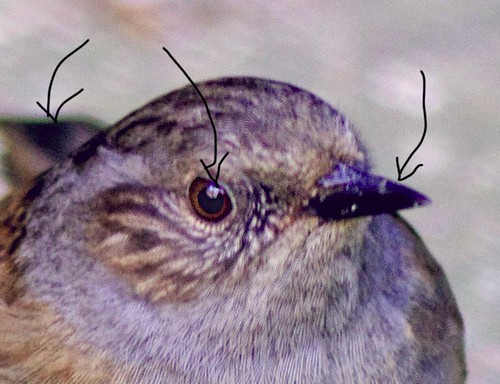
larger version: http://farm3.static.flickr.com/2706/4372302675_1e411359ff_o.jpg
Given the front-focus on this shot, you can see the purple and green fringes.
Andy
Does this affect the bokeh fringing or the front-focussing? Is this just because of this filter or do all filters do it? Either way, I'd send the filter back for a refund.
Here's what I mean by the bokeh fringing:
larger version: http://farm3.static.flickr.com/2706/4372302675_1e411359ff_o.jpg
Given the front-focus on this shot, you can see the purple and green fringes.
Andy