

What could be causing this to the RAW file

Messages
1,940
Name
Dini
Edit My Images
Yes
Some of the RAW files are showing up funny in lightroom or cs4. Here is what i see in Lightroom and also on cs4.
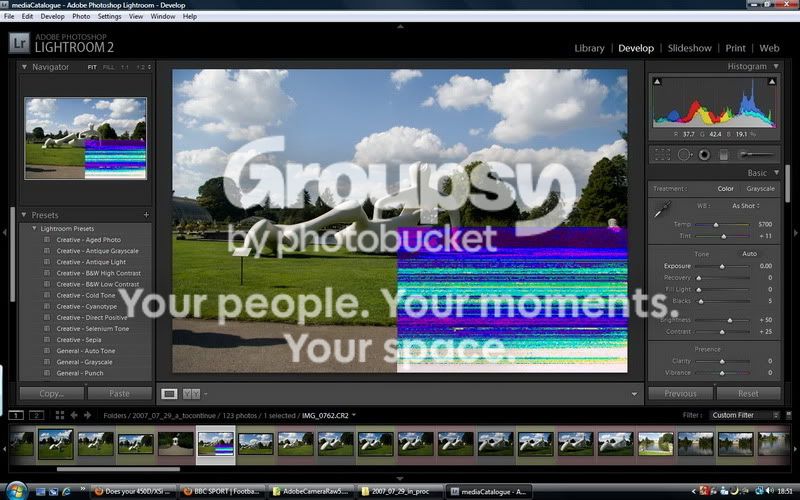
Untitled-1.jpg


If i look at the same raw file using a different tool other than lightroom and cs4 it displays fine. Presumabely this means the RAW file is not damaged but there is something wrong with how lightroom and cs4 is decoding it?
 
Ok i've just found out that it also shows as in Lightroom on the other editor as well. When i load the pic it shows fine but then after about 8 seconds that stuff on the bottom right corner appears..
 
Looks like a corrupted card to me Ziggy. Hopefully someone can help to confirm or shoot me?
 
Sorry i should have provided more information. I took these pictures quite a while back and and when i transffered them from card to disk there were no problems. i did even process them about 2 years ago.

I tried to clean up my folders and moved things around and this happened. I still have a backup on the original location which is not corrupted. All i did was move the folders around (from one disk to another) and now when i open the file thats how it comes up.

it didnt happen to all of the pictures in that folder. I think on the screenshot above you can see from the thumbnails that 3 are corrupted.

I dont understand what could have caused it. I am trying moving the files again just in case something went wrong during the copying. I wonder if the disk i am copying to is bad.
 
It's file corruption. I've had exactly the same thing on the odd raw here and there. No specific reason. Most, if not all, were fine after converting them to DNGs for some reason. I used the standalone Adobe converter. Try that if the Lightroom one doesn't work.
 
The file itself was probably corrupted in the PC when you copied it...it happens...not too often, thankfully...which is why you should back-up to at least two seprate locations.

The XMP is just the embedded data - nothing to do with it being corrupted.

Nikon Transfer allows you to specify a back-up location for the files on transfer, preferably to a separate hard-drive...
 
Hi Ziggy,

I have the same problem with the occasional image in Adobe Bridge... I have no idea what causes it but if I open the image up in DPP, it's fine! :shrug:

Si
 
Back
Top