What PC's do you guys use

Messages
370
Name
Paul Mitchell
Edit My Images
Yes
Basically im getting intpo photo editing more now and although my laptop isnt any old cheap piece of doo doo its slow at doing what i want, so just trying to find out what you guys use, processor, graphics are the main thing, im by no means new to pc's so im going to build one but want to know where to put my money for the best results.

Also what monitors are you guys using as i cant seem to find one that you can calibrate like iv read in a few threads


oh and i dont and wont use MAC sory :S
 
AMD Phenom Quad core 3Ghz, 8GB RAM, 1GB NVidia 9800GT, Vista Home Premium 64Bit. HP LP2475w monitors calibrated with an Eye One Display 2.

I built this machine up about 18 months ago, but it's still going strong and running fast. Has no problems editing stills (even 12MP images from the D300s with a couple of dozen layers in them in Photoshop) and loves editing in 1080p. :)

If I had to build it any differently, I'd probably see if I could find a motherboard that'd let me have 16GB or 32GB of RAM instead of just 8GB, but that's just a personal preference to speed up my After Effects workflow.
 
intel quad core q6600 3ish ghz last i checked (can't remember whether this is still oc'd or not) 6gb ram, 1gb ati 5770 graphics card, various hard drives but a samsung f3 1tb as the main drive with win7 64 bit

24" not amazing screen, spyder 3 pro calibrator

generally in order of importance for a new photo editing pc base unit i'd say ram, cpu, hard drive
important for a pc, decent psu and good cooling
decent graphics card is only really a must for gaming (or cad/renders)

the above is all imho but i'm obviously wrong because we're talking about pc's and someone else is always right :P
 
Top priority I'd say is a good monitor. It doesn't matter how good your PC is if your monitor's contrast and colour changes from the bottom of the screen to the top;

Basically, buy an IPS monitor. No matter how crap your PC may be, a calibrated IPS monitor is going to show you top quality results every time.
 
Hi Paul,

I'm always reluctant to recommend any particular computer hardware as there are always people who will vociferously disagree. I think it's fair to say you need the fastest processor, most RAM, biggest/fastest hard drive and best video card that you can afford - obvious, I know :D

On the monitor front, almost all lcd units can be calibrated/adjusted - you just need to buy a calibration device (Spyder/Pantone Huey/Colormonkey) to achieve that. The best lcd panel type for photographic work are S-IPS/H-IPS ones but they are generally far more expensive than VA or TN screens. You pays yer money and takes yer choice :)
 
agreed about the monitor, i was going to say something but figured we were just talking base units

ips monitor with calibrator > all

however if it's for your own personal pleasure and you're more than likely not going to print it's less of an issue :)
 
On the monitor front, almost all lcd units can be calibrated/adjusted

But a regular cheap TN screen won't be accurate, no matter how much it's calibrated.
 
haha ^^^ so tru im a computer operator for VOCALINK and everybody is always right...

anyways thanks for the info so far its giving me a few ideas...i didnt realise the calibrating was a seperate thing, need to look at these
 
A crap one.

Well, crap as in it's slow, theres nothing technically wrong with it. I don't actually need anything faster, although if I had it, I would probably utilise some of the extra power, if not just to get PP'ing done a bit quicker. I also use a 7 year old monitor that is not calibrated, and the chemists to print what I want to print. Wonderful!

As long as my photos look reasonably like they do on screen, blue is blue, red is red and green is green, I'm not bothered. When I start taking photography - or life for that matter - more seriously (like never), I'll get better, faster kit. At the moment most of my photography is for documentation with the added bonus of being arty when I can pull it off, so all the frills are unimportant to me.
 
But a regular cheap TN screen won't be accurate, no matter how much it's calibrated.

I didn't say, or infer, that it would be. The OP said he was having trouble finding any that could be calibrated so I was simply pointing out that most could.
 
Basically the way calibration works, is that the software sends out known values of colour (and grey), and a device hanging over your screen reads the actual colour that your monitor is putting out.

Then it creates an ICC profile that tells the graphics card how to adjust itself to make the colours it sends out match those that it was expecting.
 
I didn't say, or infer, that it would be. The OP said he was having trouble finding any that could be calibrated so I was simply pointing out that most could.

Ok, but if a monitor is calibrated, yet still wrong, how is it calibrated? :)

That essentially means it can't be.
 
Your monitor probably isn't "right" though it's just closer to "right" you're right that an ips display produces a "truer" image but it doesn't mean that tn's etc are just flat out wrong

i imagine the high end eizos/lacies/necs etc are more accurate than yours john but doesn't mean yours is wrong

hope you understand what i'm saying isn't insulting you're just being a bit pedantic about this i think :)
 
I'm not being pedantic, it's just a fact that you'll never get accurate with a TN display.

Without moving your head, just shifting your eyes from the top of a TN display to the bottom shows a difference in contrast and colour.
 
Intel Core 2 Quad Q9550 2.83GHz w/ Alpenföhn Panorama 'Low Profile' CPU Cooler
ZOTAC GF9300-D-E / GeForce 9300 / ITX Motherboard
1TB Samsung HD103UI EcoGreen F1
GEIL 8GB (2x 4GB) Black Dragon DDR2
XFX ATI HD 4650 1GB
BeQuiet 480w PSU
Lian Li Mini-Q (PC-Q07) Case
Dell 2209WA (Spyder 3 Pro Calibrated)
Windows 7 Ultimate

im going to bin off the 1TB in favour of a 64gb SSD shortly, dont need the storage in this box now..
 
These are just my main machines:

Mac Pro Quad Xeon 10Gb, 4x1Tb (MacOS)

Macbook Pro 2.6GHz 4Gb, 500Gb (MacOS)

iMac 1.83GHz 2Gb, 160Gb (MacOS)

Dell proliant Dual Xeon 2GHz 4Gb, 4x1Tb (Linux - FreeNAS)

Dual 3.66GHz P4 4Gb, 3x 500Gb (Windows XP + Windows Vista + Windows 7)

1.4GHz 768Mb 80Gb laptop (Windows XP)

2.66GHz 2Gb, 500Gb (Linux)
 
Basically im getting intpo photo editing more now and although my laptop isnt any old cheap piece of doo doo its slow at doing what i want, so just trying to find out what you guys use, processor, graphics are the main thing, im by no means new to pc's so im going to build one but want to know where to put my money for the best results.

Also what monitors are you guys using as i cant seem to find one that you can calibrate like iv read in a few threads


oh and i dont and wont use MAC sory :S

Working from top down my rig is -

HP 2010i 20" widescreen monitor
Gigabyte GA-945GCM(X)-S2 motherboard
Intel core 2 duo LGA775 L2 2MB cache 800mhz processor
2GB DDR2 PC5300 667mhz RAM
160GB sata hard drive with 8MB cache
ATI radeon HD4670 GPU with 1GB on board memory
Ice Cool 550 watt PSU
Saitek Eclipse II gaming keyboard (built in LED's)
Windows XP Pro 32 bit
PB mini tower unit

As I already had an old tower unit I built my PC with the above components.
Cost me a smidge over £350 to buy the parts.
The rig is ideal for photo processing and up to date gaming.

Does what I need it to do.
 
These are just my main machines:

Mac Pro Quad Xeon 10Gb, 4x1Tb (MacOS)

Macbook Pro 2.6GHz 4Gb, 500Gb (MacOS)

iMac 1.83GHz 2Gb, 160Gb (MacOS)

Dell proliant Dual Xeon 2GHz 4Gb, 4x1Tb (Linux - FreeNAS)

Dual 3.66GHz P4 4Gb, 3x 500Gb (Windows XP + Windows Vista + Windows 7)

1.4GHz 768Mb 80Gb laptop (Windows XP)

2.66GHz 2Gb, 500Gb (Linux)


your main machines JEEEEEESUS, you have more than we do at work (not really) but why so many, each have a diff use? if you were to select 1 for an everyday PS desktop what would you use.


And guys im sorry if iv caused abit of a stir with the monitor issue, im a complete novice with calibrating.

Ta
 
At Home:

MBP 17": Intel C2D 3.06GHz, 4Gb, 9400GT & 9600GT 512Mb, 500Gb 7,200rpm, OS X.6.4.
I was about to smash this thing earlier this evening when working with the adjustment brush on a measly 12mp .dng file in Lr3. Every stroke, 'loading', zooms in and out in the process. Took 15 mins to do a 1 minute job.
But it's a Mac and I can't be bothered with Windows at home so I cope with it.

At work:
Dell XPS 630i: Intel Core2Quad 2.4GHz (O/C'ed to 2.6GHz), 4Gb RAM, 8800GT w/512Mb, 500Gb 7,200rpm, Windows Vista Ultimate SP3 x64 Edition.
Lightning fast rig, really, really enjoy using it. Plus, its not a bad looker either - minus the Dell badge anyway... :D
 
My set ups:

Intel Core I7 920 2.66GHz Processor overclocked @ 4GHz

Noctua NH-D14 Dual Radiator CPU Cooler

2 x ATi Radeon HD 5870 1GB Graphics Card

Asus P6T Deluxe X58 Motherboard

6GB Patriot Viper DDR3 1600mhz RAM

80GB Intel X25-M Solid State Hard Disk (SSD)

2 x 1000GB SATA 7200rpm Hard Disks in RAID 0

Corsair 1000w modular PSU

Windows 64bit Premium.
 
your main machines JEEEEEESUS, you have more than we do at work (not really) but why so many, each have a diff use? if you were to select 1 for an everyday PS desktop what would you use.


And guys im sorry if iv caused abit of a stir with the monitor issue, im a complete novice with calibrating.

Ta

I use the Macs as everyday machines. The data is stored on the "Dell Proliant" which is running FreeNAS and effectively running as a file server. I therefore use the Macbook Pro and Mac Pro the most.

The iMac is going into the studio for tethered shooting etc.

The Windows machines are used when I have no choice!
 
A 6 year old AMD x2 4400 with 2GB of ram. "State of the art" when I built it but unfortunately I haven't been able to afford a new one since. :(

It went from 160GB to just under 2TB at the moment so plenty of storage. Only real issue is the lack of RAM can be rather annoying when processing more than one file at a time (panos etc).
 
I Run a custom build i7 over clocked to 4Ghz, watercooled.
2X Ati Radeon HD 4800 1Gb, watercooled
12Gb Triple channel DDR3 Ram
2X Western Digital velociraptor drives in RAID Stripe for Boot
2X Western Digital 1TB Blue drives in RAID Mirror for storage.
3X Dell U2410's in extended desktop all calibrated.

Must say the Screen are the best part and most important for me.
 
But a regular cheap TN screen won't be accurate, no matter how much it's calibrated.
Wouldn't it just display a smaller gamut? Or are you talking about really cheap - say below the magical 100 quid limit? There are some neat TN displays out there. If I remember correctly the Samsung 226BW was absolutely fantastic and I don't think my Viewsonic does too badly.

My little rig is pretty much value for money early 2008
- E2160 @ 2.7Ghz with Scythe Mine
- 3GB 666MHz DDR2
- WD320AAKS (suspended)
- Abit IP35
- Enermax 385 Pro 82+
- PowerColor HD3870 SCS3
- Vista Home Premium 32bit
- one Sharkoon 140mm fan @ 600rpm
- one Zalman 120mm fan @ 800rpm

Does all the Photoshop I need, is whisper-quiet, but the harddrive space is getting tight.
 
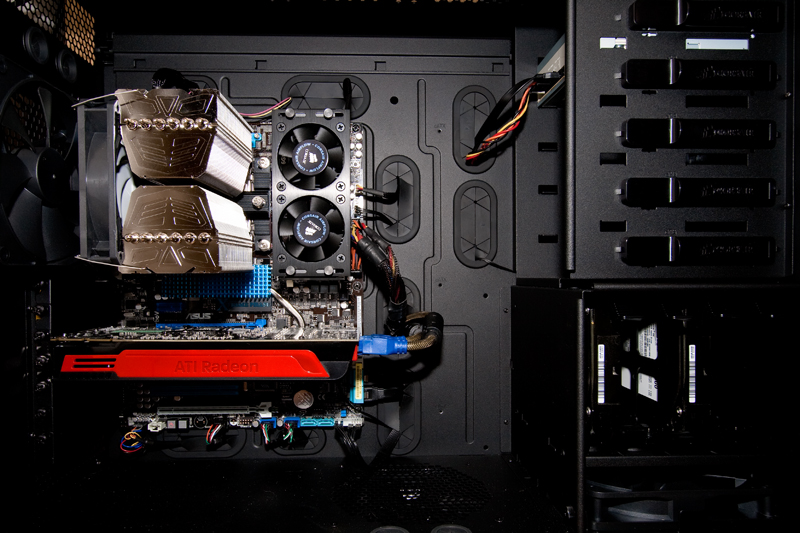
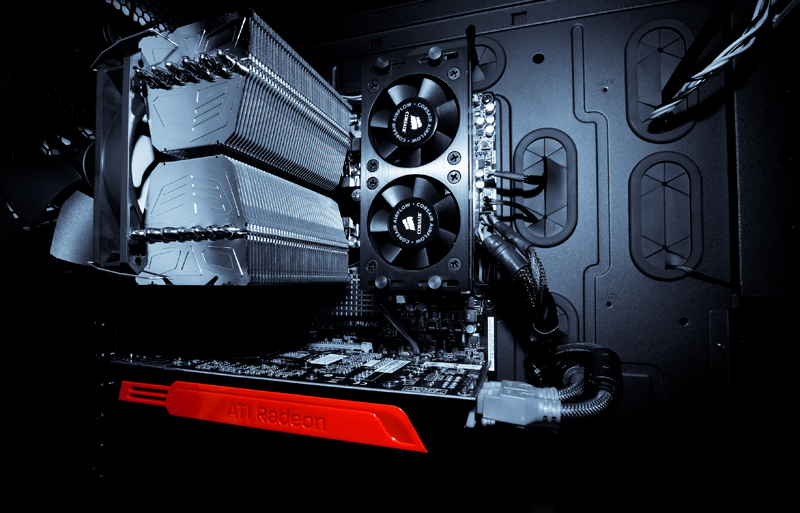
Self Built

Corsair Obsidian 700D Case.
Core i7 920 overclocked to 3.4Ghz
6Gb Corsair Dominator Tri Channel RAM 1866 running at 1600 (based on OC settings)
Asus P6X58D Premium Motherboard
ATI Radeon 5850HD (To be expanded to 2 x 5850's in Crossfire)
Lots of very quiet cooling, SATA II HDD's (although want Solid State drives)
Samsung 226BW 22" Monitor.

Shameless photo opportunity :)... because it makes photo processing SO quick :)

860864813_9Jaf3-O.jpg


860864545_fdc8X-O.jpg
 
Dell T5400, Single quad core Xeon (with space for another) and 6GB RAM

Two 21" CRT monitors. One Eizo (nice) and one Compaq (on last legs).

I have other computers, all self built. The Dell was a good deal s/h when I needed a replacement computer in a hurry.
 
Back
Top