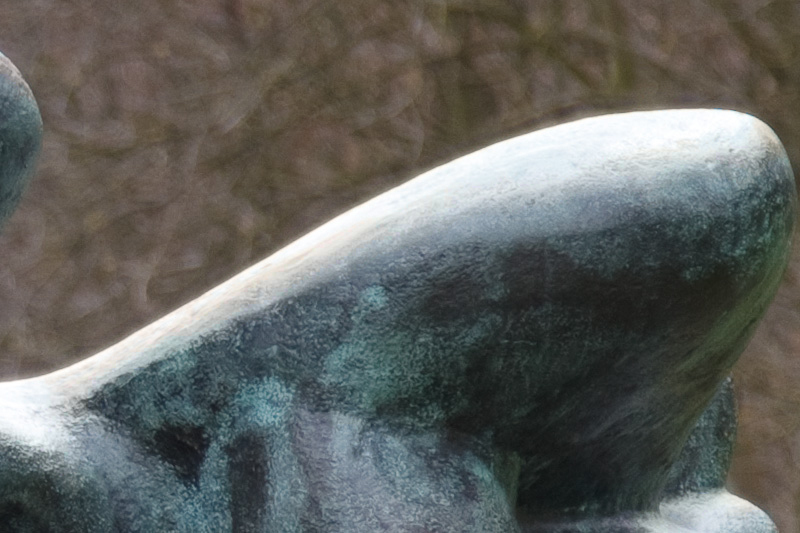
What's causing this fringing?

Messages
1,111
Name
Chris
Edit My Images
Yes
While going through some shots from last week at Yorkshire Sculpture Park I've noticed some highlight fringing on one or two shots. I at first assumed it was CA but using the sliders in Lightroom I couldn't discernibly improve it.

It wasn't present on all such shots I took (eg when I've changed angle slightly). My suspicion is that is just highlight bloom from bokeh due to the depth of focus. Other opinions would be very welcome though.

Here is the first crop...


and here is the 100% crop...


Exif as follows:
Canon 5Dmk2, 24-105mm @ 105mm. (Hoya Pro 1D filter fitted).
1/400 at f/4.0, ISO 200

Subject distance 11.9m
 
Its usually the harshness of a near white colour being bang next to a dark colour and this area is where they join together.....i think. :thinking:
 
Its usually the harshness of a near white colour being bang next to a dark colour and this area is where they join together.....i think. :thinking:

I too think that’s pretty much it, ‘unsharpness’ is noticeable in areas where one tone borders an area of a significantly different tone. In situations like this the cameras processor doesn’t know what colour the pixels should be. You might be able to improve it using some pp edge sharpening.:)
 
I at first assumed it was CA but using the sliders in Lightroom I couldn't discernibly improve it.

Try the Defringe popup menu just below the CA adjustments in Detail instead.

I usually find that you have to resort to All Edges to make an appreciable difference, but it can help reduce the effect.

In Lightroom, it seems to work by desaturating parts of the picture in close proximity to detectable edges, so it works better with subjects that aren't themselves highly coloured.

Otherwise, if it's being particularly stubborn and irritating, you can take the image into Photoshop and selectively desaturate that particular hue with Hue/Saturation Adjustment Layer (best doing this with a layer mask so you can paint on the areas you want it to apply to).
 
Thanks for the replies.

I did try the Defringe option in lightroom, again with little effect. As I said, I doesn't happen in all cases of this type of shot and from kind replies it doesn't sound like an equipment fault. I guess I'll just do a bit of judicious pp if it occurs in a critical shot.
 
What have you tried so far? Removing the filter and stopping down (you took the shot wide open) to f/5.6 or f/8 would be a splendid start. This is a lens deficiency known as chromatic abberation. The reply about the camera not knowing what to colour the pixels sounds good but in reality I don't think that's the answer (sorry!). The camera simply records what it sees - and as I say, the abberation is caused by the hunk of glass in front of the sensor.

Stop down, take a shot.
Remove the filter, take a shot.

See what's what - if still no improvement, either accept it or have the lens looked at, perhaps the condition was just pushing the optic too far.
 
Not to "nick" a thread started by a fellow TP'er but I am interested in finding out the answer on this as well as I had the same problem with a picture taken with a D300s & Nikon 28-70 f2.8 - as when I took a picture of a guard at T.o.L & his white belt had the same fringing on it as Chris's picture has here... Althou he was wearing a dark blue uniform & white gloves... Mine didn't have a filter thou...
 
What have you tried so far? Removing the filter and stopping down (you took the shot wide open) to f/5.6 or f/8 would be a splendid start. This is a lens deficiency known as chromatic abberation. The reply about the camera not knowing what to colour the pixels sounds good but in reality I don't think that's the answer (sorry!). The camera simply records what it sees - and as I say, the abberation is caused by the hunk of glass in front of the sensor.

Stop down, take a shot.
Remove the filter, take a shot.

See what's what - if still no improvement, either accept it or have the lens looked at, perhaps the condition was just pushing the optic too far.

I took it wide open (and at maximum zoom) as I wanted the shallow DOF. I've had a trawl though some other images and I'm seeing similar at smaller apertures with the same lens and filter combo.

I'll try and and recreate the effect tomorrow and try some removing the filter and stop down etc. To be honest, it happens in so few shots in extreme conditions its not really a problem. I'm just curious as to why it is occuring.
 
Back lit shots like that can have a colour fringe. If you camera lens combination gives you this, the best thing to do is to colour select the fringe. and desaturate it. It will vanish like magic.
 
If you're interested, there's a nicely written technical run down on the phenomenon here

[It's about CA in general, but focusing on purple fringing, if you'll excuse the pun :)]
 
That looks like nothing more than flare, accentuated by the use of a filter and is more obvious because of the darker background. Plenty of similar examples have been posted recently, and almost always a filter is involved.

Basically, that area is inevitably over exposed (it's essentially a specular reflection of the sun) and I bet the blinkies were flashing like mad - the highlight over exposure warning on the LCD.
 
That's classic CA.

Lens at full zoom, wide open aperture, blown white next to dark background... All of those are working against you. I don't know if the filter makes it worse, but it won't help!

Stopping down or buying a lens with better CA control would help a lot, but there's no need - 30 seconds in Paint Shop Pro gets rid of it nicely:
4549494125_d079992bb9_o.jpg
 
I'm saying nothing... you ***ts...:suspect:

Apart from...

No, I can't be bothered to go through it all again...:lol:
 
Ahhh the whole 'filters cause or enhance CA' debate...
If you buy a good one there's no reason at all that the effect shown here would be either caused or exacerbated by the use of a filter...

There's an unavoidable transmission loss - usually 3-7% with good filters. Maybe some colour-cast - again possibly 1-2% towards yellow.

A lot of people think that the problems associated with cheap filters are the same for expensive ones...it's just not the case...

Here we have an image shot with a decent, but not top-end camera and a kit lens.
There is no way any zoom with that focal range will be able to resolve accurately. None.
Canon-EF-24-105mm-f-4-L-IS-USM-Lens.jpg


Assuming it's this one - the shot was taken wide-open at maximum zoom...
That's the problem.
No lens is at it's best wide open and a kit-lens will be at it's worst and even at it's best isn't up to the standard of a lens costing three times as much.

When it comes to poor IQ and problems such as we see here, people need to stop looking for a techno-scapegoat or a cheap fix and realise that their kit just isn't up to what's being asked of it.
 
The Canon EF 24-105mm f4L IS USM may be a kit lens supplied with 5D's but it's not a cheap lens, £789.00 and it's a highly regarded lens.

Personally I don't use filters to protect my L lenses, I don't see the point in sticking a £50 filter in front of L grade glass and with the hood fitted, there is plenty of protection.
 
The Canon EF 24-105mm f4L IS USM may be a kit lens supplied with 5D's but it's not a cheap lens, £789.00 and it's a highly regarded lens.

Personally I don't use filters to protect my L lenses, I don't see the point in sticking a £50 filter in front of L grade glass and with the hood fitted, there is plenty of protection.

Exactly, you can also get the 24-70mm f2.8 in a kit with the 5DmarkII and this is widely regarded as one the best zooms available. That said, even the best/most expensive lenses are still going to suffer CA under extreme conditions.
 
I am not sure Arkady meant this but more expensive kit won't necessarily get rid of these kind of issues either. I've an 85/1.2 on a 5DmkII and the finging can be terrible - way worse than the OP has - in the wrong conditions. As the first couple of replies said, this type of shot is the perfect condition for problems to happen. The solution (for me at least) has been to close down the aperture and sometimes reframe. But then of course you don't get the shot you wanted in the first place. PP is probably the best answer.
 
Exactly - I know that lens is the fat-end of £900, but any lens with that amount of range is going to be a compromise...
I used to get this on my D2x a lot as the sensor wasn't as good as the current models... Also used to get very bad colour-fringing with dark-green next to blue - typical squaddie against a blue sky scenario, in fact...
Those issues are much reduced with the newer cameras I now use...

That camera's sensor, coupled with a lens working at it's limit is bound to show deficiencies. A blown highlight next to a dark area - it's going to show 'bleed' - you even got the same on film to a lesser extent as silver crystals affected the ones immediately adjacent to them in high-contrast situations...
It's what P&P is there for - as evidenced by the post above where it's been successfully corrected.

You learn to under-expose a little more and sacrifice shadow detail as a result...

But coming on here and saying 'oh - it's the filter' is just plain wrong - or disingenuous and misleading at best... in some situations, filters will enhance or even be the cause of some lighting abberations - but this here isn't one of them.
 
canons big teles have protective glass, a few L lenses are not sealed without filters so the hood offers little protection if moisture or rain is blown into the hood.

Do you use any filters at all in your photography, CP or square cokin/lee filters? if so these degrade the image more than what any decent multicoated UV filter does.


The Canon EF 24-105mm f4L IS USM may be a kit lens supplied with 5D's but it's not a cheap lens, £789.00 and it's a highly regarded lens.

Personally I don't use filters to protect my L lenses, I don't see the point in sticking a £50 filter in front of L grade glass and with the hood fitted, there is plenty of protection.
 
No offence Chris but this is where a lot of people get sucked into the L lens hype in my opinion.

Have a read HERE

Dave
 
No offence Chris but this is where a lot of people get sucked into the L lens hype in my opinion.

Have a read HERE

Dave

I understand the effects of CA, I had just doubted that it was the cause in this instance as it wasn't present in other similar parts of the frame and wasn't present at all in other frames taken wide open at similar FL's. Also, it didn't respond to the usual corrections in LR. In fact playing with the sliders had practically no effect on that area of the image while at the same time making over high contrast areas of the image worse.

As for being sucked in by the L lens hype, far from it. As you'll see from other posts I've made elsewhere on the forum, I'm a bid advocate of the EF-S 17-55 over the 24-70L on crop (having had one on my old 40D). It just so happens on FF the majority of the good Canon zoom glass is L. I've got a couple of Canon primes too, none L, and they are great quality also.

I do love the 24-105, it is a great zoom range (for me) for a GP lens (I went for the 24-105 'kit' over the 24-70 for this reason).

Any optical system is a series of compromises, especially a zoom lens. I was merely interested in which one of these compromises was the likely culprit here.

Having looked more at some other similar shots from the day, the effect is significantly less on shots taken at 102mm. So as Arkady had postulated, it looks likely that it is a FL/performance issue. Easily correct and possibly avoided now.

Thank you all for the advice and opinion.
 
Agree with Chris, it's not CA at all, in any form. It's just flare off a very bright surface - it's way over exposed - exagerated by the filter, and a cheap one I'll bet.

Just take the filter off, or use a high quality mulitcoated one like a Hoya HD or Pro-1 if you must. No filter is immune from image degradation problems in extreme situations and I don't want that debate again (do we Rob ;) ) but that's the problem.

A lens hood won't help here as the bright area is within the image. Hoods only shade from areas outside of the frame.
 

Haha! Sorry Chris, I missed that! It's still flare, and it's still the filter! In some difficult situations, like that one, they will cause problems :shrug:
 
Haha! Sorry Chris, I missed that! It's still flare, and it's still the filter! In some difficult situations, like that one, they will cause problems :shrug:

:)

I was planning on going out and taking a few shots to try and recreate it and try with and without the filter.

However, due to the amount of vino-collapso I imbibed at our friends last night, i'm having a similar effect with my eyes right now :eek:
 
:)

I was planning on going out and taking a few shots to try and recreate it and try with and without the filter.

However, due to the amount of vino-collapso I imbibed at our friends last night, i'm having a similar effect with my eyes right now :eek:

Here's one I prepared earlier - see post #22 and the first two comparison pics, with and without a Pro-1 UV ;) http://www.talkphotography.co.uk/forums/showthread.php?t=212297

It's very easy to provoke these effects if you know what to do, but it's also true that in most situations a high quality filter produces very few noticeable effects.

I just don't see the point in using a filter purely for protection, unless there is a real danger of damage. Sea spray is the only time I ever fit a protection filter, that kind of situation. But in 40 years I've never damaged a lens in any way, either accidentally or by careful cleaning etc. Maybe I should get out more :D But I always use a lens hood, for protection and because they can only ever enhance image quality.

You have some wonderful equipment there - same as me, as it happens. I'm sure you take great care of it anyway. Ditch the filter and get the most of that amazing image quality - 24-105L is a fantastic lens :)

Edit: There are two kinds of flare going on in those pics I linked above. The first is the halo around the lamp itself, which is quite normal, even with the best lenses in extreme siutations like that (and like yours). The filter just makes it worse.

The second kind of flare is the reflection of the lamp which bounces off the sensor and then back again from the rear of the filter, creating a ghost image. That's the worst kind of filter flare IMO and you'll almost always get it if you shoot night scenes with bright lights against dark backgrounds.
 
do you notice it at the size you will view the shot

i blow my pics up and groan.....
 
Well Hoppy says it is caused by the filter and I say it isn't - you choose...lol
 
Well Hoppy says it is caused by the filter and I say it isn't - you choose...lol

No Rob, Hoppy didn't say that.

Hoppy said, back in post #11 "That looks like nothing more than flare, accentuated by the use of a filter..." and then again "it's just flare off a very bright surface - it's way over exposed - exagerated by the filter..." And it's not CA.

Here are a couple of the pics I linked to earlier. Both images have flare, and the second one has more flare, because of the filter. You choose... :D

The halo around the lamp is present even without the filter, it is just made worse with it. This is the OP's particular problem. Then there is the other main problem with filters, which is the ghosting caused by reflections off the sensor bouncing back from the rear of the filter - that is clearly much worse with the filter, even a very high quality multi-coated one.

The ghosting is purely a digital effect - if these tests were shot on film, you wouldn't see that spot in the middle of the screen at all.


Canon 17-40L, no filter
IMG_0424.jpg


With Hoya Pro-1 UV filter
IMG_0425.jpg
 
Hoppy says all photographic problems are caused by filters...it's true...

Seriously it's the sensor being unable to cope with such drastic contrast levels...

Hoppy's images, while they do show that a filter isn't great in certain situations, doesn't really reflect the OP's situation with regard subject matter...
 
Hoppy says all photographic problems are caused by filters...it's true...

Seriously it's the sensor being unable to cope with such drastic contrast levels...

Hoppy's images, while they do show that a filter isn't great in certain situations, doesn't really reflect the OP's situation with regard subject matter...

LOL Rob ;) If I thought it would shut you up, I would go and knock up a massive sculpture now! But I fear I'd be wasting my time :p

Leaving filters completely aside for a moment, the OP's problem is good old fashion lens flare. Just as you would get with film. As I said in post #11.

It is not a sensor/contrast issue (whatever that is) and neither is it CA of any description.

IMHO! :D
 
neither is it CA of any description.

Does flare account for the cross example in the link I posted earlier in the thread?

http://toothwalker.org/optics/chromatic.html

A cross was made from two black matchsticks and mounted on a cork. It was photographed with the Canon EF 85/1.2 L USM at a routine portrait distance of one meter. The cross was placed in the very image center, against a bright white background. The high contrast and the large working aperture of f/1.2 are responsible for the longitudinal chromatic aberration observed in Fig. 3. When autofocus is used to focus on the cross, there are purple fringes all around it. After slightly defocusing the lens manually, the color of the fringes turns green. This green fringing is perhaps less distressing than the purple fringing, but it is still clearly visible. As the human eye and autofocus systems are particularly sensitive to green light, both manual focus and autofocus tend to bring the green image in sharp focus. The other colors of the spectrum are left defocused and add up to a magenta fringe. For this reason purple fringing is more common than green fringing.

and why it changes colour with a small focus shift in that example?

The OP's photograph does seem like a very similar scenario.

I must admit also that purple fringing doesn't fit my idea of lens flare. Blooming (overflow of charge from one photosite to another) perhaps, but not flare.
 
All this bickering and farting about and in all honesty I think trencheel303's post much earlier in the thread fits the bill generally. We are looking at optical weakness compounded with the settings used and conditions. Oh, wait!
 
bickering? :shrug:

It's all in very good humour as far as I can see, and a reasonable discussion of a technical question, which is the topic.

:)
 
I wasn't talking about your post specifically. The rest of the page is just useless drivel about two different opinions with hoo-hah and arrogance thrown in.
 
Does flare account for the cross example in the link I posted earlier in the thread?

http://toothwalker.org/optics/chromatic.html


and why it changes colour with a small focus shift in that example?

The OP's photograph does seem like a very similar scenario.

I must admit also that purple fringing doesn't fit my idea of lens flare. Blooming (overflow of charge from one photosite to another) perhaps, but not flare.

TBH I don't see any similarities between that test and the OP's result.

That's a demonstration of CA with an interesting twist as it illustrates de-focused CA which is less common - unless you have a lens like an 85mm f/1.2. That is a massively challenging optical spec (low f/numbers are the most difficult thing) and shows up all kinds of aberrations that are normally well controlled in a less ambitious lenses - like the OP's f/4 zoom.
 
All this bickering and farting about and in all honesty I think trencheel303's post much earlier in the thread fits the bill generally. We are looking at optical weakness compounded with the settings used and conditions. Oh, wait!

Probably quite true :D but to re-quote yourself is perhaps :crowded:
 
Back
Top