Yet another "what new PC" thread

Messages
4,347
Name
You can call me Sir.
Edit My Images
Yes
Evening all.

I've been reading this part of the forum all afternoon and I'm still not any the wiser. My current PC will be 8 years old soon, it struggles to run Lightroom1 and begged for mercy when I installed LR2 when it came out for trial.

The computer is only to be used for photo editing really, I've got laptops for anything else that needs doing. Budget is a bit limited, ideally around £300 for the hardware which will make it up to around £400 with a 64bit Win7 OS. LR and PSE9 will be upgraded as funds allow.


I can salvage some stuff from my old PC, the monitor, keyboard, mouse and external hard drive. I currently use a USB wifi dongle, are the built in wifi cards any better? Reception is poor in the room where the computer is using the USB.

Can the hard drive from my old PC be used for anything useful or is it not worth it?

Here's what I think I need:
4GB RAM. Problem is I know nothing about the different DDR versions or what speed RAM I want.
Win7 64bit so that I can add more RAM if required at a later date.
Firewire connection for the external harddrive.
At least 6 USB ports on the back, I seem to have a growing collection of peripherals.
A built in card reader would be handy.
The ability to drive two monitors (for when I buy a 2nd).

I've got absolutely no idea about motherboard, processor and PSU, I've got no idea what is compatible with what or more importantly what isn't compatible with what or what size power supply it will need!

Things it needs to drive:
Flatbed scanner
All in one printer
Graphics Tablet
Calibrator
External hard drive
USB Speaker

One other thing is that if possible it'd be good to by from www.primoit.co.uk, the company I work for has an account with them so I might be able to sweet talk my boss into buying the computer through the business so that I can save the VAT, but seeing as this isn't guaranteed I'd rather not stretch the budget at this point. One word of warning though, there website isn't too hot, If you search components>power supplies it only brings up two items but if you know what you're looking for you can search by brand along the top toolbar which should bring up everything. One thing I didn notice was that I couldn't find any case/PSU bundles which there are on places like ebuyer so that could damage the budget.

Hopefully I've given you a reasonable idea of where I'm at and where I want to be. If there's anything else you need me to answer just let me know.
 
should be easy enough, i just built a core2 quad, 4gb ddr2-800 media center box for about 350. i used an existing hard drive i had laying about the place and that was with a budget case with psu included however an expensive ITX board so you could stretch to a nicer case. that didnt have a dedicated graphics card so that would be an extra 40 quid or so.
 
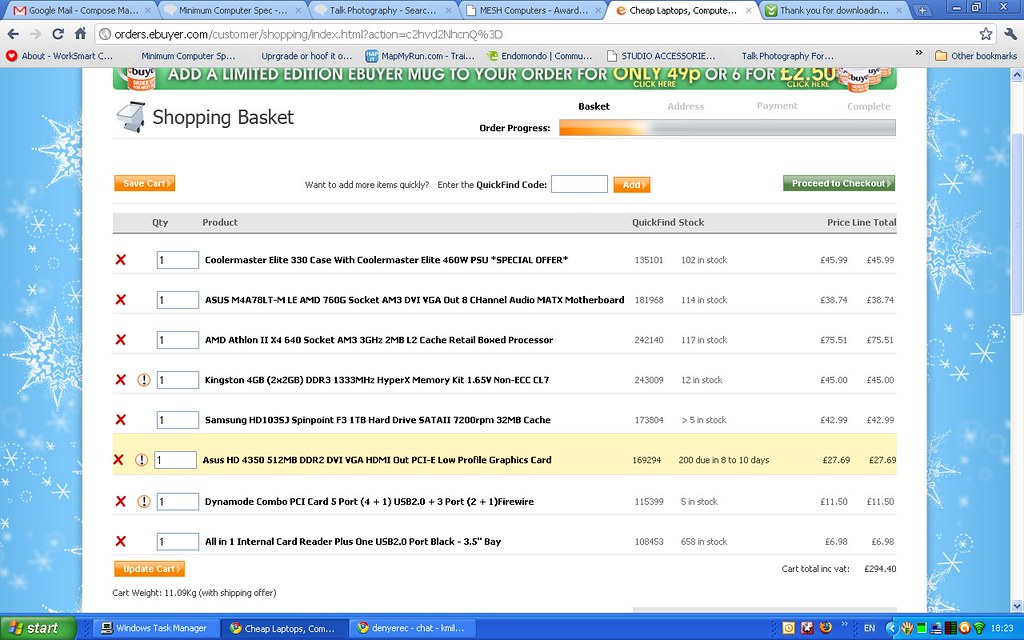
Cheers Neil. I've started putting a few things together on ebuyer which includes a mobo/cpu/ram deal but I have a question about it.

The RAM is some name I've not heard of and doesn't seem to be sold on its own on the website. Really I want 4GB not two and seeing as I can't buy another 2GB stick of the same type I might as well buy 2x2GB matched and sell the bundled RAM.

I thought I'd read somewhere that the RAM is 1333Mhz but either the mobo or cpu was slower (1066) although I now can't find that. Is the RAM over spec'd so that it doesn't run at full capacity or is it just a coincidence? If I'm looking at alternative RAM should I look at 1066 or 1333?

The Bundle

Here's a list of the RAM I was looking at. What's the difference between the 2nd and 3rd items (both Kingston RAM) and is it worth paying the extra £10 or will I not notice any difference?

RAM options
 
take alook at these people, just bought one from them, reasonably priced and they do exactly what they say they will do.
You can take a bog standard computer and add to it what ever you want too.

[URL="http://www.meshcomputers.com[/URL]

spike
 
Last edited:
Any particular reason you're looking to build your own, rather than just buy off the shelf? You can get just a base unit (and keep your existing monitor / keyboard / mouse / etc) from any computer shop. And to be honest, for what you want you probably don't need to be thinking about the spec of individual components - any half decent box from any computer shop will be more than enough for what you want to do, and should last just ad long as if you'd carefully chosen every component yourself. It's also guaranteed to work as a system, and if it goes wrong you can return it to get the whole thing fixed, rather than trying to work out which bit died. It's also often just as cheap or cheaper to buy one ready-built as it is to buy all the components yourself.

You probably won't be able to reuse much from your old PC - modern hard drives use a different interface than what was around 8 years ago, so very unlikely yours would work on any modern motherboard - and big drives are very cheap now anyway.

David
 
I guess your right about being able to buy a box for a similar price, I suppose I'm hoping that if I start from scratch I'll learn more about computers in the process and be able to sort out problems better in the future than I'm able to now. The other advantage of starting from scratch is that it won't come loaded with a load of junk that I don't want, it'll be a clean system and I can load only the things I want without having to think about deleting the things I don't want.
 
I guess your right about being able to buy a box for a similar price, I suppose I'm hoping that if I start from scratch I'll learn more about computers in the process and be able to sort out problems better in the future than I'm able to now. The other advantage of starting from scratch is that it won't come loaded with a load of junk that I don't want, it'll be a clean system and I can load only the things I want without having to think about deleting the things I don't want.

Any half decent supplier will happily sell you a PC without an o/s installed, and allow you to customise the spec. I would never trust any vendor that tries to force a particular o/s on me!
 
Not wishing to add to your choices but...

I've just spent three days going through various sites looking at a new PC. I did consider building from scratch, but I just worried about the faff involved, as well as my proclivity to break thin spidery bits of metal.

So, as mentioned above, Mesh are pretty good but whilst they're a lot cheaper than Dell, they're not as cheap as the two "customise your own PC" sites I found:

Computer Planet and DinoPC both were very competitive, and allow you to pick and choose precisely what you want. Both provide the OS with the DVD and keys (rather than a restoration DVD). I also looked at Arbico, PC Specialist, and Mesh.

I ran that spec through Computer Planet and it came up with £341 as a total, but I couldn't match the motherboard (guessed), the power supply (still got a 450W one) or the graphics card (had to opt for a 1Gb ATI Radeon 4350). Obviously that would be a system built by someone else though.

Details of what each motherboard will power (USB, Firewire slots etc) are on the "i" buttons against each component which really helped me decide which parts to choose.

I also went here: http://www.cpubenchmark.net/ to compare CPU and video card speeds to see how much of an improvement over my existing system I was making.

Hope this helps. I did spend a long time mulling over the parts I wanted and eventually opted for DinoPC as they were the most helpful on the phone.

-H
 
That Graphic card you have chosen is crappy.


I could suggest go with Intel I3 + 4gb ddr3 ram + motherboard that has onboard graphics + some good quality Power Supply. And later buy from ebay or other forums some Used Nvidia 8800gts 512 / 9800GTS or Ati 48xx. That would be more wisely.

You can use old hdd cd rom and e.t.c. from your old pc.

But if your budget is about 400 paunds ... you could simply buy used laptop with dedicated graphics card + it will add portability.
 
That Graphic card you have chosen is crappy.


I could suggest go with Intel I3 + 4gb ddr3 ram + motherboard that has onboard graphics + some good quality Power Supply. And later buy from ebay or other forums some Used Nvidia 8800gts 512 / 9800GTS or Ati 48xx. That would be more wisely.

The graphic card the op has selected is not crappy. For what he needs it will be fine. As it is the motherboard he has selected does have onboard gfx, but personally i wouldn't use it as it will need to use some of the system memory.

Kev M. you haven't listed an optical drive. Just in case you've forgotten as its a pain to place an order and realise you've not ordered something and to halt your build plans.
 
Not wishing to add to your choices but...

Computer Planet and DinoPC both were very competitive, and allow you to pick and choose precisely what you want. Both provide the OS with the DVD and keys (rather than a restoration DVD). I also looked at Arbico, PC Specialist, and Mesh.

Cheers or the tip, that Computer Planet site is pretty good. I'm going to be going through my options tomorrow with a mate who knows about these things and will see what he thinks of their stuff.:thumbs:

That Graphic card you have chosen is crappy.


I could suggest go with Intel I3 + 4gb ddr3 ram + motherboard that has onboard graphics + some good quality Power Supply. And later buy from ebay or other forums some Used Nvidia 8800gts 512 / 9800GTS or Ati 48xx. That would be more wisely.

You can use old hdd cd rom and e.t.c. from your old pc.

But if your budget is about 400 paunds ... you could simply buy used laptop with dedicated graphics card + it will add portability.

The graphics card is probably fine for my needs, all I want is something capable of running dual monitors in photoshop/lightroom. The only 13 system I've found for £400 is the lowest spec Dell's and I'd bet that to squeeze that in they're skimping on quality elsewhere. I don't need portability either, I've got laptops already for that sort of thing, I really want a decent desktop for doing the editing on.

The graphic card the op has selected is not crappy. For what he needs it will be fine. As it is the motherboard he has selected does have onboard gfx, but personally i wouldn't use it as it will need to use some of the system memory.

Kev M. you haven't listed an optical drive. Just in case you've forgotten as its a pain to place an order and realise you've not ordered something and to halt your build plans.

Cheers for the thought, the reason I've not listed the optical drive is because I intend to scavenge the ones out of my old PC. They're nothing special but they'll do for now considering how little use they've had and how little use they'll get.
 
Cheap software on eBay, is it lukewarm to the touch?;)

Seriously though, which version of W7 do you think I'll need? The MS website is a bit thin on info, the only benefit of Premium over Home that appeals is the ability to backup over a network but I'm assuming I can get 3rd part software to do that anyway if I bought W7Home?
 
Back
Top