7D always 1 to 1.5 overexposed.

Messages
760
Edit My Images
Yes
I'm still getting grips with the new body. I went to a wedding a few weeks back and a few days out with the kids. In all cases, I had to reduce the exposure of all the RAWs by at least 1 in dpp. Usually 1.33.

I can't find any settings that are causing this. Any ideas?
 
on your camera screen too bright or your monitor?? calibration on your monitor ok? also check your histogram on your cam as you shoot, that should guide you as well
 
How are you shooting? I usually find I underexpose by about 1/3 or 2/3 stop in nearly all situations from what the camera's meter says is 'right', even on Matrix...
 
How are you shooting? I usually find I underexpose by about 1/3 or 2/3 stop in nearly all situations from what the camera's meter says is 'right', even on Matrix...

I do exactly the same, shooting at 0 EV always seems too light to me.
 
I do exactly the same, shooting at 0 EV always seems too light to me.

Yep, me too. regardless of whether the histogram is 'correct', I know for a fact that a photograph on 0 EV makes the situation look brighter than it really was.
 
But isn't it better to 'shoot to the right' and reduce it in post processing of the RAW file?
 
Metering mode?

How are you shooting Av, Tv? Manual and just getting the meter to the middle?
 
on your camera screen too bright or your monitor?? calibration on your monitor ok? also check your histogram on your cam as you shoot, that should guide you as well

On both the camera and Computer. Histograms are biased to the right. Pictures from the 400d AND 50D look fine.

You haven't knocked the exposure compensation have you? Or left it set from a previous shoot?

That was my first thought....but nope its blob on. I remember checking the 50D exposure on the LCD and on the main screen and seeing they were different. I checked the 7D and nope both are set to 0.

How are you shooting? I usually find I underexpose by about 1/3 or 2/3 stop in nearly all situations from what the camera's meter says is 'right', even on Matrix...

Usually AV, Evaluative Metering. I then trust the camera to get the exposure right.:bonk:

Big white dress confusing the exposure?


Big white chief says big white dress cause underexposure.

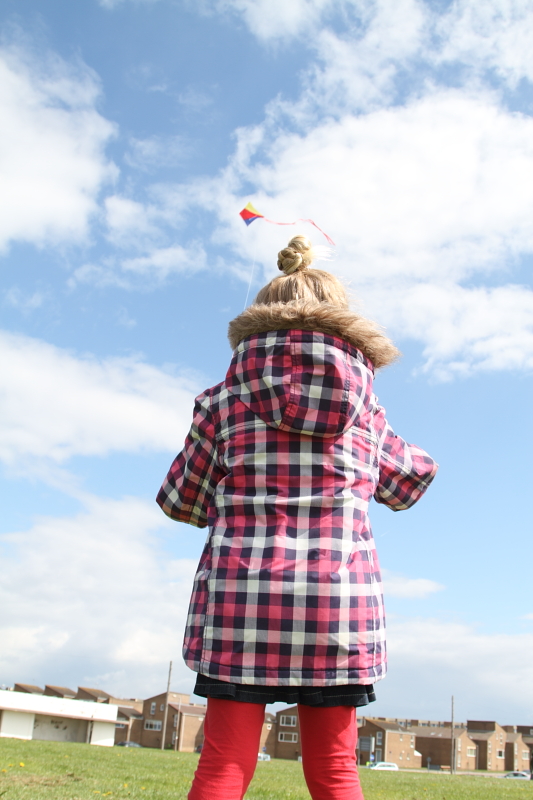
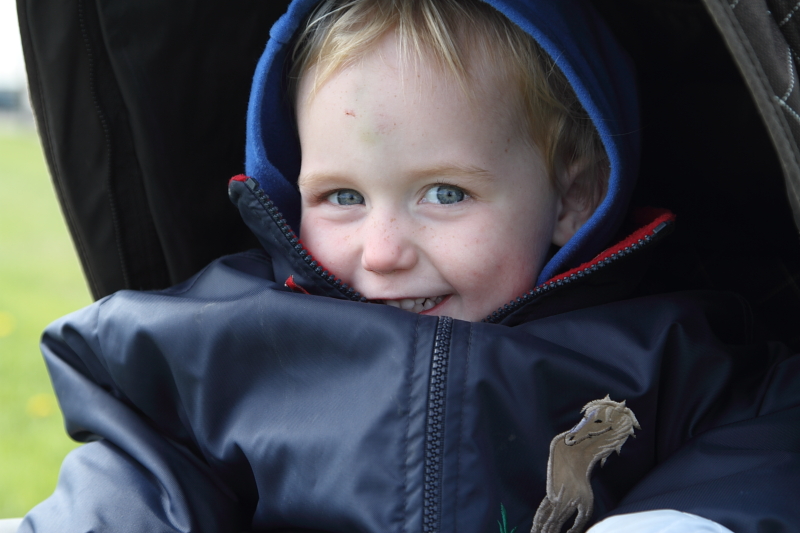
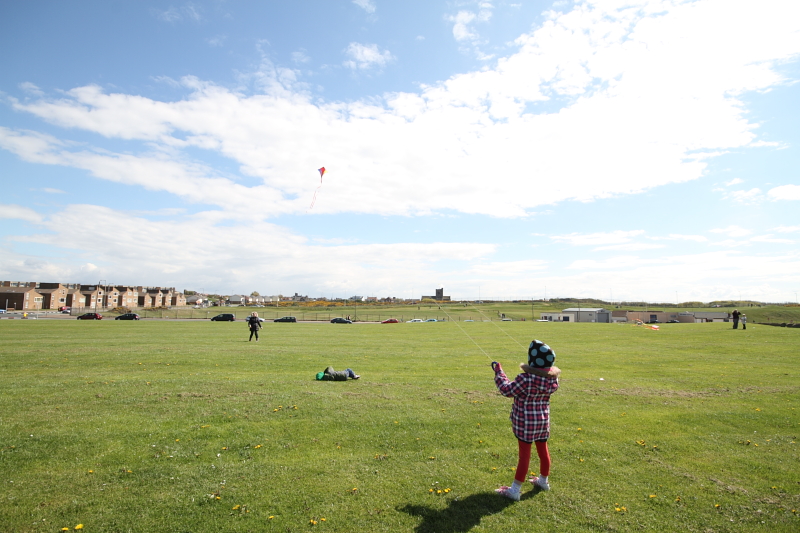
What about kite flying?, Pics of my boy in his pram?

Metering mode?

How are you shooting Av, Tv? Manual and just getting the meter to the middle?

The problems began in AV mode, Evaluative metering, Pic in AE program seam better. :bang:


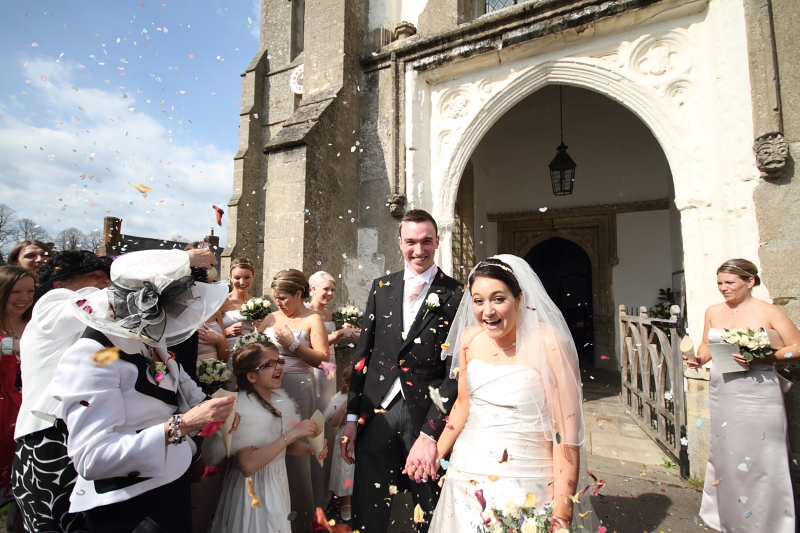
Some examples:

4589667331_061e335d21_o.jpg


4589666651_2b63e82298_o.jpg


4589665969_5e0a0f6821_o.jpg


4590285662_2eacff8ab0_o.jpg
 
But isn't it better to 'shoot to the right' and reduce it in post processing of the RAW file?

Going through hundreds of RAW files isn't my idea of fun after a day out... I only ETTR if I am at high ISO.
 
Those exposures are fine, as expected shooting most of them in Auto as well. If you want more control over the final outcome, then start shooting more in Av, etc.

I was with you all the way until you said "Av" at the end there. Did you mean Manual?

Autoexposure is not very clever, left to its own devices. It assumes the subject/scene is a middle tone unless you tell it different. In tricky lighting it can easily make assumptions that don't work well for the scene as a whole. Sometimes (most times) that requires evaluation of the subject/scene by the photographer and some input from him/her to tell the camera what it needs to know when coming up with its best guess at the exposure. If your subject/scene is darker than "middle grey" then you need to tell the camera. Ditto for subjects/scenes that are brighter than "middle grey".

In general terms, evaluative metering is a fickle beast and can catch out the unwary. While the metering does look at the whole scene, the exposure is influenced most strongly by the tones at the point where you focused, less so by the tones surrounding that focus point, and much less so elsewhere in the frame. In other words, if you focus on a dark subject, or dark area, then the camera will brighten up the exposure. If you focus on paler tones then the exposure may come out darker than you like.

As far as evaluative metering on the 7D is concerned, I have read that with its colour aware meter the 7D can expand the area which it considers to be the subject, by including areas of the scene of similar tone and distance to your subject (focused point) to have equal importance in influencing the exposure.

If you are going to do things like shoot at the shaded side of your subject while including brightly sunlit clouds in the scene it is more than likely you will need to step in and take some control. If you focus on a groom dressed in black, with a sunlit bride right beside him, you might well find the bride to be overexposed. The Exposure Compensation dial is there to be used. You can't simply point the camera at anything and everything and expect a perfect result without any input on your part. The EC dial is one tool you can/should use. The histogram and blinking highlight warnings after you've taken the shot are a couple of others.

If you have scenes of high dynamic range, or where nailing exposure accurately is tricky, then shooting raw and using good raw editing software will help you retrieve some image detail that might be lost forever when shooting JPEG. However, it is still important to try to get a perfect exposure in the first place, rather than always relying on raw as a safety net to bail you out.

There is a general rule (guideline) for digital photography, especially when shooting raw, which is to expose for the highlights and develop (edit) for the shadows. To do that well requires input from the photographer. If you just leave things to autoexposure, especially in evaluative metering mode, your results will tend to end up exposed for the subject (possibly wrongly) and b****r anything else in the scene.

My prefered approach, when I want to get my exposures spot on, is to use manual exposure and to spot meter off something that allows me to set my exposure very precisely. If I have time and need then I may well fire off a test shot and verify that my exposure setting is good before moving on. If I need to make an adjustment then I do. I'm not infallible either.

Here is one example of mine where I used manual exposure to lock in an exposure that was correct for the lighting conditions at the time. It has the histogram pegged very precisely at the right hand edge, with an exposure that is about as good as one could hope for. If I had tried to follow this bird in flight as it flew from a background of bright sky to one of shaded trees, using autoexposure, my exposures would have been all over the place, and many would have been disappointing to say the least. With manual exposure I was in charge and got the results I wanted from the first press of the shutter button.

20100505_153422_.JPG


If I had used autoexposure for this shot I couldn't even tell you what the result might have been as I have no idea how the camera would evaluate the scene. By the time I found out it might well be too late.

Here's another example. I'd say this would be a tricky scene for autoexposure to get just right. By setting my exposure manually I had no difficulty in getting things dialed in perfectly....


20100509_064608_.JPG
 
Those look ok to me ant to be honest I normally over expose all my shots by 1/3 on all my cameras.
 
Hi Brock,

Those images look fine - at least nothing wrong with the camera. Tim has given a very detailed explanation above. Without echoing what he says basically all of the examples you posted have a large dynamic range. Bright skies, but with blacks etc.

In these situations it can be difficult to dial in the correct exposure and the camera metering can get confused. At the end of the day the evaluative meter is just and average and so can get skewed quite easily.

You can either spot meter and shoot manual to get correct exposure on the subject. Or perhaps just take a shot, have a look at it and the histogram / blown highlights, then dial in some Exposure Compensation to compensate.
 
p.s. taking the wedding photo as an example, it is clear that the scene, especially the most important part(s) is brightly sunlit in early afternoon light. There is a handy rule of thumb for setting exposure when shooting in sunny conditions, called the "Sunny 16 Rule". In such conditions the rule says that with your aperture at f/16 your shutter speed should be the reciprocal of your ISO e.g. at 100 ISO you would shoot at 1/100. At 200 ISO you would shoot at 1/200 and so on. If I had been shooting this scene I would have set a manual exposure equivalent to a sunny 16 exposure, at least initially, although not at f/16, obviously. Something like f/5.6 at 1/800 would have been a better starting point. If I found that exposure to be slightly off then I would have adjusted slightly and then left it alone until the lighting conditions altered.

The exposure for the wedding shot is 1/640, f/4.5, 100 ISO. f/4.5 is 3.7 stops brighter than f/16 so we would expect a shutter speed 3.7 stops dimmer than 1/100 to compensate. Unfortunately, 1/640 is only 2.7 stops darker than 1/100, so overall, based on a sunny 16 standard exposure, the shot is too bright by about 1 stop. I'm not sure it's quite that bad, but clearly it is overexposed. Personally I would not blame the camera for that. It's a tricky scene to expose correctly, with lots of DR, and it needs the photographer to take control for best results. If this had been shot raw then there should have been quite a bit of opportunity to recover much of the highlight detail, although I think not so easily in DPP. Lightroom/ACR would almost certainly have been able to do a pretty good job of recovery.
 
Tdodd, that was quite a read and thanks for the time. The shots are shot in raw so I was able to corrent the 1stop error on all the shots from the day. Looking back at the set, there is a higher dr than i'd appreciated.

I'm still not confident to move into manual exposure yet. I've not had the 7d long so I'm still getting used to navigating through it. I still struggle with remembering iso, dof, af selection and metering modes in the time from seeing a shot to taking it before the moment has gone.

Your comment on evaluative metering are very surprising, and goes slightly against what I was taught by canon experience seminars. It does make sense. It sounds more like a slight centre weighted metering than full frame metering

out of interest, for that eagle shot, did you anticipate the bird flying there and set up prior, or are you saying you metered, manually set up and shot the image in a few moments.
 
Strangely, I find the same thing with most subject matter and my 5D Mk2.

1/3 to 2/3 stop over-exposure with evaluative metering...

As an ex-velvia user I'm used to exposing for the highlights and I usually do. The exposure compensation dial is my friend, and the develop sliders in Lightroom are then all my friends too!

But Tim, I thought the rule was to expose for the shadows and deal with the highlights in post processing, rather than the other way round?

Brocks, I'd say your pics nos 1 and 4 ARE over-exposed but it looks to me as if Lightroom could deal with them successfully. The other two..... well they look fine to me. But if you have Lightroom (or PS) you can adjust the blacks for more "saturation", and/or you could maybe turn the highlights down a little in no2. But that's really personal preference.
 
Brocks, for the "eagle" shot (I believe it's actually a kite) I had my exposure set up well in advance, and fired off many shots with identical exposures and all very good, if I may say so. I accomplished this by spot metering off the brightest part of the sky at +3 stops and locking the exposure there manually. That meant that regardless of whether the bird had a background of 100% sky (it was a grey day with fairly even cloud cover) or against a backdrop of trees, the exposure for the bird remained constant. As the sky was so flat it meant that the light did not change and so there was no need for my exposure to change either.

I had already positioned myself so that the brightest part of the sky was balancing the light in favour of the front of the bird, rather than contributing to a backlighting effect, leaving the bird in its own shadow. This gave me the best result possible under the circumstances. There is a thread over on the BirdForum where I have provided more examples and tried to explain in detail everything I do and why....

http://www.birdforum.net/showthread.php?t=165102

Coming back to evaluative metering, you can easily demonstrate how exposure alters depending on what kind of tones you are focusing on. Simply find a scene - I'm sure your back garden will do, or even indoors - or set one up where, without changing your composition, you can place different focus points over different areas of tone. Focus with a point over a bright tone and take a shot. Now, without moving the camera at all, pick a focus point that is placed over a dark tone. Focus once more and take the shot. Even though nothing in the scene has changed, or the lighting upon it, you will find you get completely different exposure results. It's actually like centre weighted metering, but instead of remaining weighted to the centre it becomes weighted to your selected focus point.

Like I say, this can catch people out, and some old hands prefer to avoid using evaluative metering and instead use centre weighted average, which gives them more predictable results, and ones for which they can more easily anticipate how much EC to dial in.
 
Here, I've shot the example I was talking about. Here are two images, both shot in Av mode with 0 EC and depending on the lens I focused on the exposure has altered significantly. That is Evaluative metering doing its thing....

20100509_113158_.JPG


20100509_111905_.JPG


The only thing I altered between shots was the focus point. The camera has decided that the shutter speed should differ from 1/60 when focused on the dark lens to 1/320 when focused on the light lens. That's a difference of 2.3 stops. As far as I am concerned that is just fracking bonkers, if you're not expecting it, and it's a good example of why I prefer to lock my exposure manually. Same scene, same lighting, should be the same exposure, but not if you let autoexposure serve you up with surprises. It's no fault of the camera; that is how it is designed to work; but you do need to know how it works if you want to get the best from it.
 
It's not explained in the manual as far as I can tell from a search of the PDF. There is one slightly cryptic line in the specifications listed at the back, where it says that Evaluative metering is "linkable to any AF point" without any explanation of what that means. That seems to imply that linking the metering to a focus point is optional, which as far as I know it is not, unless you switch to manual focusing so that there is no active focus point.

There is a discussion about the topic, including input from Chuck Westfall, here....

http://www.openphotographyforums.com/forums/showthread.php?t=8526

That discussion took place before the 7D was launched and, as I stated earlier, I think the 7D's metering system has integrated focusing data with metering data more closely, so the bias may be stronger (or not) in the 7D than other Canon cameras. It's all a bit mysterious.

I've also read somewhere that metering does not cover the entire image area, so stuff happening at the edges of the frame will have no influence at all.
 
TBH on my monitor the images look fine - detail almost everywhere and no really badly burnt out highlights.

The ones with a large expanxe of sky may be giving the appearance of being too light just because of the bright sky.

You could probably knock the exposure down by 1/2 stop and then I think they'd be spot on.
 
Perhaps its unique to the 7D then.....

No. Like I said, those discussion took place prior to the release of the 7D and pertain to evaluative metering throughout the lineup. I am simply speculating that the 7D might have different algorithms, and with a new metering and AF system that doesn't seem impossible.

Here are results from my 5D2 with a similar test setup. Once again, the only change I made between exposures was to the active focus point. The camera adjusted the exposure settings from 1/50 to 1/125 under its own steam. Nothing to do with me....

20100509_131254_.JPG


20100509_131334_.JPG


Perhaps with a less contrived scene the differences would not be so obvious in typical shooting, but when your exposures don't turn out as you might expect you may find that this behaviour is the reason.
 
http://www.imaging-resource.com/PRODS/E7D/E7DA5.HTM

Canon 7D

Quote ‘Although Evaluative metering is linked to the active AF point (whether automatically or manually selected), Spot metering is fixed to the center of the viewfinder’

Manual also says to Use AE lock when the area of focus is to be different from the exposure metering area suggesting that linked is the default. Page 106 in manual

Have you looked at the Auto lighting optimizer function on page 75 as well
 
TBH on my monitor the images look fine - detail almost everywhere and no really badly burnt out highlights.

The ones with a large expanxe of sky may be giving the appearance of being too light just because of the bright sky.

I'm surprised you say that, because I can see plenty of burned out areas and the histogram and clipping warnings confirm the problem....

20100509_132449_.JPG


20100509_132524_.JPG
 
I agree with Tim on this - all those images looked way too bright to me...
maybe 1 - 1.5 stops over, apart from the kid in the push-chair which was only maybe 1/3-2/3 stop over...
 
I was with you all the way until you said "Av" at the end there. Did you mean Manual?...[/IMG]

I said Av as the OP had shot some of those in auto, and some in Av. So I suggested he stick to using Av all the time if they were his preferred options. It's going to be better than auto if you know how to use it after all.

Personally I like to shoot in manual with spot metering all the time. But it doesn't matter, so long as you control the outcome it doesn't matter how you get there does it.

Anyway, the thread seems to have moved on a bit since then.
 
Av is auto. It is one of several autoexposure modes, including Av, Tv and P.

On cameras with a basic exposure zone, offering modes such as Portrait, Sports, Landscape and so on, those are all autoexposure modes as well. The camera is making the exposure calculations, not the photographer. I call that "autoexposure".
 
Tim, your example blows everything the experiance seminars taught me out the water. Thanks for taking the time to show it so so well

I never really noticed the issue with the 400 or 50d.

Arkady, I agree hence the question. It's better to get the shot right rather than sorting dozens of images out on the pc. It's been an education!
 
Av is auto. It is one of several autoexposure modes, including Av, Tv and P.

On cameras with a basic exposure zone, offering modes such as Portrait, Sports, Landscape and so on, those are all autoexposure modes as well. The camera is making the exposure calculations, not the photographer. I call that "autoexposure".

OK, to be pedantic, substitute 'auto' in my posts, with 'full auto'. ;)

I was just going off what the Canon put in the EXIF, that being;

"Exposure Mode:Auto"

But then you already knew that.
 
James, I didn't already know that. In fact, I would be surprised if Canon actually encodes the word "Auto" into the EXIF. There is probably a simple numeric value that gets interpreted by the EXIF viewer and displayed however that EXIF viewer sees fit. Certainly I've seen images shot in Program mode where the EXIF says "Normal". What the frack is "Normal" supposed to mean.

Anyway, as far as I see things, either you shoot with manual exposure or something else. Well surely, if it's not manual exposure it must follow that it is autoexposure. I was not trying to be funny/clever. I genuinely thought that you meant that manual exposure would be the solution and had simply mistyped, not least because even if you were to switch from "auto" to Av it wouldn't make a scrap of difference to the outcome if you were still relying on the same metering pattern to determine the exposure.

When I shoot in manual mode, which is nearly all the time, I use spot metering and choose carefully what to meter from within the scene (or perhaps not even within the scene at all) and what value to aim for on the meter itself. I evaluate the scene and I decide how to meter it and how to set exposure.

e.g. to hold detail in the white clouds I would spot meter off the clouds themselves and set an exposure to place the meter needle at +3. That might leave my subject/foreground underexposed, but at least I would have captured enough raw data from which to craft my final image. In such shooting situations it might actually be better to use an ND grad to tame the sky, but that's taking things to another level of refinement. Alternatively I might meter off the green grass at -2/3, or off my own palm at +1 1/3. In any event, I would not get fooled by weird metering patterns, such as evaluative, doing funky things, and I would be very much in charge of how to manage the dynamic range in the scene. For a simple sunny day, with my subjects sunlit, such as the wedding party, I would have my exposure locked manually into a variant of Sunny 16, and I would not blow the whites in the bride's dress or men's shirts. If I did see some odd results then a small tweak would have me sorted and good to carry on shooting.

The settings I've described above are a good starting point for preserving highlight details, say feathers on a swan, when shooting in bright conditions. If the subject/scene has no important highlight information then I may well increase my exposure in order to capture more tonal range and reduce shadow noise.

It is results such as those that started this thread that have put me off relying on autoexposure. It is often not predictable enough and thus not reliable enough, if you seek perfection. If you are more interested in the scene content rather than absolute technical perfection, and many are, then autoexposure (any mode) will usually give you a result you are happy with. If you want your results to improve technically then you can't necessarily leave everything to the camera to get right, without input from you.

I've been shooting with DSLRs for almost four years and the best thing I ever did was to move away from autoexposure (in the broad sense) and start metering precisely and setting my exposures manually. There are, without question, times when autoexposure (in the broad sense) is the right way to go, but I don't find that I encounter those times very often at all.

For those who prefer to use autoexposure (any auto mode), let's say you are shooting motorsport and panning vehicles as they come past. You can pretty much fill the frame. First you have a white car, then black, then yellow, then silver, then red, then green and blue, then yellow and red, then black and white. And so on. Which metering mode would you choose? What, if anything, would you do with your exposure compensation? How do you think your exposures would turn out? How consistent do you think the tones of the track and surrounding grass (or whatever) would be? How would you ensure that you didn't blow out your whites/brights?

If you don't shoot motorsport then how about horses - and you have to expose for white horses, black horses, patchy horses, possibly against a tricky sky. How would you meter? How would you control/adjust as horses of differing tones came past?

If it's wedding parties, let's say you first shoot the bride, then the groom, then the bride and groom together, then the groom and all his mates, then the bride and all hers. Which metering mode would you use and would you adjust EC to compensate for the differing tones parading in front of you? Would you expect to nail exposure first time for all the shots? Would the foreground and background remain the same for every shot? Would the skin tones remain the same from shot to shot?

Manual exposure is very powerful when your lighting conditions remain constant, because the tonal content of the scene can be changed freely without affecting the exposure. However, it can become a pain if the lighting is changing frequently. Conversely, autoexposure is very powerful when your subject and scene remain constant and it can react quickly and automatically to changing light levels. It is my experience that the subject/scene typically changes more rapidly than the lighting does, and for my purposes that makes manual exposure the better choice, more often than not.
 
I love reading your posts Tim - I have learned a lot in this thread!
 
as a recent convert to spot metering and manual, I wholeheartedly agree with tim (who is always spot on IMO). I find that I am so much more confident in my exposures and tackling difficult scenes, and also allowed me to think more about each shot and get more involved with understanding the subject (which for me is people).

One question for Tim: How do you expose +3 in camera? Because doesnt the in camera meter just go upto +2? Or you expose to +2 and then manually dial in 2 or 3 increments (depending how your camera is setup) to take you to +3?
 
The 7D and all 1 series bodies have a 3 stop meter, so it is a piece of cake to meter at +3. You are absolutely right that for bodies with a+/-2 meter you first have to get the meter to +2 and then add another 3 (or 2) clicks to brighten by one more stop.

It is a bit of a pain when you need to recheck, if the light changes, because you have to come back down to +2 again and then go back up 1 again. With the 7D and 1 series you just glance at the meter and confirm or adjust your settings instantly.

Perhaps the best/quickest way to deal with the 2 stop cameras is by changing ISO. After all, you pick an aperture to give the DOF you wish, and a shutter speed to give you creative control of motion, and you pick whatever ISO is necessary to allow you to use that combination. So, let's say you want to shoot f/4 at 1/250, for example, and to get the meter to +2 you need to shoot at 200 ISO. The quickest way to get to +3 is simply to bump the ISO by 1 stop. You don't really want to be adjusting your creative controls if they are where you want/need them. ISO is usually the floating "don't care" variable, although obviously as the ISO starts to climb you might choose to compromise a little on shutter speed or aperture to avoid going too high.

I only ever use full stop ISOs - 100, 200, 400, 800 etc. - because the intermediate ones are faked and serve no useful purpose when shooting raw. In fact thay can do more harm than good. So I can just click back and forth between ISOs with a single click (of course I have to press the ISO button first).

Your post has also raised another point worth mentioning. As discussed, you can manually dial in any exposure you like, placing the meter needle anywhere you want, including off the scale. When you shoot with autoexposure and a camera with only a 2 stop meter you can't usually dial in exposure compensation of more than +/-2, so if it is your aim to meter and expose at +3 you are SOL in any of the autoexposure modes. That places them at a serious disadvantage when trying to meter and expose for the highlights, which is a technique I use a lot of the time.
 
another very useful post. I never thought of treating ISO as my floating variable, I used to get so hung up about noise, when it is easily the most 'correctable' of controls. Much more so than an out of focus or motion blur.

its a shame Canon didnt give the 3 stop meter to the 5D MKII
 
Back
Top