Affinity app

Messages
173
Name
Roger
Edit My Images
No
I recently tried out Affinity photo software for image edits but found it wasn't what I wanted so deleted the app. But now I find all new raw images I download from my camera has the suffix "affinity openable" after the file name. How can I stop this? It's not a major problem just a nuisance. Thanks.
 
That looks like a windows problem, maybe look at the default apps.

Did you install the Affinity app, or the programme? I only use the programme, I don't like apps on windows, some things are not as easy to do.
 
If you are talking about Windows, it is a "file association" matter. What program were you using before that opened when double clicking the file? If you look up changing file association you will/should find the simple steps to sort it out.

When you say Affinity do you mean the now retired programs or the newer free Canva version?
 
If using w10 or w11 just type "default apps" into the search box and it will show you to the page to change the "file associations"

Enter the extension of your raw files in the top search box and it will show which is the default programme to open those files, and allow you to change it
 
Right click the file, select 'Open With' and then select 'Choose another app' tick the box that says 'Always use this app'

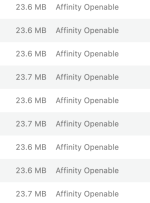
Thanks for that although that only opens a single file. I have numerous new raw files with file association as below. But if I just double click them the image opens in Preview. So I guess I have to open each image file and choose Elements as suggested. Unfortunately the Affinity image association reference stays the same. I am running Mac OS.
Screenshot 2026-06-09 at 15.32.28.png
 
Back
Top