

Alamy QC - does this look soft to you?

Joe, they all look "wrong" @ 100%. Over-processed some way. Have these had large exposure corrections in ACR? Is your "saturation" slider right down - mines set at 3 for Alamy. When you open the "sharpen" window in ACR, does it say "(preview only)" next to sharpen. I do sharpen for Alamy, last thing before converting to 8 bit. 20-25% @ 0.5px.
Are you working in 16 bit, AdobeRGB from ACR?
My workflow as follows: (1200 pix on Alamy)
All shot in RAW, opened in ACR- set to 16bit, Argb, sharpening to preview only, saturation 1-3. exposure/temp sorted - opened in PS.
Open to 100% and put a 800x800px grid over the top. Work through each grid square checking for dust and sorting.
Smart sharpen - 25%, 0.5px.
Convert to 8 bit, save as - jpeg, quality 10.
Hope that might give you some ideas
Webby
You should have no problems getting shots through with your cameras. I've recently processed a load for my daughter shot on a 400d and they all passed with my method. good luck
Webby
 
or how about (for Alamy only) doing what they advise and not sharpening at all?

I couldn't agree more here. Alamy guidelines say no sharpening at all, so why do so many of you so strongly insist otherwise?!

There are good reasons for that. The buyer may have different uses for the photos, which may need totally different levels of sharpening. Pre-sharpening may spoil everything.

For good RAW files default Lightroom settings of 25% 1px work quite well, slightly more may be OK. For printing they have export presets which seem to give good results too.

Oversharpened photos are far worse than undersharpened ones.
 
The four eyes pics : only the top (original) and number 3 are free of nasty artefacts.
Which method was number 3?
Number 2 and four have steps along diagonals and too-bright edges on some bits. Halos?

By the way I don't think that eye pic benefits from the sharpening : maybe a hairy monkey face should be the next comparison set? :)
 
Joe, they all look "wrong" @ 100%. Over-processed some way. Have these had large exposure corrections in ACR? Is your "saturation" slider right down - mines set at 3 for Alamy. When you open the "sharpen" window in ACR, does it say "(preview only)" next to sharpen. I do sharpen for Alamy, last thing before converting to 8 bit. 20-25% @ 0.5px.
Are you working in 16 bit, AdobeRGB from ACR?

no to large exposure corrections
Saturation slider on default at 0, so no to it being right down
I don't have a preview only option in the sharpen window in ACR :shrug:
I work in sRGB, I read here that you should always work in sRGB.

My workflow as follows: (1200 pix on Alamy)
All shot in RAW, opened in ACR- set to 16bit, Argb, sharpening to preview only, saturation 1-3. exposure/temp sorted - opened in PS.
Open to 100% and put a 800x800px grid over the top. Work through each grid square checking for dust and sorting.
Smart sharpen - 25%, 0.5px.
Convert to 8 bit, save as - jpeg, quality 10.
Hope that might give you some ideas
Webby
You should have no problems getting shots through with your cameras. I've recently processed a load for my daughter shot on a 400d and they all passed with my method. good luck
Webby

Thanks for the tips, I don't usually have issues, only with these last few sets, have many other images passed QC including the initial set which all went through the same processing as the ones up here :thumbs:
 
The four eyes pics : only the top (original) and number 3 are free of nasty artefacts.
Which method was number 3?
Number 2 and four have steps along diagonals and too-bright edges on some bits. Halos?

By the way I don't think that eye pic benefits from the sharpening : maybe a hairy monkey face should be the next comparison set? :)

could you point out the artifacts? I don't see them and I'd like to know what they are for my own reference in future. The third image is high pass sharpen as suggested by Byker. top is the lab method suggested by gman and the bottom is a straight forward unsharp mask
 
could you point out the artifacts? I don't see them and I'd like to know what they are for my own reference in future. The third image is high pass sharpen as suggested by Byker. top is the lab method suggested by gman and the bottom is a straight forward unsharp mask

Compare these areas, the high contrast area for haloing which makes bright white lines appear and the smooth areas where noise is increased.
sharpening.jpg
 
thanks Blasteh that is helpful

edited to say Blasteh, my bad
 
Last edited:
Joe, they all look "wrong" @ 100%. Over-processed some way. Have these had large exposure corrections in ACR? Is your "saturation" slider right down - mines set at 3 for Alamy. When you open the "sharpen" window in ACR, does it say "(preview only)" next to sharpen. I do sharpen for Alamy, last thing before converting to 8 bit. 20-25% @ 0.5px.
Are you working in 16 bit, AdobeRGB from ACR?
My workflow as follows: (1200 pix on Alamy)
All shot in RAW, opened in ACR- set to 16bit, Argb, sharpening to preview only, saturation 1-3. exposure/temp sorted - opened in PS.
Open to 100% and put a 800x800px grid over the top. Work through each grid square checking for dust and sorting.
Smart sharpen - 25%, 0.5px.
Convert to 8 bit, save as - jpeg, quality 10.
Hope that might give you some ideas
Webby
You should have no problems getting shots through with your cameras. I've recently processed a load for my daughter shot on a 400d and they all passed with my method. good luck
Webby

Ok I just did exactly this method on a pic and then did my usual processing which was no sharpening in ACR, open as 8 bit, unsharp mask across whole image

the results below.

I can't see any difference? :shrug:

:help:, point out where the difference is, because to me if this shot is "all wrong" with my processing then it's also all wrong with the other technique and in that case I'm lost.

Picture 4 by MrJoeBoy, on Flickr
 
Joe,
if you open ACR, there is an icon at the top of the screen for preferences. There is an option to apply sharpening to preview images only. You can then use the ACR sharpening to preview your images. When you open them into PS, the sharpening will be disregarded. While in there, you can set the image to open in 16bit and change the colour space to ARGB. ARGB is the preferred colour space for Alamy. Alamy do say to use no sharpening in the contributer guide, however they also say some is allowed in another section that I can't find at the moment. It may have been on the blog at some time. I've been submitting since the days of 48mb tiffs sent in on CD and been sharpening for so long I can't remember where I saw it on the Alamy site. Sorry I can't provide a link.
Webby
 
Like I said before, there is no one setting for all images when it comes to sharpening.
You need to adjust the amount of sharpening for each image individually to your needs.

In that photo above, the sharpening was too weak to make any noticeable difference to the image.
 
Joe,
if you open ACR, there is an icon at the top of the screen for preferences. There is an option to apply sharpening to preview images only. You can then use the ACR sharpening to preview your images. When you open them into PS, the sharpening will be disregarded. While in there, you can set the image to open in 16bit and change the colour space to ARGB. ARGB is the preferred colour space for Alamy. Alamy do say to use no sharpening in the contributer guide, however they also say some is allowed in another section that I can't find at the moment. It may have been on the blog at some time. I've been submitting since the days of 48mb tiffs sent in on CD and been sharpening for so long I can't remember where I saw it on the Alamy site. Sorry I can't provide a link.
Webby

righto, will check that out!
 
Like I said before, there is no one setting for all images when it comes to sharpening.
You need to adjust the amount of sharpening for each image individually to your needs.

In that photo above, the sharpening was too weak to make any noticeable difference to the image.

so was it under-sharpened then? Man I am getting very confused. I thought I was over sharpening before and now the sharpening is too weak?
 
so was it under-sharpened then? Man I am getting very confused. I thought I was over sharpening before and now the sharpening is too weak?

The strength of sharpening required is different for every photo.
In this case, the photo isn't exactly soft to begin with so undersharpening is not really such a bad thing.
 
Blasteh and Joe,
If you followed my workflow then you prob won't see any difference. Thats the whole point. Alamy will accept minimal sharpening, if you can see it - "its excessive". You're just aiming to compensate a touch for the softnest of the anti-alias filter. The last shots look fine at this size. Are they 100% crops?
Webby
 
Blasteh and Joe,
If you followed my workflow then you prob won't see any difference. Thats the whole point. Alamy will accept minimal sharpening, if you can see it - "its excessive". You're just aiming to compensate a touch for the softnest of the anti-alias filter. The last shots look fine at this size. Are they 100% crops?
Webby

yes they are 100% crops. I guess what I mean is, your method and my method provided a result that looked the same, so that would suggest my processing method is ok to begin with right?
 
The strength of sharpening required is different for every photo.
In this case, the photo isn't exactly soft to begin with so undersharpening is not really such a bad thing.

oh I think i may have mix explained my point.

it's not an unsharpened shot and a sharpened one.

It's two shots, both sharpened - one using the mthod suggested and one using the method I always use - the fact the result was the same is whats confused me. I was under the impression my processing was causing problems, but here it seems the result is fine.
 
yes they are 100% crops. I guess what I mean is, your method and my method provided a result that looked the same, so that would suggest my processing method is ok to begin with right?

I must have misunderstood you.

So the side-by-side are both sharpened using different techniques?
In that case I take back it being undersharpened, I thought one of them was original untouched.

It looks sharp enough and I can't tell the difference between the two anyway.
 
I must have misunderstood you.

So the side-by-side are both sharpened using different techniques?
In that case I take back it being undersharpened, I thought one of them was original untouched.

It looks sharp enough and I can't tell the difference between the two anyway.

yes exactly, on the left is my standard technique of sharpening using unsharp mask across the whole image and on the right was webbevents suggested technique.
 
yes exactly, on the left is my standard technique of sharpening using unsharp mask across the whole image and on the right was webbevents suggested technique.

The only thing is, using the same settings on different images produces different results.
The technique can be fine, but just make sure you use the right strength.
 
I've just gone through a few of the images that I have on Alamy and the corresponding raw files on my hd.
When I open up the raw files I see that I've taken the 'clarity' slider upto +50 for quite a few of them (which seems to be in a few people opinions a bad way to sharpen) yet they have passed qc no problem.
I even submitted this image

_ASM4411.jpg


which has had a +50 adjustment on the clarity slider and has clear evidence of camera shake in the foreground.
This image passing when some of your have not makes me think that their QC is of the hit and miss nature.

I wonder if there's a difference in the way I decide an image needs sharpened which is making a difference.
I shoot on a D3 with a 24-70mm 2.8 so I rarely feel my images are 'soft' and need sharpened.
I instead use the clarity slider in ACR (the only method of sharpening I use) if I'v increased the exposure a bit and feel that definition (maybe contrast would be a better word?) has suffered.
 
I've just gone through a few of the images that I have on Alamy and the corresponding raw files on my hd.
When I open up the raw files I see that I've taken the 'clarity' slider upto +50 for quite a few of them (which seems to be in a few people opinions a bad way to sharpen) yet they have passed qc no problem.
I even submitted this image

_ASM4411.jpg


which has had a +50 adjustment on the clarity slider and has clear evidence of camera shake in the foreground.
This image passing when some of your have not makes me think that their QC is of the hit and miss nature.

I wonder if there's a difference in the way I decide an image needs sharpened which is making a difference.
I shoot on a D3 with a 24-70mm 2.8 so I rarely feel my images are 'soft' and need sharpened.
I instead use the clarity slider in ACR (the only method of sharpening I use) if I'v increased the exposure a bit and feel that definition (maybe contrast would be a better word?) has suffered.

don't forget they don't qc every image. this one could have been one they didn't qc
 
Yeah but your rejected squirrel/monkey could've been one they didn't QC too, only a false negative instead of the lightning's (maybe) false positive.

Blasteh's left side rectangles exactly cover the baby eye artefects I spotted : at about 200% in my browser.
The two-different-sharpenings confused me too : I thought you were posting one not sharpened and one sharpened. I think you should always include a non sharpened example too. I'm thinking the fleshy baby eye pictures don't need ANY sharpening at all so are the wrong things to analyse. Let's get back to monkeys.
 
Yeah but your rejected squirrel/monkey could've been one they didn't QC too, only a false negative instead of the lightning's (maybe) false positive.

Blasteh's left side rectangles exactly cover the baby eye artefects I spotted : at about 200% in my browser.
The two-different-sharpenings confused me too : I thought you were posting one not sharpened and one sharpened. I think you should always include a non sharpened example too. I'm thinking the fleshy baby eye pictures don't need ANY sharpening at all so are the wrong things to analyse. Let's get back to monkeys.

How could the monkey and squireel shots been rejected if they weren't QCed? They only reject shots that fail QC - or did I misunderstand you?

I can't go back to the monkeys they were taken with my old camera and i can't re-sharpen as I don't have the originals, we'll have to stick with my current setup and my current shots.
 
I think Ulfric means that he monkey and squirrel shot might not have been the ones that caused the batch to be rejected but if I remember correctly Alamy do specify which specific image has failed don't they?

Joescrivens, I hope I'm not teaching you to suck eggs but when you say you don't have the originals is it part of your standard workflow to delete/overwrite original files once you have edited?

I am struggling to remember which of my images was in my first submission but there's one that I'm pretty certain was in there and it has a +25 adjustment on the clarity slider in ACR.
Of course Alamy take jpegs so they wouldn't know that and the image doesn't look sharpened.
 
Last edited:
I think Ulfric means that he monkey and squirrel shot might not have been the ones that caused the batch to be rejected but if I remember correctly Alamy do specify which specific image has failed don't they?

yes they specify and these were the ones specified
 
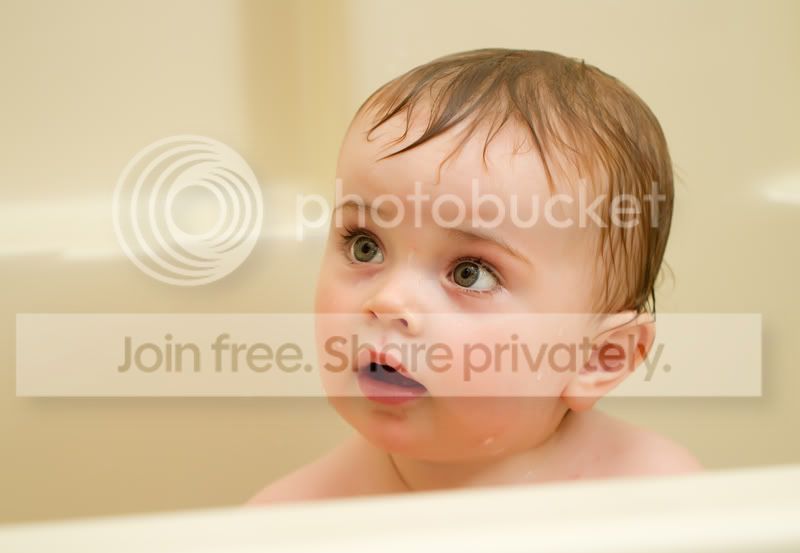
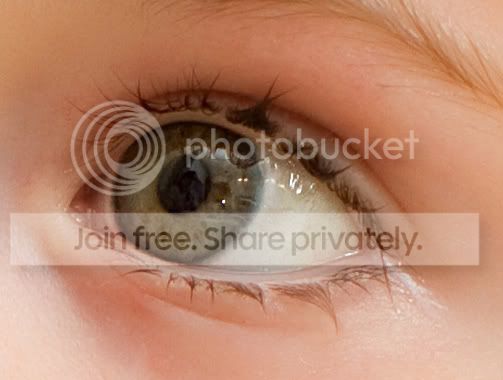
ok, going back through my submissions to try and compare ones that were rejected and approved, here was another a few months back that recieved a rejection due to "lack of definition/soft" can you help me to understand what was wrong with this one? It doesn't demonstrate any of the sharpness issues described - haloing etc so is this image also soft? I thought it was quite sharp

IMG_7295.jpg


eye2.jpg
 
I think they just have a grudge against you!
That image looks pin sharp.
On first glance at the enlargement of the eye I thought the skin looked a bit smooth and plasticy, like you would get if you were a bit heavy handed with the skin retouching but then I realised it was just because it's baby skin, not haggard, weather ravaged adult skin.
Surely QC would have realised that too?
 
I think they just have a grudge against you!
That image looks pin sharp.
On first glance at the enlargement of the eye I thought the skin looked a bit smooth and plasticy, like you would get if you were a bit heavy handed with the skin retouching but then I realised it was just because it's baby skin, not haggard, weather ravaged adult skin.
Surely QC would have realised that too?

lol, maybe! I do have a fair amount of passes too, just seems quite often it's a random rejection here and there.

She was 9 months old here and skin very smooth, There is no skin smoothing in the pic, I imagine it would be even smoother due to her being in the bath and having just been washed with moisturising cream!
 
Maybe it's just Alamy having to 'assert their authority' every now and then. IRA drug lords would do this every now and then to keep "staff" on their toes by knee-capping one of them every now and then even if they were innocent! Perhaps not a very good analogy.
 
Thinking.
Aha!
Edited my comment ;
Yeah but your rejected squirrel/monkey could've been one they didn't properly QC too, only a false negative instead of the lightning's (maybe) false positive.

How could the monkey and squireel shots been rejected if they weren't QCed? They only reject shots that fail QC - or did I misunderstand you?
Let's say some pics get accepted even though they fail to meet the QC criteria ... = false positive.
Let's say some pics get rejected even though they meet the QC criteria ... = false negative.
My opinion is your monkeys or whatever may well have been in that second category. We cannot assume that alamy Quality Control is fair and infallible, or even that they properly QC those pics that they say they QC.

I'll stop harping on about the monkeys now. :)

:shake:
... by knee-capping one of them every now and then even if they were innocent! ...
Joe don't answer the door to any strangers with big monitors.
 
Last edited:
Are they picky about narrow DoF? Maybe they wanted a photo shot at F11 with everything sharp? :D
 
Back
Top