Another stupid question...

Messages
774
Edit My Images
No
I am currently trying to take pics at my charity event... I am having problems. I want to get most of the room in focus so I have set my appature to about 10 or 16 and iso 500. The room is well lit with lights with natural light through the windows. On these settings the pic's are not as bright as the room is and if I use my flash it looks orange. I moved the appature to about 5-6 and the pics are brighter, but won't this mean more of my pics will be out of focus??

Any quick suggestions as I'm there now?? X x
 
Tried that, still as dark, if not a tad worse, do u think that 9 + appature is too much??
 
Try around f6 and see how you get on, you could try iso as high 3200 that would give you a few extra stops. If your flash is causing a colour cast ajust the white balance or take in raw a adjust in pp later.
 
Actually upping the iso makes it a lot worse. I'm sure its summet to do withj my appature.
 
I just asked some woman to check my screen and she said they will look brighter on my comp.
 
Its in appature, but I have set my iso also. Everthing else my camera chooses.
 
BTW it's "aperture" but I don't understand how your pics can be darker at a higher ISO unless you are getting a bright light in the pic which will upset the exposure.

If that's the case you need to adjust the exposure compensation to +1 or +2 over exposure.

What actual settings are you using - manual, aperture control, exposure control or what?

Also one or 2 pics would be helpful.

.
 
Yes there are many lights and some parts of the room are brighter than others. I am using apature (spelt correctly). Sorry can't send a pic as I am actually at the event now.
 
Ok set your camera to manual. select f5.6 or 7, set iso to 3200, set shutter to 1/60 and try that, if it's still to dark you have a choice of choose a lower number f stop. Increase the iso further but the image will have more noise. Use a slower shutter speed or lastly increase the ambiant light with flash. Or you could just go to the bar and forget it. ;)
 
Last edited:
How big is the room? try focus 1/3rd of the way into the room to maximise the depth of field at your chosen aperture.

Turn on your histogram and try ensure its not bunched all to the left - this is the accurate exposure. Not how bright your LCD as this could be low or being overpowered by the lights in the room

EDIT - try a Tungsten white balance too
 
Last edited:
Double check that you are shooting in raw, and that your exposure compensation is at 0, sounds obvious but that's happened to me before.
 
Hey guys, thanks for ** help I have taken on board everything u have said. I have upped my exposure and this has helped :) Are screens really an acurate reflection of the pic. I am interesed to learn about this histogram thing, but I am unsure where to find it lol. I think my problem in here is that there are lots of lights getting into the shot. X x
 
Think I've worked out my problem, am I correct in thinking that if I have a light in my pic it can make the pic dark so I need to over compensate?
 
If you are using matrix metering then turn it to centre weighted or spot.
 
No you can adjust the brightness of the screen to suit your viewing playback. If it was at either extreme of adjustable brightness it could lead you to believe you image is too dark or too bright. Similarly if you were in a total black out, the LCD would always look brighter than standing outside in the midday sunshine.

The histogram will capture it and display the range recorded - if you can understand how to read this, then regardless of the combinations of situations above you will be able to trust it.

Brief description here for the D5000 http://www.imaging-resource.com/PRODS/D5000/D5000A3.HTM


Histograms
http://www.cambridgeincolour.com/tutorials/histograms1.htm

White Balance
http://www.cambridgeincolour.com/tutorials/white-balance.htm

Depth Of Field
http://www.cambridgeincolour.com/tutorials/depth-of-field.htm


Andy
 
Have a look at your white balance as well and adjust as neccesary especially if you are using flash. Also if you are trying to get the entire room pinsharp you could use a wider aperture to deepen the dof - for example a 17mm lens on a crop body focused at 4' would keep the entire room sharp.
 
Have a look at your white balance as well and adjust as neccesary especially if you are using flash. Also if you are trying to get the entire room pinsharp you could use a wider aperture to deepen the dof - for example a 17mm lens on a crop body focused at 4' would keep the entire room sharp.

Do you mean a narrower/smaller aperture?
 
No I mean a wider aperture, bigger - smaller f number. OP is shooting at f11+ as I understand.
 
No I mean a wider aperture, bigger - smaller f number. OP is shooting at f11+ as I understand.

So by wider you mean a lower number?? This always confuses me :lol:

I have been taking pics at no lower number than f5.6, will this ensure all room is in focus?? On a side not whats the lowest no you can go down to before not all the image is in pinpoint focus??
 
Last edited:
No you can adjust the brightness of the screen to suit your viewing playback. If it was at either extreme of adjustable brightness it could lead you to believe you image is too dark or too bright. Similarly if you were in a total black out, the LCD would always look brighter than standing outside in the midday sunshine.

The histogram will capture it and display the range recorded - if you can understand how to read this, then regardless of the combinations of situations above you will be able to trust it.

Brief description here for the D5000 http://www.imaging-resource.com/PRODS/D5000/D5000A3.HTM


Histograms
http://www.cambridgeincolour.com/tutorials/histograms1.htm

White Balance
http://www.cambridgeincolour.com/tutorials/white-balance.htm

Depth Of Field
http://www.cambridgeincolour.com/tutorials/depth-of-field.htm


Andy

Thanks for the links, I will take a look. I am very interested in the histogram thing that could save me loads of time :)
 
Ok set your camera to manual. select f5.6 or 7, set iso to 3200, set shutter to 1/60 and try that, if it's still to dark you have a choice of choose a lower number f stop. Increase the iso further but the image will have more noise. Use a slower shutter speed or lastly increase the ambiant light with flash. Or you could just go to the bar and forget it. ;)

Didn't see the bar suggestion till now... damm what a good idea :)
 
I always call it a narrower aperture when moving from f2.8 to f16 for example, to increase the depth of field.

http://photoluminary.com/wp-content/uploads/2011/03/aperture_diagram.jpg
aperture_diagram.jpg
 
On a side not whats the lowest no you can go down to before not all the image is in pinpoint focus??

Its not quite that simple I'm afraid, depends on focal length and subject distance as well.

Cock a snook at this and that will give you some good general working figures.
 
Easy way to remember apertures - the bucket method. If you have a bucket full of water with a f1.8 hole in it, not much water as its a massive hole. If its an f22 hole, lots of water as its a small hole.
 
So by wider you mean a lower number?? This always confuses me :lol:

I have been taking pics at no lower number than f5.6, will this ensure all room is in focus?? On a side not whats the lowest no you can go down to before not all the image is in pinpoint focus??

Think of the f stop as a fraction where f4 = 1/4 and f16 = 1/16

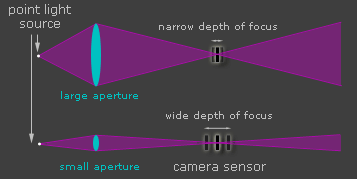
You can see that f16 is a smaller number. This is also the smaller aperture and therefore increased depth of field.

You can see how the smaller aperture controls the light
from http://www.cambridgeincolour.com/tutorials/depth-of-field.htm
dof_aperturediagram.png
 
Last edited:
Thanks guys I am still learning :D

Does anyone know how I can turn the histogram on on a Nikon D5000, I can't find the option anywhere :confused:
 
Found it :D I thought it was something you could see whilst taking the pic, but it is only when u have seen the pic u can see it :lol:
 
Whatever method you use the bright lights are going to screw up your exposures.

There is a method which allows you to forget about the lights and get pretty good exposures all the time - I used to use it back in the days of film when I was doing weddings.

I call it "the back of the hand method."

Firstly set the ISO, aperture and WB.

Then point the camera at the back of your hand and take a note of the exposure (I use a Canon camera and to do this I just depress the button half way).

Then reset the camera mode to manual and set the ISO, aperture, and WB as before and exposure to that indicated.

You have now set the camera to correctly expose for faces etc.

You can now use the LCD screen for final checks (ignoring any bright lights).

I used this method for years and still use it when conditions dictate.

.
 
Last edited:
Big Andy said:
Ok set your camera to manual. select f5.6 or 7, set iso to 3200, set shutter to 1/60 and try that, if it's still to dark you have a choice of choose a lower number f stop. Increase the iso further but the image will have more noise. Use a slower shutter speed or lastly increase the ambiant light with flash. Or you could just go to the bar and forget it. ;)

Sorry newbie here. I have the nikon d3100. I have gone to manual. Set shutter speed to /60 and iso to 3200 but now this is where I look stupid. How do I change aperture because when I do try it just keeps changing shutter speed.
Sorry if this makes me really silly looking.
 
Nickler said:
Sorry newbie here. I have the nikon d3100. I have gone to manual. Set shutter speed to /60 and iso to 3200 but now this is where I look stupid. How do I change aperture because when I do try it just keeps changing shutter speed.
Sorry if this makes me really silly looking.

Hold down the little +/- button next to the shutter whilst turning the dial. That'll adjust the aperture in manual mode. In s and a mode, it'll adjust exposure compensation.
 
Back
Top