Bokeh

Messages
255
Name
George
Edit My Images
Yes
As some of you may know I recently bought a Canon 50D and along with this I bought a Canon 60mm 2.8 Macro. I'm loving the camera, easy to use, very clear pics etc but am struggling to create bokeh using this lens. Do any of you have any advice?

I'm after creating pics like this:
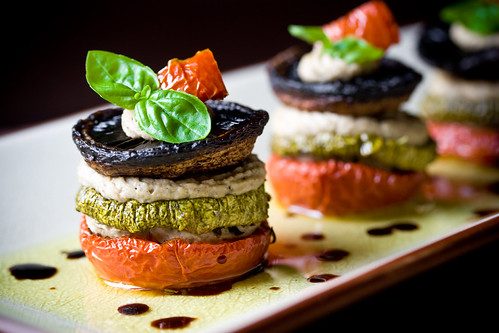
2678132790_4614ac4e52.jpg


Image from: http://veganyumyum.com/2008/09/food-photography-for-bloggers/
 
Focus on the 1st subject and use your lens at 2.8 and the others should be thrown out of focus like the pic your showing.

md:shrug:
 
Easy when you know how ;)

not a bad shot.


md:clap:
 
Set to aperture priority and keep it as wide open as it will go i.e. f/2.8. Having more distance between your in-focus subject and the background will also help, if your composition allows.
 
Not a bad shot.
You might as well try out the 100mm F2.8..
Might be better...:D
 
Just an extra thought from me, and its cheap too. In the above pic, theres significant shadow on the right side of the tin and contents of the front plate.

Being as your using natural light from one side, try making a reflector to bounce the light back into the frame. Some card wrapped in tin foil would do the job.


For now, if you want to get a close up effect like the 90 or 100mm lenses that have been suggested, just use the maximum resolution that the camera can output and crop the shot back down to one usable on your website. For special shots for your book, maybee rent the lens for a week to see how you get on with it... yes it will be lost money if you end up buying one, but would be cheaper than buying and selling again if you didn't like it!
http://www.lensesforhire.co.uk/canon-specialised-10-c.asp
 
Just an extra thought from me, and its cheap too. In the above pic, theres significant shadow on the right side of the tin and contents of the front plate.

Being as your using natural light from one side, try making a reflector to bounce the light back into the frame. Some card wrapped in tin foil would do the job.


For now, if you want to get a close up effect like the 90 or 100mm lenses that have been suggested, just use the maximum resolution that the camera can output and crop the shot back down to one usable on your website. For special shots for your book, maybee rent the lens for a week to see how you get on with it... yes it will be lost money if you end up buying one, but would be cheaper than buying and selling again if you didn't like it!
http://www.lensesforhire.co.uk/canon-specialised-10-c.asp

Wonderful tip, thank you :thumbs:
 
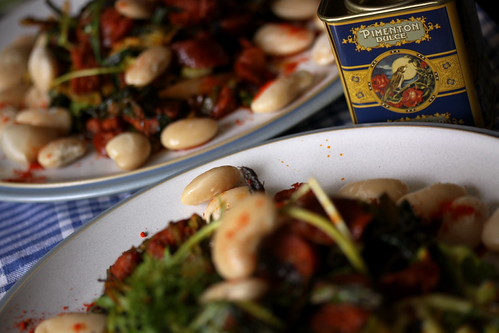
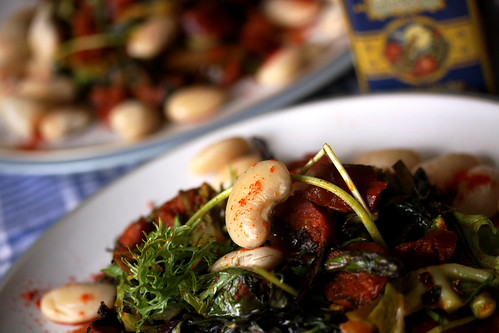
Looks very blue. I prefer the original. The original is nice and homely to me, only complaint is the out of focus bean in the centre-foreground that seems to draw too much attention (in both images).
The in-focus part of the image is more clear in the second shot.
 
i think the compositions arent quite working here, its close though, as for bokeh maybe change the range at whcih you take the pics, move back a bit.

the last pic is better bit why not try and show more of the plate., at the moment its like a bean and thats it, the lighitng doesnt show any detail on the rest of the plate.
its really nearly there though all of it, just needs a bit of adjustment. all imo of course
 
3641280811_24ff055c22copy.jpg

I think this one works MUCH better, the emphasis is on the salad on front plate, instead of the edges of the plates and the tin, which should just be a prop, not the focal point.
I just brightened up the area of the salad on the front plate, to bring out some detail from the shadows. Done in CS2, by a curves layer and just pulling the darks up a bit, with a mask to limit the adjustment to the front plate. Finished with a sharpen, which picked out the highlites a bit better (IMO). If it wasn't for the butter beans, I would be getting tempted to make this :clap:
 
3641280811_24ff055c22copy.jpg

I think this one works MUCH better, the emphasis is on the salad on front plate, instead of the edges of the plates and the tin, which should just be a prop, not the focal point.
I just brightened up the area of the salad on the front plate, to bring out some detail from the shadows. Done in CS2, by a curves layer and just pulling the darks up a bit, with a mask to limit the adjustment to the front plate. Finished with a sharpen, which picked out the highlites a bit better (IMO). If it wasn't for the butter beans, I would be getting tempted to make this :clap:

Thank you so much! I've been doing all my editing in iPhoto which is so basic but will get around to learning photoshop soon I hope.
You know you could just leave out the butter beans :) I'm in the process of writing this up on my blog ... I'll post the link here when it's done, so you can grab the recipe if you want.
 
thats the pic it should have been good stuff
3641280811_24ff055c22copy.jpg

I think this one works MUCH better, the emphasis is on the salad on front plate, instead of the edges of the plates and the tin, which should just be a prop, not the focal point.
I just brightened up the area of the salad on the front plate, to bring out some detail from the shadows. Done in CS2, by a curves layer and just pulling the darks up a bit, with a mask to limit the adjustment to the front plate. Finished with a sharpen, which picked out the highlites a bit better (IMO). If it wasn't for the butter beans, I would be getting tempted to make this :clap:
 
Back
Top