Broadband

Wheels

Julian Keeler
Messages
2,812
Name
Julian
Edit My Images
No
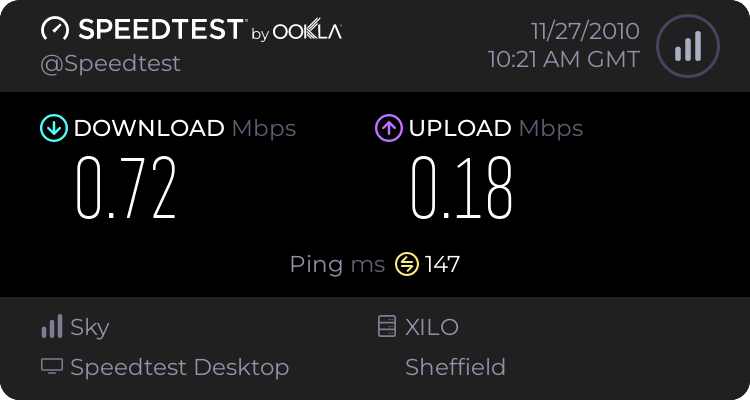
We have just changed from virgin to sky as a cost cutting exercise we are finding sky really unpredictable and the speed is terrible has anyone else had problems with sky broadband? At the most we have the kids playstation and kids laptop and my iPod connected.

This is just with the laptop connected
1047199984.png
 
Last edited:
You need to find out what your BRAS rate is and what your sync speed is. Your ISP control panel should tell you your bras rate and the router control panel should tell you your sync speed.

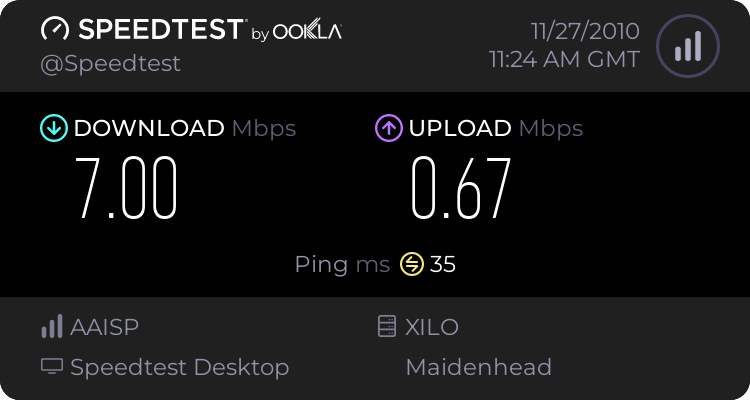
For example my sync speed is 8783 and my bras is 7.15M and my connection speed is normally about 7.00MB/s. Basically the connection speed should be pretty close to the BRAS rate and if it's more than say 10% lower then it means there is something wrong somewhere! Also the ping speed looks very high at 147ms! It should be about 15ms on fast path or about 35ms on interleave. I use the interleave option as I have a poor quality phone line with a lot of noise. Other things can affect sync speed, such as the stability option you have selected (normal, stable or super stable - i'm using "stable" as I don't have a good line).

 
Your speed does look very poor.

ADSL is always dependent on the quality of the piece of copper wire between your house and the exchange, and the distance between house and exchange.

Having said that there are some things you can try.

First try unplugging every phone and extension in the house, plug your router directly into the master phone socket. Do a few speedtests.

If you get a faster speed then think about replacing the internal phone extension cabling.
Also check every phone is plugged into a microfilter.

Let us know how you get on.
 
Your speed does look very poor.

ADSL is always dependent on the quality of the piece of copper wire between your house and the exchange, and the distance between house and exchange.

Having said that there are some things you can try.

First try unplugging every phone and extension in the house, plug your router directly into the master phone socket. Do a few speedtests.

If you get a faster speed then think about replacing the internal phone extension cabling.
Also check every phone is plugged into a microfilter.

Let us know how you get on.


Only 1 socket in the house no extensions it has the micro filter plugged in along with the phone and my emergency care line I have just had the router plugged in and it's still the same sort of speeds, it's only been active since tuesday
 
Is it always a similar sort of speed? As some companies throttle speeds during peak times.

Other than that, maybe it's worth giving them a ring and telling them it's not acceptable, and threaten to cancel your contract if they don't do something about it (think I remember somewhere you have an amount of time called the "cooling off period" that you can cancel your contract)

I'm assuming your Virgin connection was cable, rather than DSL? Try something like this: http://www.samknows.com/broadband/broadband_checker and see if your a ridiculous distance from your exchange, as that would make a difference to speed & reliability.
 
It's been a long time since I worked in ADSL support, but if I remember correctly there used to be some issues with emergency care lines. This was a long time ago so I'm sure most systems are compatible nowadays.

Is your careline hardwired into the back of the master socket ?
If so then it probably won't have a microfilter on it and might cause problems.

It might be worth calling the care line company to ask about ADSL compatability.
 
When I joined Sky a couple of years ago from Virgin I found the wireless router Sky supplied to be absolutely useless. I wasn't getting very good speeds and was regulary losing the signal.

My computer engineer replaced it with a router made by Linksys. Totally different experience.

Sky would normally test your line to tell you your max speed and they do offer different broadband speeds based on how much you're willing to pay and what your local exchange can take.

Here's an unofficial website for Sky users which is a valuable source of information:

http://www.skyuser.co.uk/
 
Multple people have this issue when first starting to use ADSL with any company. (Apart from BT)

You need to get on to Sky, and get them to confirm what package BT have you on - ALL ADSL suppliers go through BT, and they quite often put people who have paid their supplier for the higher rates on the lowest rate package. Basically, even though you have paid Sky for XXMb, BT have you on a much lower rate. If you don't get any joy with the 1st line people at Sky, request it is raised to the next level.

Have a look through the Skyuser forums as posted above - there's a full walkthrough on what to say and what not to say on there - written by a tech from Sky. There's a load of tools you can use to ascertain what speeds you should be getting.
 
Back
Top