


- Messages
- 529
- Edit My Images
- Yes
Lovely people of TP, I need some help here tonight.
I am using Bob books for some low end stuff for a couple of budget brides this year and have done a couple of test runs with limited success. First set of books slipped in transfer (That's what Bob books said) and they were printed very wrong, second set have same problem, white band on edges of images that are supposed to bleed over the edge of the page, mis aligned images etc etc. So spent sometime on phone the customer support guys today but feel i am banging my head against a wall with them on this issue and am starting to loose faith in a company a good few of you all use with no issues I suspect.
I have designed the page sin PS s I can drop one image onto a two page spread in their software (Bob designer pro), but although this was done for the first set of books they inform me I have to set the image as a background image otherwise it will print wrong. But the issues I have is that doing it that way the image is increased in size and where I have worked to the 3mm bleed lines these are no off the page and some images are missing bit and as i set as a background image i can reduce it's size, in reality I feel the bleed is about 10mm.
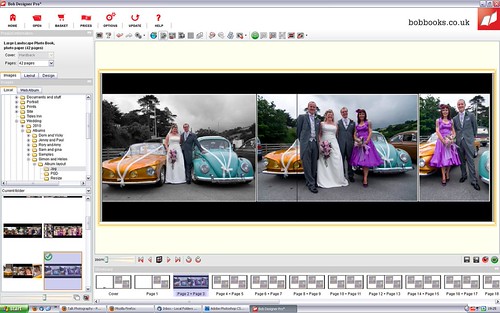
You will see from the screen grab and original image what i mean hopefully.
Screen grab (click to see full size)
Original Image

As you will see the original image has a generous bleed but when placed as background image it doesn't in fact the edges are cut off.
Just a few facts on the book, it's a 28x21 photographic book I am designing, my pages are 566mm x 216mm in size designed in PS, and saved as jpg's. I have turned off auto image adjust in Bob designer pro.
I have also gone down the route of placing each image on the page and stretching the image frame until it fits perfectly, but this way resulted in 6 books being printed like this. See below.
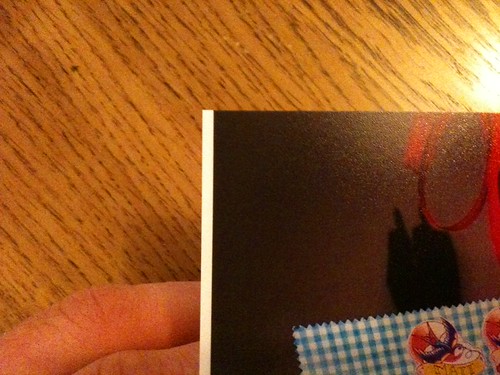
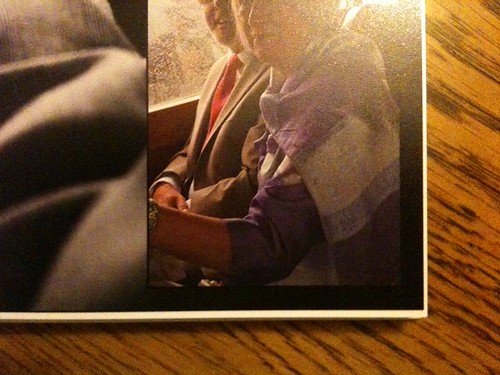
The above images should have been printed right to the edge.
I am not sure what I am doing wrong or what to do to sort it out, so any help advice absue or guideance would be greatly appreciated tonight .
Thanks
I am using Bob books for some low end stuff for a couple of budget brides this year and have done a couple of test runs with limited success. First set of books slipped in transfer (That's what Bob books said) and they were printed very wrong, second set have same problem, white band on edges of images that are supposed to bleed over the edge of the page, mis aligned images etc etc. So spent sometime on phone the customer support guys today but feel i am banging my head against a wall with them on this issue and am starting to loose faith in a company a good few of you all use with no issues I suspect.
I have designed the page sin PS s I can drop one image onto a two page spread in their software (Bob designer pro), but although this was done for the first set of books they inform me I have to set the image as a background image otherwise it will print wrong. But the issues I have is that doing it that way the image is increased in size and where I have worked to the 3mm bleed lines these are no off the page and some images are missing bit and as i set as a background image i can reduce it's size, in reality I feel the bleed is about 10mm.
You will see from the screen grab and original image what i mean hopefully.
Screen grab (click to see full size)
Original Image
As you will see the original image has a generous bleed but when placed as background image it doesn't in fact the edges are cut off.
Just a few facts on the book, it's a 28x21 photographic book I am designing, my pages are 566mm x 216mm in size designed in PS, and saved as jpg's. I have turned off auto image adjust in Bob designer pro.
I have also gone down the route of placing each image on the page and stretching the image frame until it fits perfectly, but this way resulted in 6 books being printed like this. See below.
The above images should have been printed right to the edge.
I am not sure what I am doing wrong or what to do to sort it out, so any help advice absue or guideance would be greatly appreciated tonight .
Thanks