

- Messages
- 9,926
- Edit My Images
- Yes
Hi everyone
I have recently moved from Mac to PC for photo editing and also started using Affinity Canva
I shoot in Raw on Canon R5 then convert with DXO 8 to tiff then edit in Canva, have been using Affinity 1 and 2 along with DXO for years with no issues on Mac
I have noticed that on some images that have been edited and saved using Canva and then viewed on MacBook Pro and ipad the colours are wrong but look OK on PC
(If I use Affinity 1 on my PC and view on MacBook there are no problems)
According to google Canva changes the colour space
Looks like I will be going back to using Affinity 1 again, unfortunately I only have Affinity 1 on PC
I suspect the long term solution will be to go back to Adobe photoshop a shame as Affinity was perfect for what i do which is mainly macro work and image stacking
Has anyone else seen this problem
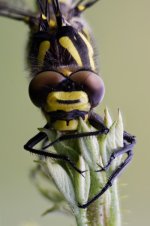
An example image, the colour is wrong brown tinge in other images the reds are muted
I have tried converting to sRGB directly from DXO but doesn’t always work
I have recently moved from Mac to PC for photo editing and also started using Affinity Canva
I shoot in Raw on Canon R5 then convert with DXO 8 to tiff then edit in Canva, have been using Affinity 1 and 2 along with DXO for years with no issues on Mac
I have noticed that on some images that have been edited and saved using Canva and then viewed on MacBook Pro and ipad the colours are wrong but look OK on PC
(If I use Affinity 1 on my PC and view on MacBook there are no problems)
According to google Canva changes the colour space
Looks like I will be going back to using Affinity 1 again, unfortunately I only have Affinity 1 on PC
I suspect the long term solution will be to go back to Adobe photoshop a shame as Affinity was perfect for what i do which is mainly macro work and image stacking
Has anyone else seen this problem
An example image, the colour is wrong brown tinge in other images the reds are muted
I have tried converting to sRGB directly from DXO but doesn’t always work
Last edited:
