Cropped prints help

Messages
739
Name
David Martin
Edit My Images
Yes
Hi, I'm a bit stumped. I sent some pics to an online service to be printed and some have came back with the tops or feet cropped off. The print size was 8X6 and the pics were in full view that I sent.
I had look in the pc printing software and that does the same, crops a bit off top and bottom, even 6X4.
Is it the way I'm framing the shots, does crop factor come into it, or am I doing something else wrong:shrug: ?
Any help would be appreciated. :help:
Luckily the main pics I needed were ok. :thumbs:

Thanks
 
It depends how they (the printers) handle the images.

With photobox I send them a large image, choice a print size and use the setting to fit the image I've chosen to the size of print I've chosen, so this option might be available to you on their website.

However, some website require you to resize the image to the specific size of print you require, so you only send them a 8x6 image for printing at 300dpi (or what every image quality they print at) which you can do using you editing software.

It sounds like either you've sent them too large an image or have clicked on resize to fit print.
 
Dunno if I can offer any advice but just experienced the same thing with tescos instore photo printing, it would seem that 6x4 doesn't correspond to what the camera outputs originally.
 
It depends how they (the printers) handle the images.

With photobox I send them a large image, choice a print size and use the setting to fit the image I've chosen to the size of print I've chosen, so this option might be available to you on their website.

Ahh, I didn't notice anything, but then I didn't look. Thanks for the reply :thumbs:

I had some 12x8's done of a different shot and they were fine
 
Dunno if I can offer any advice but just experienced the same thing with tescos instore photo printing, it would seem that 6x4 doesn't correspond to what the camera outputs originally.

I've used the Asda service for 6x4 and found them ok. It was just these few I had done via Snapfish. It's the first time I've used an online printing service.
 
This might sound strange but what how were the images sized before you sent them?

My camera takes 6x4 images so if I wanted 8x6 it would crop the edges off and 8x10 (or 4x5) would crop even more off.
If you don't perform this crop yourself the printing company will do it for you - with their best guess as to the results!

For crop-free 8x6 prints you need to look at the 4/3 format cameras which allow this.
 
Its all to do with the ratio that your camera takes.
Take a pic, then in photoshop or other program see what length and width the photo is eg 12 x 8
That then tells you the aspect ratio so for mine 3:2, so then you know that you can print all sorts without cropping - so 6 x 4, 7.5 x 5, 9 x 6, 12 x 8, ....

If you print at any other sizes then make sure that you go to your picture and crop to the ratio you are going to print. So in my example if i do a 10 x 8 (which is a 5:4 ratio) then I have to crop first (so I'm in control) or leave photobox et al to crop for me :(

Hope that explains it a bit. I too found it hard at first
 
This might sound strange but what how were the images sized before you sent them?

My camera takes 6x4 images so if I wanted 8x6 it would crop the edges off and 8x10 (or 4x5) would crop even more off.
If you don't perform this crop yourself the printing company will do it for you - with their best guess as to the results!

For crop-free 8x6 prints you need to look at the 4/3 format cameras which allow this.

They were basically sent as they came out of the camera. Me being a bit dim thought that a pic was a pic and it could be printed at whatever size. It's the first time I've had any done 8x6.
 
It seems a bit clearer now :thinking: Thanks for the replies I'll have another bash
 
They were basically sent as they came out of the camera. Me being a bit dim thought that a pic was a pic and it could be printed at whatever size. It's the first time I've had any done 8x6.

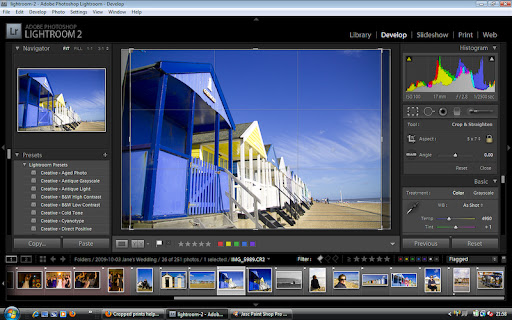
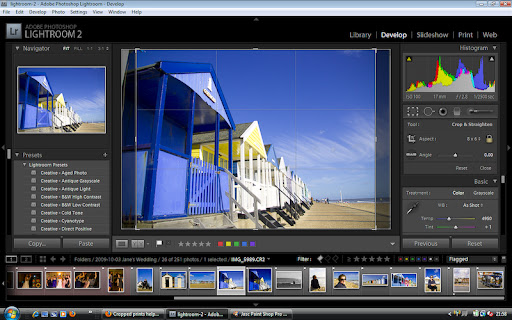
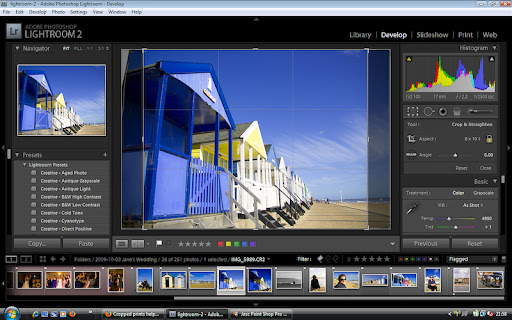
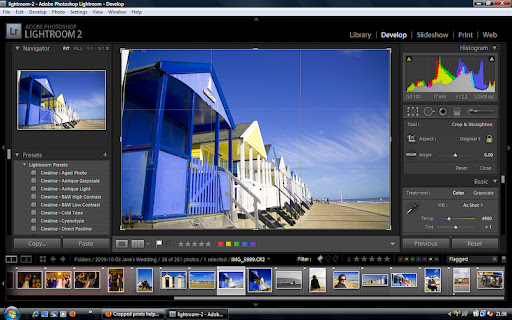
Have a look at the following sequence of screenshots from Lightroom - look at the crop outline on the centre image to see the effect of the crop.

Original 6x4
crop6x4-2.jpg


5x7 crop
crop5x7-1.jpg


8x6 crop
crop8x6-4.jpg


8x10 crop
crop8x10-3.jpg
 
I've only just found this out. straight out the camera they're in a 2:3 ratio so any enlargements will have to be the same eg. 6x9, 8x12, 10x15 etc. otherwise depending on the place they'll either come back with pixels missing or white borders which you'll have to remove yourself.

for other sizes you'll have to crop it to the right aspect ratio

don't forget you can keep your 2:3 ratio in photoshop, just tick the 'keep aspect ratio' box when cropping
 
I've used Photobox which allows you to resize your image to fit your chosen size of print. If the print is different to the native ratio of 3:2, you have the option to resize to cover the entire print, which will involve some cropping, or you can resize to fit the longest side, which will give you white borders that can be trimmed off when you receive the print.
 
You really should be resizing your files yourself before sending them to printers.

Then you keep control over what happens to it. Some places will use pretty shocking methods for resizing that will lose you a lot of quality in the final print.

Resizing first allows you to sharpen correctly as well.


This is the best method.
 
Back
Top