

You are using an out of date browser. It may not display this or other websites correctly.
You should upgrade or use an alternative browser.
You should upgrade or use an alternative browser.
Does anyone else under expose a lot?
- Thread starter StephyB
- Start date
OP

- Messages
- 932
- Name
- Steph
- Edit My Images
- Yes
Ok. Given I have not written that clearly enough, there is the bar on the bottom of the viewfinder that has dark to the left and bright is to the right. Right in the middle is what I've been told is 'correct'.
It doesn't matter what the other settings are, for normal photos during the day if I aim for that middle 'sweet spot' the picture is wrong. I was asking if that is normal or not. If I aim for 1-3 stops under that middle point I get something that is actually right.
It doesn't matter what the other settings are, for normal photos during the day if I aim for that middle 'sweet spot' the picture is wrong. I was asking if that is normal or not. If I aim for 1-3 stops under that middle point I get something that is actually right.
Last edited:
It would depend a lot on what subjects you are shooting and in what conditions. Have you been shooting particular subjects/ conditions or a variety?
What metering mode do you usually use?
Sorry to state the obvious, but have you checked to make sure you haven't accidentally left exposure compensation on?
What metering mode do you usually use?
Sorry to state the obvious, but have you checked to make sure you haven't accidentally left exposure compensation on?
OP
- Messages
- 932
- Name
- Steph
- Edit My Images
- Yes
MJWC1 said:It would depend a lot on what subjects you are shooting and in what conditions. Have you been shooting particular subjects/ conditions or a variety?
What metering mode do you usually use?
Sorry to state the obvious, but have you checked to make sure you haven't accidentally left exposure compensation on?
I shoot a lot of different subjects and its across the board - literally every shot I take excluding night shots.
I've used exp comp a couple of times but its off until I put it on manually and I always turn it off again.
Varying shutter speeds, apertures, isos, varying light during the day yet every shot needs be be at least one stop below the middle mark.
Maybe my camera is just weird?
And stating the obvious can be a good thing!


Forbiddenbiker
The Enforcer
- Messages
- 11,048
- Name
- Adam
- Edit My Images
- Yes
We need to see a shot or two if you can Stephy ... am I right to think they contain lots of very bright sky? ..with the foreground kinda dull and in shadow...so when you push the foreground exposure up the sky gets blown out?

Possibly but VERY unlikely.Maybe my camera is just weird?
I think it is far more likely to be user error.
Post us a sample photo of one that has under exposed and tell us exactly what the camera settings were including the metering mode and where your focus point was. Also, do you focus then recompose?

- Messages
- 2,845
- Name
- Jon
- Edit My Images
- Yes
Possibly but VERY unlikely.
I think it is far more likely to be user error.
Post us a sample photo of one that has under exposed and tell us exactly what the camera settings were including the metering mode and where your focus point was. Also, do you focus then recompose?
...or do you set the camera while looking at the back screen? If so, it's possible that you are taking a reading with the camera pointing slightly down, then when you lift it to your eye it is pointing higher and into brighter light.
OP
- Messages
- 932
- Name
- Steph
- Edit My Images
- Yes
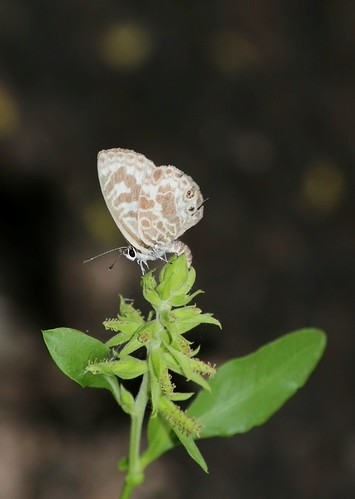
I'm fairly certain it's on evaluative metering but it could have been on centre average, and the focus point was the butterfly. I don't usually focus then recompose, but I'm not sure 
If it's user error I'll be happy - in all likelihood that's all it is.
Exif for the slightly blown one:
f/8.0
1/250 sec
ISO 250
Exp Bias 0 Stop
Focal Length 171mm
Metering Mode: Centre weighted average
With Flash
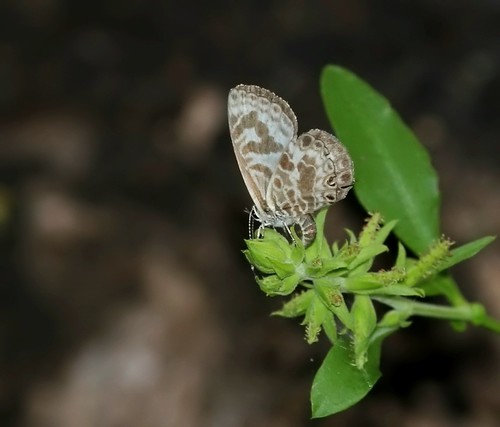
and the second one:
f/8.0
1/250 sec
ISO 200
Exp Bias 0 Stop
Focal Length 171mm
Metering Mode: Centre weighted average
With Flash
If it's user error I'll be happy - in all likelihood that's all it is.
Exif for the slightly blown one:
f/8.0
1/250 sec
ISO 250
Exp Bias 0 Stop
Focal Length 171mm
Metering Mode: Centre weighted average
With Flash
and the second one:
f/8.0
1/250 sec
ISO 200
Exp Bias 0 Stop
Focal Length 171mm
Metering Mode: Centre weighted average
With Flash

- Messages
- 13,582
- Name
- Dean
- Edit My Images
- No
Is your screen calibrated? Every screen I've ever used has been way too bright without calibration.

- Messages
- 19,354
- Name
- Rich
- Edit My Images
- Yes
Using the viewfinder (not the screen unless it's a really awkward angle) but these were with the viewfinder.
This indicated perfect exposure on the butterfly:
This was the one stopped down:
I tend to underexpose slightly Steph. In all honesty as mentioned there is not a lot wrong with those shots, so long as you are shooting Raw then you can quite easily in PP get #1 looking like #2 and vise versa.
With centre weighted metering on this image, 3/4 of the metering area is dark. The metering doesn't know you want the butterfly exposed correctly, it will average the centre of the image and expose correctly for that. Which is exactly what it has done in the first image. BTW the second one is probably as much under exposed as the first one is over.
Last edited:

OP
- Messages
- 932
- Name
- Steph
- Edit My Images
- Yes
-Rob- said:I don't see what your issue is with these photos. They're not 100% perfect but they look ok to me.
What do you think is wrong with them?
I actually love the second, it came out exactly how I wanted it to.
The first I think the butterfly is a little to bright/pale.
I am able to get the results I want, I just thought with all the books I've read saying aim for the middle of the meter bar thing and as I'm aiming one to three stops below I thought maybe there was a problem with my camera or something - now I think about it it's probably just me - I'm using an iPad so I'm not sure on the calibration but I'd like to say yes!
And thank you everyone! So glad it's me not the camera!!
I'm completely confused now.
Your original post said you were unhappy because you were metering for the middle but it was coming out under exposed. You then posted photos that are absolutely fine. Now you're saying you're happy with your results but you've been aiming 1-3 stops under.
I'm lost.
Your original post said you were unhappy because you were metering for the middle but it was coming out under exposed. You then posted photos that are absolutely fine. Now you're saying you're happy with your results but you've been aiming 1-3 stops under.
I'm lost.

- Messages
- 2,839
- Name
- Chris
- Edit My Images
- Yes
I actually love the second, it came out exactly how I wanted it to.
The first I think the butterfly is a little to bright/pale.
I am able to get the results I want, I just thought with all the books I've read saying aim for the middle of the meter bar thing and as I'm aiming one to three stops below I thought maybe there was a problem with my camera or something - now I think about it it's probably just me - I'm using an iPad so I'm not sure on the calibration but I'd like to say yes!
And thank you everyone! So glad it's me not the camera!!
Going back to Trevor's point. What metering mode are you using as this is what will drive the metering your camera gives you.
For example if you used spot metering and metered on the butterfly you may get exactly what you want without using any compensation.
I think what Steph's trying to say is that she has to exposure compensate (in this case under expose) for the final picture to look correctly exposed.
Steph, have you tried spot metering instead of centre weighed? This may have given you the results you wanted without having to under expose. Just a thought.
Maybe you could try experimenting with the different metering modes and see the effect it has on the final exposure of your subject....
Steph, have you tried spot metering instead of centre weighed? This may have given you the results you wanted without having to under expose. Just a thought.
Maybe you could try experimenting with the different metering modes and see the effect it has on the final exposure of your subject....
OP
- Messages
- 932
- Name
- Steph
- Edit My Images
- Yes
ernesto said:Going back to Trevor's point. What metering mode are you using as this is what will drive the metering your camera gives you.
For example if you used spot metering and metered on the butterfly you may get exactly what you want without using any compensation.
It was centre weighted average, but I'll try spot metering next time
thanksamer369 said:I think what Steph's trying to say is that she has to exposure compensate (in this case under expose) for the final picture to look correctly exposed.
Steph, have you tried spot metering instead of centre weighed? This may have given you the results you wanted without having to under expose. Just a thought.
Maybe you could try experimenting with the different metering modes and see the effect it has on the final exposure of your subject....
Will do, and yes, that's exactly what I was trying to say!! I'll try the metering modes to outgrow - it was only today after it was brought up that I realised I could change it!
StephyB said:It was centre weighted average, but I'll try spot metering next time
Will do, and yes, that's exactly what I was trying to say!! I'll try the metering modes to outgrow - it was only today after it was brought up that I realised I could change it!
Learning by experiences is the best way to learn

OP
- Messages
- 932
- Name
- Steph
- Edit My Images
- Yes
Dan_H said:Is it always when you use flash as you have in those 2 photos? Generally if you are using flash you want the lowest ISO you can.
What mode do you use your camera in?
Full manual mode normally. And no, I dont usually use the flash because its normally light enough without. I've found the auto modes (the p, av and tv mode things) do the same or just annoy me because it doesn't do what I want it to (it'll raise the iso instead of dropping shutter etc), it was just the on camera flash at the lowest setting. Never really used flash before and I wanted to try it out.
Last edited:

- Messages
- 201
- Edit My Images
- No
I echo the 'check your screen calibration', the second one is quite underexposed, the top one is better exposed, but the flash seems to have reduced the contrast of the subject (which is probably partly what you don't like)...
If you had some non-flash examples, that would help greatly
Other then that, I think when you want a certain contrasty look etc, you are better off exposing correctly (like the first shot) and then using PP to dial down midtones etc.. if you underexpose to start with, you have less shadow detail to play with..
If you had some non-flash examples, that would help greatly
Other then that, I think when you want a certain contrasty look etc, you are better off exposing correctly (like the first shot) and then using PP to dial down midtones etc.. if you underexpose to start with, you have less shadow detail to play with..

- Messages
- 1,179
- Name
- Gemma
- Edit My Images
- Yes
"Correct" exposure is, as I understand it, based on 18% grey exposing correctly. Anything else it becomes less accurate.
Real "correct" exposure depends as much on personal taste as anything else. Many portraits (of Caucasian people anyway, unsure about other skintones) are slightly overexposed as the lightness disguises blemishes.
Ultimately, I'd argue both of your photographs here are "correctly" exposed as neither highlights are blown nor dark parts made black, however your personal taste is to the second. And depending on light, sometimes you may blow highlights are still have too dark patches if it's hitting parts differently.
Oh, and one final thing - assuming the flash was the same level, one was ISO 200, one ISO 250 - that's I think 1/3 of a stop difference, not very big really.
Real "correct" exposure depends as much on personal taste as anything else. Many portraits (of Caucasian people anyway, unsure about other skintones) are slightly overexposed as the lightness disguises blemishes.
Ultimately, I'd argue both of your photographs here are "correctly" exposed as neither highlights are blown nor dark parts made black, however your personal taste is to the second. And depending on light, sometimes you may blow highlights are still have too dark patches if it's hitting parts differently.
Oh, and one final thing - assuming the flash was the same level, one was ISO 200, one ISO 250 - that's I think 1/3 of a stop difference, not very big really.
- Messages
- 19,354
- Name
- Rich
- Edit My Images
- Yes
Ultimately, I'd argue both of your photographs here are "correctly" exposed as neither highlights are blown nor dark parts made black, however your personal taste is to the second.ExactlyAs for the comment about the OP calibrating the screen
Nobody can see what her monitor is like
so a pointless comment really, if her examples where way off then calibrating might be an idea. Like I said in my earlier reply you can alter the image in PP and change the final outcome to anything you like.

- Messages
- 2,032
- Name
- David Williams
- Edit My Images
- No
"Correct" exposure is, as I understand it, based on 18% grey exposing correctly. Anything else it becomes less accurate.
I can't recall the exact reason for this not being strictly true but I think some maufacturers calibrate to 12% IIRC.
I would have a quick Google if I were you.
HTH
David
Here you go http://bythom.com/graycards.htm found this.
Last edited:

- Messages
- 8,247
- Name
- Terry
- Edit My Images
- Yes
The point of photography is the picture...
we do whatever it takes to achieve it.
The butterfly shots do not look blown.
Extreme highlights "Need" not contain detail, they often look dull if they do.
Experiment more
especially with exposure modes other than centre weighted. try partial or spot.
Only by trying things for yourself will it all fall into place.
The shots of the butterfly are flat because the flash is "head on" and gives fill but little modelling. You need a main light (sun, off camera flash) to give shape, modelling and texture. and fill to lighten the shadows ( but not kill them) a reflector is good.
we do whatever it takes to achieve it.
The butterfly shots do not look blown.
Extreme highlights "Need" not contain detail, they often look dull if they do.
Experiment more
especially with exposure modes other than centre weighted. try partial or spot.
Only by trying things for yourself will it all fall into place.
The shots of the butterfly are flat because the flash is "head on" and gives fill but little modelling. You need a main light (sun, off camera flash) to give shape, modelling and texture. and fill to lighten the shadows ( but not kill them) a reflector is good.


- Messages
- 5,092
- Name
- James
- Edit My Images
- No
As said, the difference in those two is 1/3rd of a stop no where near 1-3 stops, and a very negligible difference.
Anyway, I think it would serve you well to look up the basics of how (reflective in particular) metering and exposure works. I feel you may be missing the starting blocks of understanding this stuff.
Anyway, I think it would serve you well to look up the basics of how (reflective in particular) metering and exposure works. I feel you may be missing the starting blocks of understanding this stuff.
OP
- Messages
- 932
- Name
- Steph
- Edit My Images
- Yes
phil-t said:I echo the 'check your screen calibration', the second one is quite underexposed, the top one is better exposed, but the flash seems to have reduced the contrast of the subject (which is probably partly what you don't like)...
If you had some non-flash examples, that would help greatly
Other then that, I think when you want a certain contrasty look etc, you are better off exposing correctly (like the first shot) and then using PP to dial down midtones etc.. if you underexpose to start with, you have less shadow detail to play with..
I'm on the iPad - I don't know how to check screen calibration on there? But I'll google later.
littlemonster said:Ultimately, I'd argue both of your photographs here are "correctly" exposed as neither highlights are blown nor dark parts made black, however your personal taste is to the second. And depending on light, sometimes you may blow highlights are still have too dark patches if it's hitting parts differently.
Oh, and one final thing - assuming the flash was the same level, one was ISO 200, one ISO 250 - that's I think 1/3 of a stop difference, not very big really.
This was showing as -1 on my in camera meter that shows in the viewfinder. That's all I can go by.
Terrywoodenpic said:The point of photography is the picture...
we do whatever it takes to achieve it.
The butterfly shots do not look blown.
Extreme highlights "Need" not contain detail, they often look dull if they do.
Experiment more
especially with exposure modes other than centre weighted. try partial or spot.
Only by trying things for yourself will it all fall into place.
The shots of the butterfly are flat because the flash is "head on" and gives fill but little modelling. You need a main light (sun, off camera flash) to give shape, modelling and texture. and fill to lighten the shadows ( but not kill them) a reflector is good.
The sun was behind the tree & I don't have off camera flash, it was an experiment with the on camera flash.
Jayst84 said:As said, the difference in those two is 1/3rd of a stop no where near 1-3 stops, and a very negligible difference.
Anyway, I think it would serve you well to look up the basics of how (reflective in particular) metering and exposure works. I feel you may be missing the starting blocks of understanding this stuff.
It was showing as a full step down, not 1/3 not 1/2, but one full stop according to the meter.
Want to point me to some more reading then? I've read Bruce peterson's understanding exposure six times so far, plus the hand exposure meter book and exposure & lighting for digital photographers.
Or perhaps there's a tutorial you could send me to?

- Messages
- 23,200
- Name
- Richard
- Edit My Images
- No
Based on the OP's examples of the butterfly, of course the meter in the viewfinder indicates under exposure as it's reading the ambient light, which is all it can do, and not the flash that is contributing the lion's share of the light.
Edit: Briefly, the meter reads what it 'thinks' is correct exposure, and in most typical scenes it will not be far out, but there are exceptions. The OP also seems to be suggesting problems of dynamic range rather than exposure, and no exposure settings can change that - you have to modify the dynamic range in some way. A graduated filter for a blown sky in landscapes for example, or fill-in flash for a back-lit portrait. If you want to know what is correct exposure, the histogram will tell you.
BTW, if the OP want's to understand exposure, Bryan Peterson's book is woefully mis-titled. For example, it doesn't even mention the histogram...
Edit: Briefly, the meter reads what it 'thinks' is correct exposure, and in most typical scenes it will not be far out, but there are exceptions. The OP also seems to be suggesting problems of dynamic range rather than exposure, and no exposure settings can change that - you have to modify the dynamic range in some way. A graduated filter for a blown sky in landscapes for example, or fill-in flash for a back-lit portrait. If you want to know what is correct exposure, the histogram will tell you.
BTW, if the OP want's to understand exposure, Bryan Peterson's book is woefully mis-titled. For example, it doesn't even mention the histogram...
Last edited:
- Messages
- 5,092
- Name
- James
- Edit My Images
- No
Haven't time to read all of this, but they're usually pretty good with the basics of photography and the science behind it. Have a search around the site as well.
http://www.cambridgeincolour.com/tutorials/camera-metering.htm
http://www.cambridgeincolour.com/tutorials/camera-metering.htm
- Messages
- 23,200
- Name
- Richard
- Edit My Images
- No
Here's another one on histograms http://www.luminous-landscape.com/tutorials/understanding-series/understanding-histograms.shtml
Perhaps the best single aid to getting good exposures is 'blinkies' - highlight over-exposure warning that flashes black/white on the LCD over areas that are over cooked. Enabled in the menus.
Perhaps the best single aid to getting good exposures is 'blinkies' - highlight over-exposure warning that flashes black/white on the LCD over areas that are over cooked. Enabled in the menus.
Last edited:

On the Huh
Little Ball of Fur
- Messages
- 4,405
- Name
- Zulfi
- Edit My Images
- Yes
So make some suggestions on what I should read!!!!!
Richard's posts!

- Messages
- 26,490
- Name
- Phil
- Edit My Images
- No
Trying not to sound too harsh, but there's some real inconsistency in your postings here Steph.
Firstly you claim your meter is out by 1-3 stops and then show us an example where the difference was 1/3 of a stop.
Your example was lit by flash, you'd know because you've read the exposure book 6 times, that your ambient meter has had very little to do with that shot because you'd need to set FEC to make a big difference there.
You talk about overexposure, but haven't told us how that manifests itself other than 'it looks wrong to me'
Are you seeing the overexposure:
On the screen on the camera - could be just set too bright.
On the histogram - 3 stops would show as everything beyond the centre and right off the right edge of the histogram
On your computer screen- maybe a little work on rudimentary calibration would help
Your preview shows blinkies - tbh for a full stop or 3 the majority of the screen ought to be flashing.
Have you got some examples of exactly what your problem is, as above your posted example doesn't show it at all.
Firstly you claim your meter is out by 1-3 stops and then show us an example where the difference was 1/3 of a stop.
Your example was lit by flash, you'd know because you've read the exposure book 6 times, that your ambient meter has had very little to do with that shot because you'd need to set FEC to make a big difference there.
You talk about overexposure, but haven't told us how that manifests itself other than 'it looks wrong to me'
Are you seeing the overexposure:
On the screen on the camera - could be just set too bright.
On the histogram - 3 stops would show as everything beyond the centre and right off the right edge of the histogram
On your computer screen- maybe a little work on rudimentary calibration would help
Your preview shows blinkies - tbh for a full stop or 3 the majority of the screen ought to be flashing.
Have you got some examples of exactly what your problem is, as above your posted example doesn't show it at all.
OP
- Messages
- 932
- Name
- Steph
- Edit My Images
- Yes
Thanks Phil, I figured it out today and sorted the problem though, no further help necessary - there was an issue with my cameras sensor which has been repaired - I wanted to double check so I took it into a canon repairer today and voila problem solved.
ETA: I knew there was something wrong by the reactions here. The meter said it was one full stop under exposed, given the reaction here something was wrong.
ETA: I knew there was something wrong by the reactions here. The meter said it was one full stop under exposed, given the reaction here something was wrong.
Last edited: