dpi dpi all this talk about dpi

..MD..

Helen Shapiro
Messages
10,257
Name
MonkeyDave
Edit My Images
Yes
am i missing something here. as i have never changed any dpi settings on anything i have printed or put onto big canvases. i upload my card to ps edit as required then save at the biggest/ largest size normally 12 on the slider then upload to wherever to be printed


so am i missing somthing :shrug:


md:thinking:
 
I think there is a maximum dpi allowed if you send photos to a lab, don't quote me on it though.
 
Different labs have different profiles and settings that they require.

The images I print big I usually save as TIFF's if the printer uses them. Even maximum JPEG uses compression so you lose info from each file. TIFF's are uncompressed so you get the maximum quality.

As for printing, I usually use 240 or 300 dpi depending on the printer's specs.
 
am i missing something here. as i have never changed any dpi settings on anything i have printed or put onto big canvases. i upload my card to ps edit as required then save at the biggest/ largest size normally 12 on the slider then upload to wherever to be printed


so am i missing somthing :shrug:


md:thinking:

I think most camera files show on computers as being at 240 or 300 dpi when uploaded anyway, which is pretty compatible with good quality prints, hence you will havenever noticed. There are technical reasons and stuff that I neither know nor care about that much, as I don't print myself, I just know that as long as I dont reduce the dpi my camera is producing, everything is normally fine :D I only reduce them to 72 for web use, just to make them load quicker, and even then, I dont always bother if its under 800px on longest side, very few people are stuck with dial up connections these days and need the very small file size.

Perhaps you should consult Right Said Fred about it. They were deeply dpi about something or other.

*runs away quickly*

:lol::lol:
 
I don't always bother if its under 800px on longest side, very few people are stuck with dial up connections these days and need the very small file size.

:lol::lol:

That's a good point. Up till now I've always reduced my pics to 72dpi for the website; but DO most people have broadband these days if they're looking at photos on the web?
 
Yep - for me it's 72 dpi for the web, and between 120 and 180 dpi for (non print quality) posters A3 sizes and up. If it's print quality, I stick to over 250 dpi (the difference between 300 and 250 takes an expert to differentiate).
 
That's a good point. Up till now I've always reduced my pics to 72dpi for the website; but DO most people have broadband these days if they're looking at photos on the web?

I think a good majority of people have changed over, but it often comes down to context too, if its a case of one image per page, then I rarely bother, selfish laziness if you like, but if I know there are going to be several images on the same page, I will reduce them if I remember.
 
Here's an interesting point, pointed out to me by another TPer or two in this thread - have a read http://www.talkphotography.co.uk/forums/showthread.php?t=111164

An 800 px image saved at 300 dpi is the same file size as an 800 px image saved at 72 dpi (assuming you use the same save-as jpeg setting) - so there's no point resizing to 72 dpi for web use, dpi only matters in print usage

Surprised?

DD
 
the dpi number just relates to how large in printed measurement a picture is not the actual file size, like diddy says, an 800 x 600px image @ 72dpi is exactly the same file size as a 800 x 600px image @ 300dpi, but the 300dpi would if NOT resized print smaller on the page and more clearly due to the pixel density
 
Here's an interesting point, pointed out to me by another TPer or two in this thread - have a read http://www.talkphotography.co.uk/forums/showthread.php?t=111164

An 800 px image saved at 300 dpi is the same file size as an 800 px image saved at 72 dpi (assuming you use the same save-as jpeg setting) - so there's no point resizing to 72 dpi for web use, dpi only matters in print usage

Surprised?

DD

Not really mate because it's not entirely correct, the resampling methods seem to play a large role, for example, an exported JPEG from Lightroom at 72 dpi is much smaller than the same file exported at 300 dpi.
 
yes and no Dave, I have always been told that lowering the pixels per inch ratio [and I use pixels as opposed to dots specifically, as when I reduce, thats the setting in CS I am refering to, on the image size box] means the information can be sent more quickly and load onto page quicker - havent got a slow connection to try this theory out on, so perhps a web techie cum print expert can sort this out for us? :shrug:

EDIT: thanks cannockwolf ;)
 
the resampling methods seem to play a large role,

thats the trouble we are getting onto resampling which is totally different, it is not just a change of dpi it is a change of pixel amount too
 
if you take off the checkbox next to resample image it has no effect on the file size
 
Here is some posts I made on other threads

If you do not resample then changing the ppi/dpi leaves the file size the same because the file is the same number of pixels.
dpi or ppi is only relevant to printing, it has no effect on the file size, unless you enable resampling.
ppi is simply pixels per inch. Divide the number of pixels wide by the printed images width and you get the ppi. 3000 pixels wide and a 10 inch wide print needs a ppi of 300.
ppi (sometimes called dpi by some software) is simply how many pixels per inch will be in the printed image.
If you do not resample changing the ppi will change the inches of the printed image. It will not change the file size as the number of pixels does not change.
If you do resample changing the ppi will change the number of pixels and this will cause the file size to decrease, or increase. The printed image size will not change as you have lost/created pixels to suit.


and

The dpi is only for printing.
Your camera just loads the pixel data, it does not load at 72dpi, 300dpi, or any other dpi.

The picture data may be, for example, 3000 pixels by 2000 pixels, if you want a picture that is 10 inches wide then you need to print at 300 pixels per inch, or 300ppi (or confusingly dpi in some software) as 3000 pixels/10 inches = 300ppi.

The software just puts a default figure in the ppi/dpi box. A lot of software still put 72ppi/dpi as this used to be the standard monitor pixel resolution, therefore it gave an idea of the size the image would be on that standard monitor. Other software may stick 300 ppi/dpi in the box.

Nowadays monitors have different resolutions and different pixel sizes so ignore the dpi/ppi figure for everything except printing.

The above ignores resampling, this can reduce or increase the number of pixels in the picture data and would allow you to print, for example, a 3000 pixel picture 20 inches wide at 300ppi/dpi.


If you rely on your printer software for printing then it will determine the ppi/dpi depending on the paper, quality level you have set etc. My HP uses 300ppi for most & 600ppi for photo paper.
 
Here's an interesting point, pointed out to me by another TPer or two in this thread - have a read http://www.talkphotography.co.uk/forums/showthread.php?t=111164

An 800 px image saved at 300 dpi is the same file size as an 800 px image saved at 72 dpi (assuming you use the same save-as jpeg setting) - so there's no point resizing to 72 dpi for web use, dpi only matters in print usage

Surprised?

DD

thats the trouble we are getting onto resampling which is totally different, it is not just a change of dpi it is a change of pixel amount too

Y'know chaps, I throw my hands up as having just exported both these JPEGS, one a 72 and the other 300 they are identical apart from 2 bytes.

So I retract my previous statement and admit that I had it wrong.

300 pixels per inch export from LR2
_TDW5633-Edit-2.jpg


72 pixels per inch export from LR2
_TDW5633-Edit.jpg


Can anyone see a notable difference between these images?
 
Y'know chaps, I throw my hands up as having just exported both these JPEGS, one a 72 and the other 300 they are identical apart from 2 bytes.

So I retract my previous statement and admit that I had it wrong

:clap::clap::clap:

Which is exactly what I had to do too :D

Argued it, tested it, apologised :lol:

DD
 
:bang: ok, now more confused then ever now! I just resized the same image twice, with resample enabled, once to 800x600 @72ppi, and once to 800x600 @240ppi, BOTH are identical in size in terms of kilobytes, but everyone seems to be saying [or I am going mad] that they will stay the same if dont have resample enabled :thinking:


So, please a simple question requiring a yes or no answer - if I want to post low res images to the web, should I reset the ppi setting or not? :(
 
Thankyou :D So I can be lazy ALL the time now then :woot:


As for printing, I let others do that for me, alwaysleft them as they are and so far I have printed up to 30inches with no problems, if I ever need to go really big, Iwill get back to you guys and you can confuse me some more :lol:
 
can you remind me which program you are using please?


edit: no matter then
 
can you remind me which program you are using please?

who, me? *wonders if I brave enough to head back into confusion* :lol: Ok, using CS3 [on a PC]. Image>Image Size>size box opens, yes, with a default 240ppi showing at bottom. If I leave that alone, set height to 800 pixels with all 3 boxes at the bottom ticked, I get a new size image that is, in this case 1.3m. If I then go back to my original image, and do the same, but this time changing the ppi to 72ppi before setting my 800 pixels eight, the new saved image is identical in size in terms of actual data, 1.3M again. Now, maybe, it occurs to me, its something to do with having those other two boxes checked, I dont know :shrug:
 
:bang: ok, now more confused then ever now! I just resized the same image twice, with resample enabled, once to 800x600 @72ppi, and once to 800x600 @240ppi, BOTH are identical in size in terms of kilobytes, but everyone seems to be saying [or I am going mad] that they will stay the same if dont have resample enabled :thinking:

As both images were 800x600 they will be the same kilobyte size.
Normally when you resample and change the resolution the number of pixels change, that gives a different kilobyte size.


So, please a simple question requiring a yes or no answer - if I want to post low res images to the web, should I reset the ppi setting or not? :(
 
There are 3 abreviations people seem to not understand fully...

ppi - pixels per inch. your screen displays at 72ppi, an image measuring 800px x 600px at 72ppi is exactly the same size ON SCREEN as one 800px x 600px at 300ppi.

dpi - dots per inch. this is a printing resolution. "My laser printer is 1200dpi" for instance. An image 8cm x 6cm at 72dpi will print out very p[ixelated and poor quality compared to one 8cm x 6cm at 300dpi. However, the second file will be much larger and when compared in px will be bigger too.

lpi - lines per inch. this is the screen ruling used when printing and affects greyscale gradients, etc. Doesn't really affect us when saving images.

If you are PRINTING, then you shouldn''t be working in px at all. mm, inches, whatever... but not pixels!
 
There are 3 abreviations people seem to not understand fully...

ppi - pixels per inch. your screen displays at 72ppi, an image measuring 800px x 600px at 72ppi is exactly the same size ON SCREEN as one 800px x 600px at 300ppi.

dpi - dots per inch. this is a printing resolution. "My laser printer is 1200dpi" for instance. An image 8cm x 6cm at 72dpi will print out very p[ixelated and poor quality compared to one 8cm x 6cm at 300dpi. However, the second file will be much larger and when compared in px will be bigger too.

lpi - lines per inch. this is the screen ruling used when printing and affects greyscale gradients, etc. Doesn't really affect us when saving images.

If you are PRINTING, then you shouldn''t be working in px at all. mm, inches, whatever... but not pixels!

That's all fine and dandy but the failure to understand is connected to the software we are using and more importantly the export options.

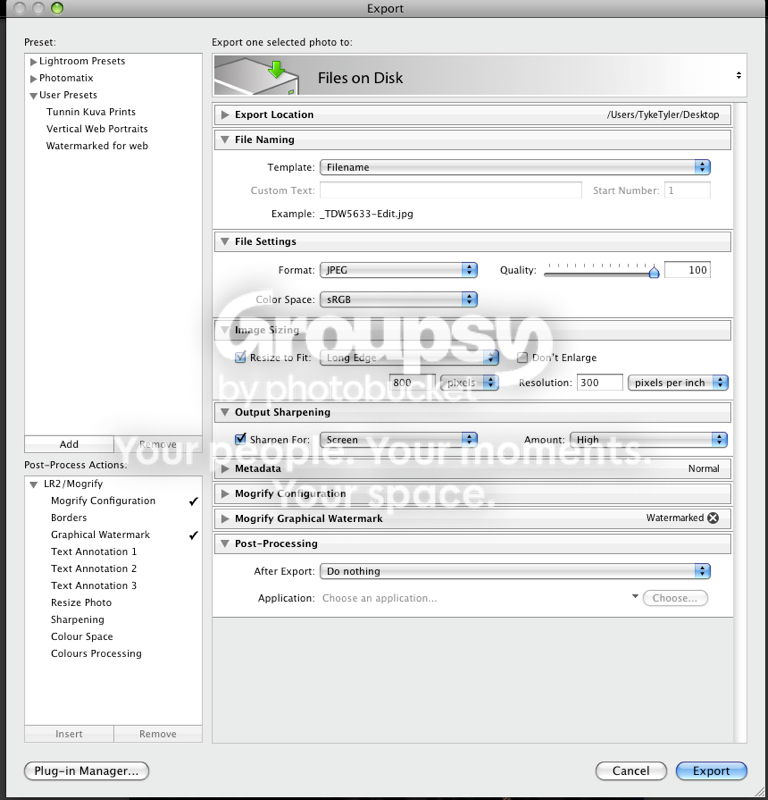
In the export menu's of Lightroom there are only options to use pixels per inch or pixels per centimeter.

When printing I would assume the highest resolution 240 ppi or 300 ppi is the option to go for?
 
There are 3 abreviations people seem to not understand fully...

ppi - pixels per inch. your screen displays at 72ppi, an image measuring 800px x 600px at 72ppi is exactly the same size ON SCREEN as one 800px x 600px at 300ppi.

dpi - dots per inch. this is a printing resolution. "My laser printer is 1200dpi" for instance. An image 8cm x 6cm at 72dpi will print out very p[ixelated and poor quality compared to one 8cm x 6cm at 300dpi. However, the second file will be much larger and when compared in px will be bigger too.

lpi - lines per inch. this is the screen ruling used when printing and affects greyscale gradients, etc. Doesn't really affect us when saving images.

If you are PRINTING, then you shouldn''t be working in px at all. mm, inches, whatever... but not pixels!

Sorry, I agree that dpi is printing resolution and is dots per inch. It is how many dots the printer sprays per inch, so a printer can be 1200dpi.

However dpi is also used by some software for output resolution when ppi should be used. 72dpi, 300dpi output resolution should really be 72ppi, 300ppi etc. It is the number of pixels divided by the printed image size. So a file which is 3000 pixels wide will print out 10 inches wide if you use a print output resolution of 300ppi. pixels divided by inches should be ppi not dpi, unfortunately some software still use the term dpi.
This can be confusing if you tell someone to use a print resolution of 300dpi and a printer resolution of 600dpi :D
Incidentally the printer resolution should be at least twice the output resolution so that each pixel in the printout consists of at least 2 dots. So print at 300ppi and 600dpi.
 
I never got on with LR. Does LR have rulers to describe the physical dimensions of an image? What unit options does it have here?
 
Here's the export menu:

Seems fairly straighforward...

For screen set longest edge in px (800 is max for this site), and resolution at ANYTHING.

For print set longest edge in mm/cm/inches (305mm for A4 bleed), and resolution at 300ppi.
 
Seems fairly straighforward...

For screen set longest edge in px (800 is max for this site), and resolution at ANYTHING.

For print set longest edge in mm/cm/inches (305mm for A4 bleed), and resolution at 300ppi.

Pretty much what I was doing before hand minus the changing to 72 ppi for web. :thumbs:
 
Y'know chaps, I throw my hands up as having just exported both these JPEGS, one a 72 and the other 300 they are identical apart from 2 bytes.

So I retract my previous statement and admit that I had it wrong.

300 pixels per inch export from LR2
_TDW5633-Edit-2.jpg


72 pixels per inch export from LR2
_TDW5633-Edit.jpg


Can anyone see a notable difference between these images?

Tomas - sorry to go off topic here mate, but regarding that particular portait. It's a very nice shot - I've got a bit of mass portrait session coming up (for a staff photo board thing) and it's going to be using a blue background. Wondered if I could just pick your brains on your lighting set up here. I'm guessing off camera high right at front (through a white brolly?) and then something behind and slightly to the left? (just using speedlights non?)
 
Tomas - sorry to go off topic here mate, but regarding that particular portait. It's a very nice shot - I've got a bit of mass portrait session coming up (for a staff photo board thing) and it's going to be using a blue background. Wondered if I could just pick your brains on your lighting set up here. I'm guessing off camera high right at front (through a white brolly?) and then something behind and slightly to the left? (just using speedlights non?)

You will have PM in just a few smidges my good Dangle, I didn't want to clutter the thread up with a an off topic photie :thumbs:
 
I'm with the OP.

I understand the principles for printing etc but I have no idea why some of the Pro Labs like you to resample the image to the right DPI/Size before you send them.

I've always been from the school of thought when resampling images that you should only do this once. So, when looking at the Pro/Mini Lab equipment specs, these seem to claim having amazing 'image scalers' .... so if these printers have the best of breed 'scalers' (is that the right term?), why are we being asked to use consumer scalers to scale the images before they get them?

And one more thing I don't understand, if I've resampled my image to say 18"x12" at 300dpi as they've requested, and most Labs seem to 'overprint' - does this mean the Lab resamples the image? (as surely overprinting means the image needs to be x% larger?

I must admit when ever I've had images back from the Labs and I have either scaled the image myself or send the images 'as is', I've not beeen able to tell the difference. Maybe I should do a print test of a 18"x12" enlargement - but send them an image at 5000dpi with the original number of pixels (i.e. not resampled) and see how the image looks.

Anyone had poor quality prints back because they've used the wrong DPI?
 
sorry for not replying before tonight guys:bonk: i thought this thread had died " as i dont have notifiers or such"


anyhow thanks for all the help i understand now:suspect:


md:wave:
 
Back
Top