

You are using an out of date browser. It may not display this or other websites correctly.
You should upgrade or use an alternative browser.
You should upgrade or use an alternative browser.
first star pic oh dear
- Thread starter iwols
- Start date


- Messages
- 1,171
- Name
- Chris
- Edit My Images
- Yes
tinge is light pollution exacerbated by the long exposure. The blur is either camera shake or poor focusing I reckon.
Exif helps too if you want replies.
from flickr
Exif data
Camera Nikon D90
Exposure 15.6
Aperture f/4.5
Focal Length 18 mm
Focal Length 18.3 mm
ISO Speed 1600
Exposure Bias +8/3 EV
Exif helps too if you want replies.
from flickr
Exif data
Camera Nikon D90
Exposure 15.6
Aperture f/4.5
Focal Length 18 mm
Focal Length 18.3 mm
ISO Speed 1600
Exposure Bias +8/3 EV

Tringa
Numpty of the Day'
- Messages
- 6,218
- Name
- Dave
- Edit My Images
- Yes
Cameras sensors pick up light pollution very easily, but the photos show a lot for a 15 second exposure. Were they taken in a light polluted area?
The shots look unfocused, rather than suffering from camera shake. Did you use autofocus and if so what did you focus on? Auto focus system will struggle trying to focus on stars.
Try auto focussing on something distant on the horizon then switch to manual focus so the focus setting does not change or,
manually focus on something distant on the horizon, or
set the focus on the lens to infinity.
Why is there a large +ve exposure compensation? That could have boosted the effect of the light pollution.
Dave
The shots look unfocused, rather than suffering from camera shake. Did you use autofocus and if so what did you focus on? Auto focus system will struggle trying to focus on stars.
Try auto focussing on something distant on the horizon then switch to manual focus so the focus setting does not change or,
manually focus on something distant on the horizon, or
set the focus on the lens to infinity.
Why is there a large +ve exposure compensation? That could have boosted the effect of the light pollution.
Dave


- Messages
- 1,675
- Name
- Chris
- Edit My Images
- No
For focus (as I don't have live view) I focus on a distant light or something similar then switch to manual, and am careful not to change any lens settings (focal length or knock the focus). Not ideal but it does work of you're careful, live view would be a better bet if it can boost the exposure enough.
As for the orange, a Tungsten WB will get rid of a lot of it but shoot raw and then you can try get rid of some more later. I live next to the M25 so know all about light polution.
I'd also go for a longer exposure something around the 25-30s area.
As for the orange, a Tungsten WB will get rid of a lot of it but shoot raw and then you can try get rid of some more later. I live next to the M25 so know all about light polution.
I'd also go for a longer exposure something around the 25-30s area.

OP

- Messages
- 918
- Edit My Images
- Yes
Cameras sensors pick up light pollution very easily, but the photos show a lot for a 15 second exposure. Were they taken in a light polluted area?
The shots look unfocused, rather than suffering from camera shake. Did you use autofocus and if so what did you focus on? Auto focus system will struggle trying to focus on stars.
Try auto focussing on something distant on the horizon then switch to manual focus so the focus setting does not change or,
manually focus on something distant on the horizon, or
set the focus on the lens to infinity.
Why is there a large +ve exposure compensation? That could have boosted the effect of the light pollution.
Dave[/QUOTE
Thanks guys like I said,really struggled to focus on anything even on live view,where would the 8.3 exposure bias come from,thought it would be 0 unless altered,any more comments appreciated guys

- Messages
- 3,231
- Name
- North York Moors
- Edit My Images
- Yes
You'd probably get away with it if lens stopped down, but the infinity symbol on the lens is only a guide.Could you not just set the focus to 'infinity'?
Lenses usually go just past infinity - sounds quite alarming - but I guess the exact infinity focus point varies with different cameras so the marked point is like an average.

magicaxeman
An Idiot
- Messages
- 3,097
- Edit My Images
- No
as said shoot raw and use tungsten white balance to minimise it, then correct it completely when you process the raw later.
Focus, use manual focus, use live view, centre a bright star or constellation, then use the zoom function of live view to zoom in, focus, take a 10 second test shot, check it and adjust if needed.
I cant see any camera shake in those images, just de-focused stars, nice and round too so your not getting much "trailing".
Keep going, your on the right track and once you've nailed the focusing and post processing to adjust the white balance you'll have some nice images.
Focus, use manual focus, use live view, centre a bright star or constellation, then use the zoom function of live view to zoom in, focus, take a 10 second test shot, check it and adjust if needed.
I cant see any camera shake in those images, just de-focused stars, nice and round too so your not getting much "trailing".
Keep going, your on the right track and once you've nailed the focusing and post processing to adjust the white balance you'll have some nice images.
- Messages
- 89
- Edit My Images
- Yes
Cheers for posting your picture. I tried to do one and finished with a similar image to yourself. The picture looked very orange. Great to see a solution posted!
thanks
thanks


OP
- Messages
- 918
- Edit My Images
- Yes
hi guys not the finished articel but better,any suggestions appreciated,how many stars are there

stars3 by iwols, on Flickr
exif data
Make NIKON CORPORATION Model NIKON D90
ExifOffset 214
ExposureTime 26
FNumber 4.5
ExposureProgram Manual
ISOSpeedRatings 1600
ShutterSpeedValue -4.70044 (26.00 s)
ApertureValue 4.33985 (F4.5)
ExposureBiasValue +0.7
MaxApertureValue 4.3 (F4.4)
MeteringMode Spot
LightSource Unknown
Flash Not fired
FocalLength 55
ExposureMode Manual exposure
WhiteBalance Auto white balance
stars3 by iwols, on Flickr
exif data
Make NIKON CORPORATION Model NIKON D90
ExifOffset 214
ExposureTime 26
FNumber 4.5
ExposureProgram Manual
ISOSpeedRatings 1600
ShutterSpeedValue -4.70044 (26.00 s)
ApertureValue 4.33985 (F4.5)
ExposureBiasValue +0.7
MaxApertureValue 4.3 (F4.4)
MeteringMode Spot
LightSource Unknown
Flash Not fired
FocalLength 55
ExposureMode Manual exposure
WhiteBalance Auto white balance
Last edited:
- Messages
- 1,675
- Name
- Chris
- Edit My Images
- No
You've zoomed in a lot more than the 1st shot which has lead to some streaking. Rough rule of thumb I picked up was to keep the shutter speed faster than 600/focal length seconds (eg 600/18mm = 33.3s but 600/55 = 10.9s). If you break this you get the streaking you can see here caused by the earth's rotation. If you want/need to use a longer speed then you need to start looking at devices that move the lens to account for the earth's movement.
OP
- Messages
- 918
- Edit My Images
- Yes
You've zoomed in a lot more than the 1st shot which has lead to some streaking. Rough rule of thumb I picked up was to keep the shutter speed faster than 600/focal length seconds (eg 600/18mm = 33.3s but 600/55 = 10.9s). If you break this you get the streaking you can see here caused by the earth's rotation. If you want/need to use a longer speed then you need to start looking at devices that move the lens to account for the earth's movement.
Yes Chris I did zoom in a bit more just so I could see a star to focus on,even with live view and zooming in i could not see a star to focus on ,on the screen it was just plain black
Yes Chris I did zoom in a bit more just so I could see a star to focus on,even with live view and zooming in i could not see a star to focus on ,on the screen it was just plain black
You need to find a brighter star then

In all seriousness, use live view and zoom in, then manually adjust to focus. If the stars are out it should be dark enough to see them in live view, by manually focusing and looking at the screen you should see stars.
Keep at it, you are getting better results.

OP
- Messages
- 918
- Edit My Images
- Yes
You need to find a brighter star then
In all seriousness, use live view and zoom in, then manually adjust to focus. If the stars are out it should be dark enough to see them in live view, by manually focusing and looking at the screen you should see stars.
Keep at it, you are getting better results.
thanks just need to see some clear sky through the rain here in yorkshire

- Messages
- 2,748
- Name
- Stuart
- Edit My Images
- Yes
Your first shot was out of focus and looks like it was a bit cloudy (or could be reflections), your 2nd one looks in focus but there is a bit of star trail but at least they are getting better.
I use the (optical) viewfinder to manually focus and frame roughly, then switch to liveview to do final focus (zoomed in of course). I assume your D90 can zoom during liveview, not sure being a Canon user myself? Choose a bright star to focus on, makes life a lot easier.
Also if you have got a lens hood, use it, it will help to reduce reflections and flare from stupid street lights. Oh and also remove any filters on the lens if one is fitted.
Once you are sorted in a light polluted area, you can take your kit with you if you go to a dark site and get some cracking shots.
Learn to find Polaris (North Star) and point your camera towards it if you want to make concentric star trails.
I use the (optical) viewfinder to manually focus and frame roughly, then switch to liveview to do final focus (zoomed in of course). I assume your D90 can zoom during liveview, not sure being a Canon user myself? Choose a bright star to focus on, makes life a lot easier.
Also if you have got a lens hood, use it, it will help to reduce reflections and flare from stupid street lights. Oh and also remove any filters on the lens if one is fitted.
Once you are sorted in a light polluted area, you can take your kit with you if you go to a dark site and get some cracking shots.
Learn to find Polaris (North Star) and point your camera towards it if you want to make concentric star trails.
OP
- Messages
- 918
- Edit My Images
- Yes
Your first shot was out of focus and looks like it was a bit cloudy (or could be reflections), your 2nd one looks in focus but there is a bit of star trail but at least they are getting better.
I use the (optical) viewfinder to manually focus and frame roughly, then switch to liveview to do final focus (zoomed in of course). I assume your D90 can zoom during liveview, not sure being a Canon user myself? Choose a bright star to focus on, makes life a lot easier.
Also if you have got a lens hood, use it, it will help to reduce reflections and flare from stupid street lights. Oh and also remove any filters on the lens if one is fitted.
Once you are sorted in a light polluted area, you can take your kit with you if you go to a dark site and get some cracking shots.
thanks for the great advice as usual guys
Learn to find Polaris (North Star) and point your camera towards it if you want to make concentric star trails.
Have you thought about star trails - multiple 30 second shots "stitched" together - see here for a free tool http://www.startrails.de/html/software.html
startrails is a cracking piece of software. StarStax is also worth looking at (if you're Mac orientated).
I used StarStax for this (only my second attempt at a star trails photo)...
http://photoblog.groovyf.co.uk/index.php?showimage=268
I used StarStax for this (only my second attempt at a star trails photo)...
http://photoblog.groovyf.co.uk/index.php?showimage=268
Thanks
I had an automated trigger attached for this. One of these: http://www.ebay.co.uk/itm/Timer-Rem...=Camera_Camcorder_Remotes&hash=item3f0c9a1f04
I had to spend a little time getting used to how to best set the remote timer, (instructions weren't the best... but as it came from China I wasn't expecting the best english translation...)
I had an automated trigger attached for this. One of these: http://www.ebay.co.uk/itm/Timer-Rem...=Camera_Camcorder_Remotes&hash=item3f0c9a1f04
I had to spend a little time getting used to how to best set the remote timer, (instructions weren't the best... but as it came from China I wasn't expecting the best english translation...)
- Messages
- 1,675
- Name
- Chris
- Edit My Images
- No
Thanks
I had an automated trigger attached for this. One of these: http://www.ebay.co.uk/itm/Timer-Rem...=Camera_Camcorder_Remotes&hash=item3f0c9a1f04
I had to spend a little time getting used to how to best set the remote timer, (instructions weren't the best... but as it came from China I wasn't expecting the best english translation...)
I just put it on continuous burst and hold down the shutter with a pebble and a rubber band. Less chance of gaps, but the band has pinged off a few times. A locking remote would be better, but it doesn't need to be a timer one.
^^ liking the ghetto-technique!I just put it on continuous burst and hold down the shutter with a pebble and a rubber band. Less chance of gaps, but the band has pinged off a few times. A locking remote would be better, but it doesn't need to be a timer one.
iwols - look forward to seeing your achievements with the automated trigger.
Last edited:
This is one of mine
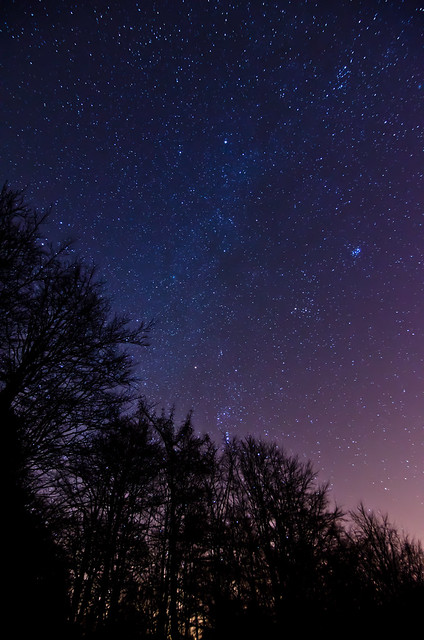
Dark Forest by 42zx, on Flickr
Using infinity focus and being far enough away from light pollution are important things to get right with these kind of shots.
On most lenses infinity focus (if not marked) is all the way to the end of the focus ring then back a little bit, try focusing all the way both ways until you get it.
Above was taken about 10 miles from town in the dead of winter, also found a place surrounded by hills to help block the light pollution.
25 Seconds, ISO 3200, f/3.5.
Dark Forest by 42zx, on Flickr
Using infinity focus and being far enough away from light pollution are important things to get right with these kind of shots.
On most lenses infinity focus (if not marked) is all the way to the end of the focus ring then back a little bit, try focusing all the way both ways until you get it.
Above was taken about 10 miles from town in the dead of winter, also found a place surrounded by hills to help block the light pollution.
25 Seconds, ISO 3200, f/3.5.
OP
- Messages
- 918
- Edit My Images
- Yes
This is one of mine
Dark Forest by 42zx, on Flickr
Using infinity focus and being far enough away from light pollution are important things to get right with these kind of shots.
On most lenses infinity focus (if not marked) is all the way to the end of the focus ring then back a little bit, try focusing all the way both ways until you get it.
Above was taken about 10 miles from town in the dead of winter, also found a place surrounded by hills to help block the light pollution.
thanks for that and sharing that great pic,still finding live view a pain on my d90 even on a bright star,and magnified on the screen just doesnt seem to show the star,still using the view finder for focus cheers
25 Seconds, ISO 3200, f/3.5.