Focus question

Messages
1,517
Edit My Images
No
When using a camera which doesn't have spot focus. If that's the right term for the focus square with a dot in the middle. How do you ensure you get focus on the eye of an animal when shot from a few yards away when the focus square takes up most of the animals head? This may sound like a daft question, but when the blighters have long snouts and are looking directly at me, I find it difficult to get the eye and not the end of its bugle in focus. Yes I can use a higher F stop number, but I like to shot wide open a fair bit, especially in dirty weather, such as we are getting at the moment.

Any pointers?
 

Could you give the identity of the guilty one?
 
In that particular case would the middle of the forehead work?. Other wise it may be switching to manual focus.
 

Well, not knowing the identity of the guilty one…
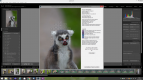
Based on what this picture is showing me and given that the focus was on
the eyesI think you have to deal with a common front focus issue.
 
Which camera, @Gary Kinghorn ?

Manual focus would seem the way to go & lens stopped down/greater DOF if poss.
 
Last edited:
I agree it looks very much like a front focusing problem.

Look in your menu and see if you can make micro adjustments. Might be all you need.
 
Focus square with a dot in the middle, which camera has this? The only time I get a dot in the focus point is to mark the centre FP in liveview, or when using 3D tracking (IIRC), neither of which I'd use for shots like the lemur. Unless that shot is cropped heavily I would have thought a focus square wasn't any bigger than an eye so focus shouldn't have been an issue. In the latter case of the person having the FP covering the eye and some of the face as depth of field won't be that shallow I wouldn't have thought, even with a wide prime.
 
Last edited:
Camera was a 1d mk4 - lens a 120-300 sigma sport

5d mk3 has a dot in the middle of the square, which I believe give you even more accuracy, but I might be wrong?

Image has quite a large crop on it, so the single square was taking up most of the head at the time - from memory.
 
was f value did you use and how far away were you?

looks to me as though you actual focused on the middle of the noise .. not the eye

if the eye is not sharpe, no matter what, an image like that will never look sharpe
 
Last edited:
Hence why I'm interested in how to cure it or become better at taking this kind of shot.

On my phone at the moment so can't check data but probably 20-30 feet and more than likely at f2.8 knowing me.
 
Looking on flickr it was shot @ 300mm F2.8 & probably not a massive crop, so as Bill says, you've not focussed on the eye.

Have you sussed the single focus point?
 
Last edited:
Hence why I'm interested in how to cure it or become better at taking this kind of shot.

On my phone at the moment so can't check data but probably 20-30 feet and more than likely at f2.8 knowing me.

DOF at f2.8 is very narrow ...... so you need to focus on the most important element ..... the eye

there is a free piece of software .. focus point ...... that is a plug in for LR .. that will show you what you focussed upon

quite a lot of the time when you think that you have focussed on the eye ... you have just missed it because of the slight movement when you press the shutter on a DSLR or because of subject movement, (birds)
 
Looking on flickr it was shot @ 300mm F2.8 & probably not a massive crop, so as Bill says, you've not focussed on the eye.

Have you sussed the single focus point?
OP says it was a large crop so DOF probably not wafer thin. Does look like it's focussed on the nose though so either a front focus issue or user error.
 
If the nose was in the focus square as well as the eye, the nose would have been the closest point and been the point of focus.

I guess I could have tried manual focusing but I was hand holding and its a heavy beast so I'm not convinced I would have done a better job in that way.
 
If the nose was in the focus square as well as the eye, the nose would have been the closest point and been the point of focus.

I guess I could have tried manual focusing but I was hand holding and its a heavy beast so I'm not convinced I would have done a better job in that way.

How do you know where the focus point was?
 
Last edited:
If the nose was in the focus square as well as the eye, the nose would have been the closest point and been the point of focus.

I guess I could have tried manual focusing but I was hand holding and its a heavy beast so I'm not convinced I would have done a better job in that way.
If you were that far away that the focus point covered most of the head I would expect DOF to be large enough to get the nose and eyes in focus.

Can you post an uncropped version with the AF point overlay and then maybe we can offer more advice? If you use Lightroom you can get a free plug in which shows an overlay of the AF points and which was was used, you could then take a screenshot.
 
I was asking the question to the OP

- I know how to identify where the focus point is - see post #15
Oops, my bad. I didn't read all the post ;)
 
Wow, great plug-in.

So it appears that I missed the focus point, was a lot closer than I thought and didn't do such a heavy crop. That's a great piece of software though, I'm sure to use it loads.

Thanks for the pointers guys.
 
PP will help a little ... and you could even go further in focusing the eyes

image removed, just seen "Edit my images" is a No
 
Last edited:
PP will help a little ... and you could even go further in focusing the eyes

image removed, just seen "Edit my images" is a No

Did you have all 45 points selected Gary? I notice that the screen shot implies that they were or at least you were using an expanded setting.

For some reason Canon decided not to allow spot focus on this body except for when you have a canon super tell attached. Never could understand that as I find spot focus very useful.
 
Did you have all 45 points selected Gary? I notice that the screen shot implies that they were or at least you were using an expanded setting.

For some reason Canon decided not to allow spot focus on this body except for when you have a canon super tell attached. Never could understand that as I find spot focus very useful.

Not 100% sure, as I'm still getting to grips with the focus system on the camera. I was picking the focus points I wanted to use, rather than having all 45 active and letting the camera find what was nearest. If that makes sense.
 
And there's the answer, focus was on the nose and DOF would have been shallow from that range. I would always advise using single point AF and focus on the nearest eye. If you'd selected the FP one to the left and two up from the bottom red one you'd have been bang on and got a very good shot :)
 
Looking on flickr it was shot @ 300mm F2.8 & probably not a massive crop, so as Bill says, you've not focussed on the eye.

Have you sussed the single focus point?

OP says it was a large crop so DOF probably not wafer thin. Does look like it's focussed on the nose though so either a front focus issue or user error.


As I said then ;)
 
Back
Top