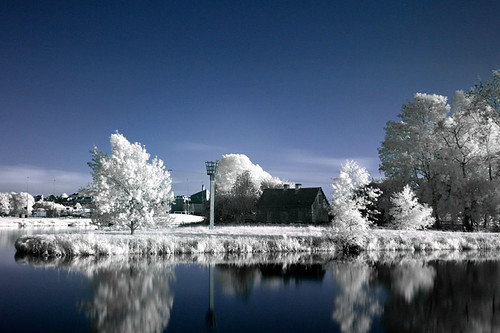
Having trouble with infrared

Messages
53
Edit My Images
No
Hello! not been here for a while!! my last posts where about which camera to go for...and i finally went for the 400d!

Neways thats by the by!! Ive recently bought an IR filter (R-72). ive got to grips with the basics and the post processing, im just having trouble with my white balance. No matter whether i use dark blue or light blue, dark green or light green as the WB...my images always have a purple hue on them...which after post processing turns pink, instead of "infrared white"...any tips on how to get my white balance spot on? and if i cant get it right in the camera any tips on fixing it with post processing?

cheers!
 
Ideally you should set the white balance using either grass or plant leaves as your custom wb source, could you post quick rundown on your post processing workflow and I'll see if I can offer any suggestions
 
1806130-2-untitled.jpg


it seems as though the blue is bleeding into other parts of the picture - like the house (which is really white) has a blue hue as does the rest of the picture and obviously the pink is there too! i havent done anything to this apart from channel swap.

advice?

Flash In The Pan - I tried using leaves grass and sky...i also used a blue piece of cloth to see what difference that would make but everything always comes out pink!
 
If your using PS, when loading image you could try using the eye-drop/white balance tool to set your wb. Use over foliage.
Do you only swap the red & blue? No green adjustment.
Do you adjust the contrast? Usually to the minus side.
 
Okay, I had a wee play with the image and problem with the chimney and bleeding is down to blown highlights, the rest of the image can be cleaned up quite successfully, but those two areas remain an aqua blue colour no matter what I do.

Out of interest what lens are you using, is it your kit one by any chance?
 
If your using PS, when loading image you could try using the eye-drop/white balance tool to set your wb. Use over foliage.
Do you only swap the red & blue? No green adjustment.
Do you adjust the contrast? Usually to the minus side.


Hi Slipper! i dont have PS :-( i have the gimp which allows me to swap the channels. i'll have a look to see if there is anything there which allows me to select white balance with an eye dropper.

yes for this i used the basic red and blue swap - how do i incorperate swapping the green? im new to all this! havent touched the contrast on this either, it was just a basic channel swap so i could give you an example!
 
Okay, I had a wee play with the image and problem with the chimney and bleeding is down to blown highlights, the rest of the image can be cleaned up quite successfully, but those two areas remain an aqua blue colour no matter what I do.

Out of interest what lens are you using, is it your kit one by any chance?

oh right i see, ill try and use a picture with less heavy contrast to do my test shots. can i ask what you did to clean the rest up?

yes its my kit lens! im actually quite pleased with the kit lens i got...i hear people have terrible trouble with them sometimes!
 
Hi Slipper! i dont have PS :-( i have the gimp which allows me to swap the channels. i'll have a look to see if there is anything there which allows me to select white balance with an eye dropper.

yes for this i used the basic red and blue swap - how do i incorperate swapping the green? im new to all this! havent touched the contrast on this either, it was just a basic channel swap so i could give you an example!

No need to adjust green channel just swap red - blue 100%.

Not familiar with gimp but should think there's a way to do it.
Can we assume you shoot raw then convert to jpeg.
Maybe if you post an unprocessed jpeg FITP could play about with it.
 
oh right i see, ill try and use a picture with less heavy contrast to do my test shots. can i ask what you did to clean the rest up?

yes its my kit lens! im actually quite pleased with the kit lens i got...i hear people have terrible trouble with them sometimes!

The 18-55 Canon kit lens is well known for suffering from a hotspot when used for ir.


This is the best I could do with Lightroom...

2917035708_8bc351ce43_o.jpg
 
You could cheat and convert to black and white :D.

I've found the white balance typically very hard to get just right for digital IR shots, it really just is a matter of carefully adjusting it to try and get it neutral as I've always found it's a very small threshold.

I quite often find myself after processing cleaning up parts of the image by desaturating and selectively boosting bits.

2921354844_a07de22743.jpg
 
I often go B&W. My vegetation gets a purple-ish tinge to it when I play with the white balance, and if I try to go for the typical white veg, blue sky I end up with lots of red in the foliage and red speckles in the sky.
 
Back
Top